

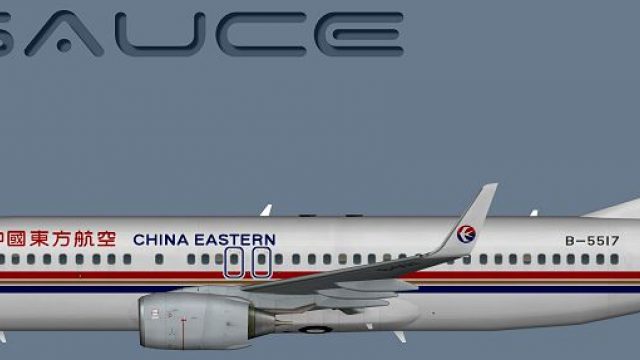
China Eastern Boeing 737-800
China Eastern’s classic Boeing 737-800 livery brings authentic, period-correct airline presence to AI traffic with crisp fuselage shading, accurate titles, and carefully aligned logos. Designed for Microsoft Flight Simulator X using the FSX AI Bureau (FAIB) 737-800 model, it includes DDS textures plus a fallback Targa for flexible setups.
 Rate
Rate
Images & Screenshots
1 total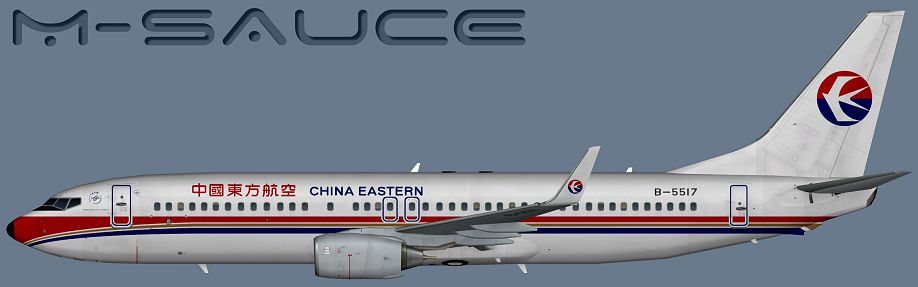
This freeware package features a detailed repaint of the Boeing 737-800 in the classic China Eastern scheme, adapted specifically for the FSX AI Bureau (FAIB) model. It includes DDS-format textures and a fallback Targa file, enabling compatibility with various simulator configurations. Created by Mariano Bonaccorso, this repaint aims to enhance your virtual AI traffic within Microsoft Flight Simulator X by accurately portraying the airline’s earlier color layout.
Airline Background and Aircraft Highlights
The showcased livery reflects the previous branding of China Eastern, known for its distinctive tail logo and a streamlined fuselage pattern. Since its inception, China Eastern has maintained extensive routes across Asia, Europe, and North America, making its aircraft recognizable at numerous major airports. The Boeing 737-800, a member of the Next Generation series, boasts a single-aisle configuration and twin-engine design. Many operators favor it for medium-haul flights thanks to its efficiency and reliability.
Included Visual Elements
Profile view of China Eastern Boeing 737-800.
Inside this repaint pack, you will find realistic fuselage shading, bold airline titles, and precise alignment of logos. These details respect the aircraft’s structural lines and capture the original aesthetics from the real-world livery of this narrow-body twinjet.
Integration Steps
- Place the texture folder contained in this package into the respective FAIB 737-800 folder of your simulator. If you haven’t installed the base model yet, it is freely available in the Fly Away Simulation mod library.
- Add the necessary aircraft configuration entry. A sample entry can be found below; remember to assign the correct incremented number to
[fltsim.X]. - Ensure any additional parameters (like
modelorui_manufacturer) match your setup. If you’re uncertain, consult the aircraft's documentation or review the sections on container configurations in the simulator’s SDK.
Example Configuration Entry
[fltsim.X]

title=AI B738W CES_Old

sim=B737NG

model=

texture=CES_Old

atc_airline=CHINA EASTERN

atc_id=B-5517

atc_parking_codes=CES

atc_parking_types=GATE

ui_manufacturer=Boeing

ui_type=B737-800W

ui_variation=China Eastern

description=AI Aircraft from FAIB
Technical Notes
- DDS format (DirectDraw Surface): This is the primary texture format, aligning with the guidelines outlined in the FSX SDK for efficient use of memory and faster loading.
- Targa file: Provided as an alternative for those who wish to convert or edit the textures while preserving image quality.
- Developer Information: Textures by Mariano Bonaccorso with thorough adjustments for naming conventions, ensuring compatibility with any updated paint kit releases.
- Freeware Notice: This repaint is offered freely to the flight-sim community, but does not include the base FAIB 737-800 model.
By adding this repaint, simmers can incorporate an iconic airline appearance into their AI traffic environment. The China Eastern Boeing 737-800—in its older color style—brings additional variety and authenticity to your growing fleet of AI aircraft.
Ready to download China Eastern Boeing 737-800?
Free for all simmers · 6.25 MB · Scanned clean Sep 2026
File information
Download speed: Free tier is capped at 0.5 Mbps (this file takes approximately 2 mins at the cap). PRO members download at full line speed.
Requires dependencies
This file is a repaint — the package below is the base model it paints onto. Install it first, or the textures will have nothing to load onto.
How to install this mod
FSX / P3D
Repaint
How to install this mod
-
Extract the downloaded archive
Use 7-Zip (free) or WinRAR to extract the ZIP to a temporary folder. Don't install while still zipped — the simulator can't read inside ZIP files. -
Add livery to base aircraft folder
Place the texture folder (typicallytexture.{airline}) insideFSX\SimObjects\Airplanes\{base-aircraft}\. -
Update aircraft.cfg
Open the baseaircraft.cfgin Notepad. Add a new[fltsim.X]section per the readme. -
Always read the included readme
Every mod ships with areadme.txtorREADMEfile. It tells you exactly where files go, what dependencies are needed, and any quirks specific to this add-on.
What’s inside this archive
The archive faib_b738w_ces_old.zip has 8 files and directories contained within it.
File Contents
This list displays the first 500 files in the package. If the package has more, you will need to download it to view them.
| Filename/Directory | File Date | File Size |
|---|---|---|
| FAIB_737_800_T.dds | 01.13.15 | 5.33 MB |
| Targa | 01.13.15 | 0 B |
| CES_Old.tga | 01.13.15 | 16.00 MB |
| Installation.txt | 01.13.15 | 1.82 kB |
| Preview.png | 01.13.15 | 174.71 kB |
| Thumbnail.png | 01.13.15 | 5.89 kB |
| flyawaysimulation.txt | 10.29.13 | 959 B |
| Go to Fly Away Simulation.url | 01.22.16 | 52 B |
Rate this add-on
PRO perkOnly PRO members can place votes.
0 comments
Be the first to leave a comment on this download.
No comments yet
Be the first to share your thoughts on this download.