

 FSX General Aviation Aircraft
Piper J-3 Cub
Piper J-3 Cub. This file contains the default FS2004 Piper J3 Cub that has be…
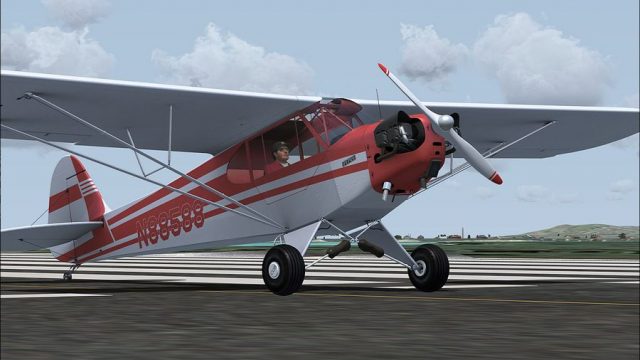
Piper J-3 Cub repaint N88588 brings a classic U.S. registration to the A2A Simulations Cub, pairing period-correct markings with the aircraft’s stick-and-rudder character and open, immersive virtual cockpit feel. Built for Microsoft Flight Simulator X, it requires the A2A Piper J-3 Cub and integrates cleanly into the livery selection.
 Rate
Rate
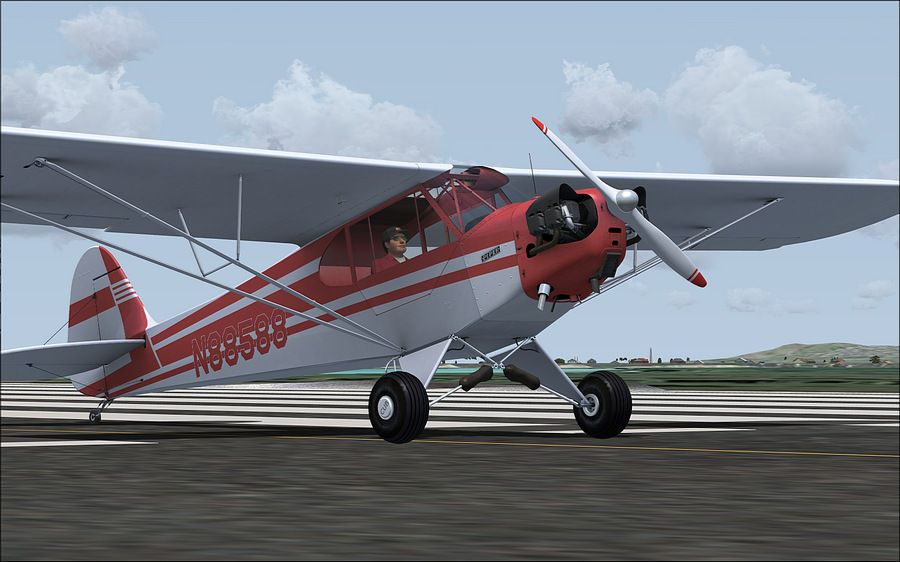
N88588 repaint for the A2A Cub A recreation of the N88588 registration for the lovely A2A J-3 cub. The Piper Cub embodies the very essence of the romance and gypsy-lure of flying. Its design is one of the most fundamental expressions of the basic, primal relationship between pilot and airplane and few airplanes define stick and rudder more faithfully and distinctly than does the Cub. By Aaron Myers.
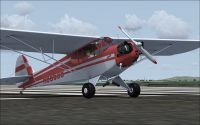
Piper J-3 Cub on runway.
Thanks for downloading my paint of US registration N88588 for the lovely A2A Simulations Piper J-3 Cub.
Installation:
- Extract the "texture.N88588" folder into your \Microsoft Flight Simulator X\SimObjects\Airplanes\A2A_PiperJ3 folder.
- Open the aircraft.cfg file and add the following to the [fltsim.x] section changing the x to the next available number in your list:
[fltsim.x]

title=A2A Piper Cub N88588

sim=PiperJ3

model=

panel=

sound=

texture=N88588

kb_checklists=A2A_Piper_J3_check

kb_reference=A2A_Piper_J3_ref

atc_id=N88588

atc_id_color=

ui_manufacturer="A2A Piper"

ui_type="J-3 Cub"

ui_variation="N88588"

ui_typerole="Single Engine Prop"

ui_createdby="A2A Simulations Inc."

description="The Piper Cub embodies the very essence of the romance and gypsy-lure of flying. Its design is one of the most fundamental expressions of the basic, primal relationship between pilot and airplane and few airplanes define stick and rudder more faithfully and distinctly than does the Cub."
Aaron Myers
Free for all simmers · 8.09 MB · Scanned clean Oct 2026
Download speed: Free tier is capped at 0.5 Mbps (this file takes approximately 2 mins at the cap). PRO members download at full line speed.
texture.{airline}) inside FSX\SimObjects\Airplanes\{base-aircraft}\.aircraft.cfg in Notepad. Add a new [fltsim.X] section per the readme.readme.txt or README file. It tells you exactly where files go, what dependencies are needed, and any quirks specific to this add-on.The archive a2an88588.zip has 10 files and directories contained within it.
This list displays the first 500 files in the package. If the package has more, you will need to download it to view them.
| Filename/Directory | File Date | File Size |
|---|---|---|
| ReadMe.txt | 09.23.09 | 1.03 kB |
| engine.dds | 09.23.09 | 4.00 MB |
| PiperJ3_t.dds | 09.24.09 | 16.00 MB |
| Pit1.dds | 09.23.09 | 4.00 MB |
| Pit3.dds | 09.23.09 | 4.00 MB |
| texture.cfg | 07.15.09 | 152 B |
| thumbnail.jpg | 09.23.09 | 12.07 kB |
| N8858801.jpg | 09.23.09 | 121.93 kB |
| flyawaysimulation.txt | 10.29.13 | 959 B |
| Go to Fly Away Simulation.url | 01.22.16 | 52 B |
Only PRO members can place votes.
More FSX & P3D add-ons hand-picked based on this download.
FSX General Aviation Aircraft
Piper J-3 Cub. This file contains the default FS2004 Piper J3 Cub that has be…
 FSX General Aviation Aircraft
A repaint of the Flight Replica PA-18 Super Cub. Screenshot of yellow Piper S…
 FSX General Aviation Aircraft
Piper PA-18 Super Cub, registration D-EKIB / D-ELJH. This is a repaint (DXT5)…
 FSX General Aviation Aircraft
Piper Cub On Floats. This is Golden Age Simulations FS2004 Piper Cub modified…
 FSX General Aviation Aircraft
Repainted textures for the default J3 Cub for FSX.
 FSX General Aviation Aircraft
This modification resolves texture clarity issues for the classic Piper J-3 C…
 FSX General Aviation Aircraft
Piper Super Cub. A repaint of the Flight Replicas Piper Super Cub "Tiger" for…
 FSX General Aviation Aircraft
SP-2 Acceleration Piper Super Cub. A repaint of Flight Replica's Piper Super …
Be the first to leave a comment on this download.
Be the first to share your thoughts on this download.