

 FS2004 Civil Jet Aircraft
Air Canada Boeing 767-375 GE
This package introduces a detailed Air Canada Boeing 767-375 repaint, exclusi…
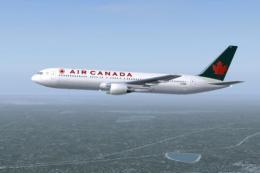
Air Canada Boeing 767-375 GE in non-cheatline livery brings efficient, realistic AI traffic to FS2004 with an AI Aardvark model tuned to look sharp at gates and on approach while staying frame-rate friendly via six LOD stages. Optional reflective model support and practical AI flight dynamics keep arrivals smooth and traffic flow moving.
 Rate
Rate
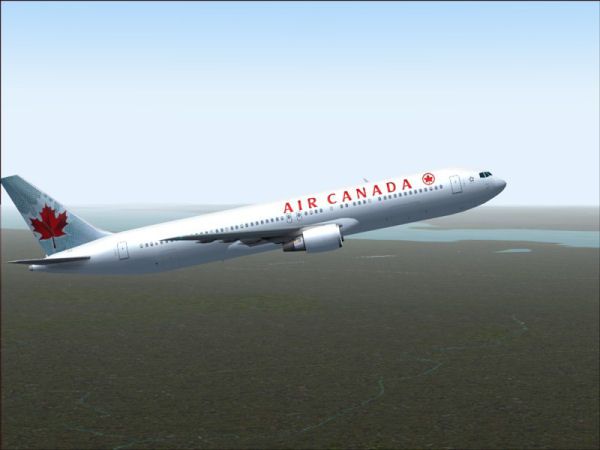
This AI Aardvark aircraft was designed specifically for use as an AI aircraft. As such, the primary design criteria were that it look good sitting at the gate, or as seen when landing from an aircraft waiting to take off. This plane also uses 6 different LOD (levels of detail) models, which means that as the plane gets visually smaller, the model displayed becomes simpler and simpler, thus reducing the drag on your computer. Painted by Shane Strong. Model by Craig Crawley. Paint kit by Boback Shahsafdari and Peter Pavlin. (See also AIC767NU.ZIP).
-fs9-1.jpg)
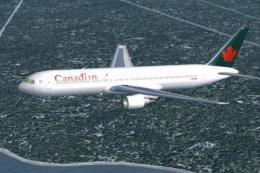
Screenshot of Air Canada Boeing 767-375 in flight.
INSTALLATION:
Just drop the "AIA_767_300_GE_Alitalia" folder into your FS2k/4k aircraft folder. Then assign the aircraft to some flightplans and you're on your way.
If you're not sure how to assign an aircraft to a flightplan, please visit our website and look in the FAQ/ Help section.
FS2002 FDE INSTALLATION:
By default this aircraft is using FS2004 FDE. To use the FS2002 FDE (aircraft.cfg and *.air files), simply back up the FS2004 FDE and put them in a safe place for future FS2004 use; then copy the FS2002 FDE from the supplied zip folder and overwrite the FS2004 FDE in the main aircraft folder. Special thanks goes to Koji (Mr Hiro) Tanaka for the FS2002 FDE.
REFLECTIVE MODEL:
By default this aircraft is using a non-reflective model. If you wish to use the optional reflective model, you will have to change the line in the aircraft.cfg file that reads: "model=no_refl" to "model=reflective"
This will enable the use of a reflective texture, though the texture included with this package does not have a reflective channel, so it will look exactly the same, regardless of which .mdl you are using.
NOTES:
This aircraft was designed specifically for use as an AI aircraft. As such, the primary design criteria were that it look good sitting at the gate, or as seen when landing from an aircraft waiting to take off.
This plane also uses 6 different LOD (levels of detail) models, which means that as the plane gets visually smaller, the model displayed becomes simpler and simpler, thus reducing the drag on your computer.
If you download a GMAX aircraft that is just gorgeous, but really chews up your frame rates when used as AI if several of them appear on the screen at once, the designer probably did not use the LOD feature, so the model is always 20,000 polygons no matter how far away from you it is.
AI FLIGHT DYNAMICS:
FDE's for AI aircraft are somewhat of a compromise. Dynamics that allow beautiful takeoffs often result in planes that will not land or land very badly. AIA fde's are also designed with traffic flow in mind. This means an AIA aircraft is going to touch down very near the end of the runway and quickly exit to make room for the next aircraft. If you want more "float" on landing, you can adjust the cruise lift, parasite drag and induced drag parameters in the aircraft.cfg file.
Free for all simmers · 486.02 KB · Scanned clean Oct 2026
Download speed: Free tier is capped at 0.5 Mbps. PRO members download at full line speed.
This add-on may require the following files to function properly. If this is a repaint, the dependency below is likely the base aircraft package.
FS9\Aircraft\, FS9\Addon Scenery\, FS9\Gauges\, or FS9\Effects\.readme.txt or README file. It tells you exactly where files go, what dependencies are needed, and any quirks specific to this add-on.The archive aic767nc.zip has 18 files and directories contained within it.
This list displays the first 500 files in the package. If the package has more, you will need to download it to view them.
| Filename/Directory | File Date | File Size |
|---|---|---|
| aiac767nc | 10.20.04 | 0 B |
| aia_767_300_GE.air | 06.13.03 | 8.69 kB |
| Aircraft.cfg | 10.20.04 | 13.69 kB |
| FILE_ID.diz | 10.20.04 | 602 B |
| model.reflections | 10.20.04 | 0 B |
| aia_767_300_ge.mdl | 10.09.03 | 534.13 kB |
| model.cfg | 09.07.03 | 31 B |
| README.txt | 10.20.04 | 4.66 kB |
| ScreenShot00.gif | 10.20.04 | 4.54 kB |
| ScreenShot00.jpg | 10.20.04 | 28.43 kB |
| sound | 10.20.04 | 0 B |
| sound.cfg | 06.16.99 | 32 B |
| texture.aca2 | 10.20.04 | 0 B |
| aia_767_300_ge_L.bmp | 10.10.03 | 256.07 kB |
| aia_767_300_ge_t.bmp | 10.20.04 | 1.00 MB |
| aiac767nc | 10.20.04 | 0 B |
| flyawaysimulation.txt | 10.29.13 | 959 B |
| Go to Fly Away Simulation.url | 01.22.16 | 52 B |
Only PRO members can place votes.
More FS2004 add-ons hand-picked based on this download.
FS2004 Civil Jet Aircraft
This package introduces a detailed Air Canada Boeing 767-375 repaint, exclusi…
 FS2004 Civil Jet Aircraft
Enhance your FS2004 collection with this faithful representation of the Boein…
 FS2004 Civil Jet Aircraft
Textures only. Requires SUNNY767.ZIP. Model by Sunny Xia. Textures by Shane S…
 FS2004 Civil Jet Aircraft
This repaint brings the Air Canada Boeing 767-375 (PW engines) into Microsoft…
 FS2004 Civil Jet Aircraft
Air Canada Boeing 767-300 GE (new colors). Model by AI Aardvark. Repaint by B…
 FS2004 Civil Jet Aircraft
Canadian Boeing 767-375ER in Proudwings livery. This aircraft was designed sp…
 FS2004 Civil Jet Aircraft
This package features an authentic repaint of a classic Boeing 767-375 ER in …
 FS2004 Civil Jet Aircraft
Textures only. Requires SUNNY767.ZIP. Model by Sunny Xia. Textures by Shane S…
Be the first to leave a comment on this download.
Be the first to share your thoughts on this download.