


 FSX Historic & Vintage Aircraft
Lockheed P-38 Lightning Fear The Reaper
This is David C. Copley's P38 Lightning updated for Microsoft Flight Simulato…
Lockheed P-38 Lightning “White Lightnin” brings Lefty Gardner’s Reno racer N25Y to life in Microsoft Flight Simulator X with tuned race-spec flight dynamics, detailed textures, and an included P-38 panel that anchors the period cockpit feel. The package also bundles background history and photos of the real aircraft for added authenticity.
 Rate
Rate
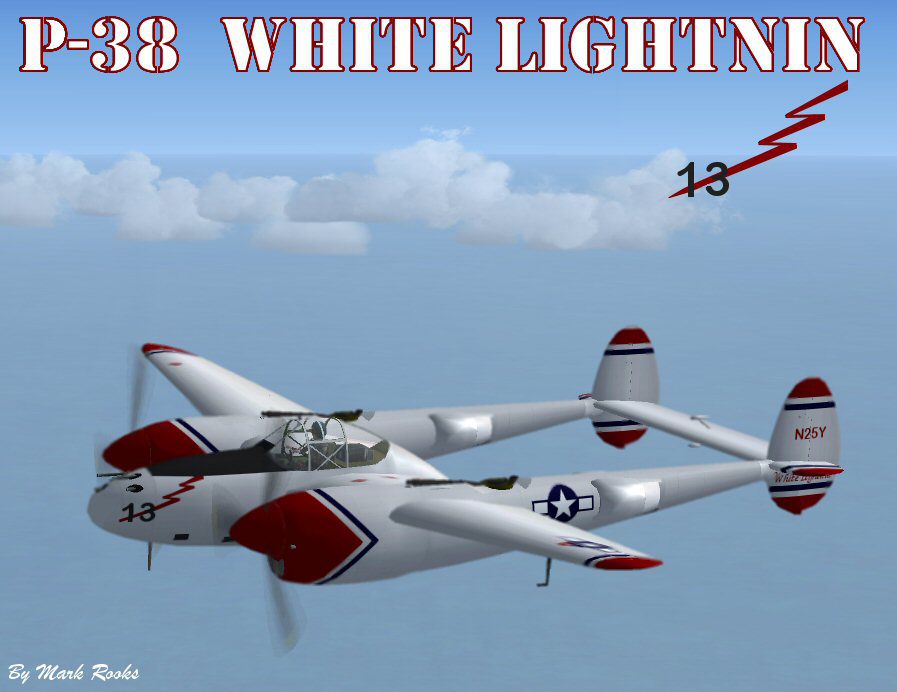
This is David C. Copley's Lockheed P38 Lightning modified for Microsoft Flight Simulator X. This P-38 N25Y "White Lightnin" served the Army Air Corps as 44-53254. Its construction number is 8509. From April 1946 to 1977 it passed through several hands when in 1977 she was acquired a second time by Marvin Lefty Gardner in 1977. Gardner raced it as "White Lightnin" several times at the Reno National Air Races. On June 25, 2001 she suffered an engine failure that resulted in a belly landing in a cotton field in Greenwood, Mississippi. The Red Bull drink company bought the wreckage on January 12, 2005. It was moved to Breckenridge, Texas for restoration to airworthy condition. It has been registered to Aircraft Guaranty Title Corporation since January 30, 2006. This aircraft's flight dynamics have been tuned to Lefty Gardner's race specs. Also includes Mel Mutter's P-38 panel for FSX and has the history and pictures of the actual aircraft. Textures By Mark Rooks of RDG Aircraft.

Screenshot of P-38 "White Lightnin" in flight.
To install this aircraft:
As always back up any original files.
1.Unzip downloaded folders to your desktop or temporary directory of your choice.
2. Copy the " P-38 "White Lightnin" and paste it in the main aircraft folder. By default the main aircraft folder is located at: "C:Program FilesMicrosoft GamesFSXSIM Objects /Aircraft".
3. Be sure to completely unzip all files the aircraft file when complete will Cotain 6 files the Following 6 files goes in the aircraft folder CFG Airfile Model Sound Panel Textures.
4. Unzip the gauges folder and put the gauges in the FSX gauges folder located at "C:Program FilesMicrosoft GamesFSXGauges".
Made Simpler:
Make sure all files are unzipped the New Plane folder should contain 6 files unzipped they are CFG Airfile Sound Model Texture Panel the New Plane folder with the 6 files goes in the game aircraft folder found at C:Program FilesMicrosoft GamesMicrosoft Flight Simulator XSimObjectsAirplanes follow the path ie open the c drive then open program files then open Microsoft Games then open Microsoft Flight Simulator X then open SimObjects then open Airplanes folder the New Plane goes in that folder.
Textures and FSX updates created by Mark "Fire Ball" Rooks.
Enjoy your new repaint.
Thanks for downloading.
Be sure to contact David C. Copley at www.kazoku.org/xp-38n for his wonderful aircraft and his work.
"Fire Ball"
Free for all simmers · 13.32 MB · Scanned clean Oct 2026
Download speed: Free tier is capped at 0.5 Mbps (this file takes approximately 4 mins at the cap). PRO members download at full line speed.
SimObjects\Airplanes\, Addon Scenery\, Effects\, or Gauges\.readme.txt or README file. It tells you exactly where files go, what dependencies are needed, and any quirks specific to this add-on.The archive leftygardnersp38.zip has 8 files and directories contained within it.
This list displays the first 500 files in the package. If the package has more, you will need to download it to view them.
| Filename/Directory | File Date | File Size |
|---|---|---|
| Gauges.zip | 12.07.09 | 1.58 MB |
| P-38 #13 White Lightnin.zip | 12.31.09 | 10.42 MB |
| P-38 White Lightnin Screen.jpg | 12.31.09 | 70.88 kB |
| Picture and History.zip | 12.31.09 | 1.24 MB |
| Read Me First.txt | 12.31.09 | 3.57 kB |
| Reg. Text.txt | 12.31.09 | 1.06 kB |
| flyawaysimulation.txt | 10.29.13 | 959 B |
| Go to Fly Away Simulation.url | 01.22.16 | 52 B |
Only PRO members can place votes.
More FSX & P3D add-ons hand-picked based on this download.
FSX Historic & Vintage Aircraft
This is David C. Copley's P38 Lightning updated for Microsoft Flight Simulato…
 FSX Historic & Vintage Aircraft
This is David C. Copley's Lockheed P38 Lightning updated for Microsoft Flight…
 FSX Historic & Vintage Aircraft
The P-38 Lightning “Fear The Reaper” freeware package provides a faithful rec…
 FSX Historic & Vintage Aircraft
Enhance your virtual hangar with this freeware Lockheed P-38 Lightning model …
 FSX Historic & Vintage Aircraft
Sikorsky S-38 NC144M. The Sikorsky S38 was used by Pan American Airways throu…
 FSX Historic & Vintage Aircraft
Weapons configuration for the P-38 "Fear the Reaper" by David Copley. Require…
 FSX Historic & Vintage Aircraft
Now version 3.14 (V3.1406). This package includes the latest Douglas C-47 Sky…
 FSX Historic & Vintage Aircraft
This is A.F. Scrub's Submarine MK-22 Spitfire Updated For Flight Simulator X.…
Read what other simmers think, or add your own.

Cool plane! I saw this plane fly at the 50th anniversary of the end of World War II in Midland Texas. I loved the color scheme. I understand that it crashed and was purchased by Red Bull and repainted to their color scheme, so sad. Nice plane though. Thanks!