



IVAO Releases Multiplayer Traffic Library Installer v2
IVAO has introduced its refined MTL (Multiplayer Traffic Library) Installer v2, granting flight sim aficionados a smoother way to integrate…
 Ian Stephens
 The multiplayer features of Microsoft Flight Simulator 2004 have never been publisised greatly and people are usually very vague when it comes to playing FS2004 online. Well, we have opened a new forum that allows users to post information on their active Flight Simulator games, including IP address and game information for you to connect to. We hope this new forum will get users of FS2004 to play online more frequently, and make it easier for budding multiplayers to find a game to join.
Start Flight Simulator 2004. Once the simulator has completed loading start a flight of your choice. Make sure you are parked on the apron and not on the runway. The reason for this is when you eventually connect to the online network another pilot might be seconds from touchdown and he would not appreaciate you "appearing" on the runway.
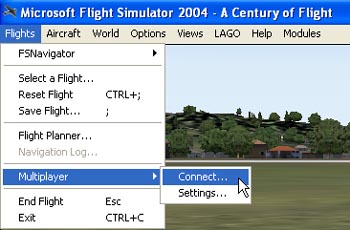
From the Flights Menu, select Multiplayer option by moving your mouse cursor over it. Another menu will now appear. Click on the Connect option.
Note: If you can't see the menu, Press "ALT" + "ENTER" to exit full screen mode or press "ALT" to access the menu.
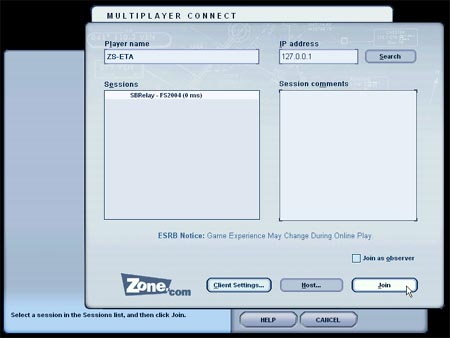
The Multiplayer Connect screen will now appear. You will need to fill in a Player name. This is only for internal use of the Flight Simulator and needs not be the "callsign" you will be using on the online network. However it might be a good habbit to keep them the same.
You should then type in the IP Address of the users game as posted and click on search. When completed, all active sessions will appear on the left of the screen - select a session from the list (also the same as said in the post) and click on Join!
Click here to find a server for multiplayer gaming in our forums
Upgrade Microsoft Flight Simulator, FSX, P3D & X-Plane in minutes with our curated file library packed with aircraft, scenery, liveries, and utilities.
Ready to upgrade your hangar?
Browse the free file library
Ian Stephens is a flight simulation industry expert with over 20 years of experience and also has a keen interest in aviation and technology. Ian spends a lot of his time experimenting with various simulator packages but has a love for Microsoft Flight Simulator X because of the huge selection of add-ons available. However, Ian also has copies of Prepar3D and X-Plane installed.
Ian has been writing for Fly Away Simulation for over 9 years. Should you wish, you can contact Ian via email at ian.stephens@flyawaysimulation.com.
IVAO has introduced its refined MTL (Multiplayer Traffic Library) Installer v2, granting flight sim aficionados a smoother way to integrate…
This all-new Scenery Peru North & Lima for FS2004 delivers an immersive flight simulation experience by combining precise mesh terrain at…
In this new FS2004 texture bundle, you’ll find enriched runway, sky, and foliage visuals that ensure photoreal realism while maintaining…
ActiveSky wxRE v1.9 seamlessly synchronizes with FS2004, blending its upgraded weather engine with advanced forecasting features like…

FS2004 enthusiasts can now experience Carenado’s newly built Piper PA-28-181 Archer II, complete with a refined 3D model, lifelike…

Flight simulator enthusiasts can now experience Carenado’s newly introduced PA32R 301 Saratoga SP for FS2004, a meticulously crafted…
Comments below are the opinions of the individuals posting them and do not always reflect the views of Fly Away Simulation. We moderate all comments manually before they are approved.

I love this site fs2004

I still use FS2004 (FS9) on the IVAO platform and have no problems connecting to other Flight Sim (FSX, P3D & X-Plane) platforms and see my flying buddies. Its a very stable Flight Sim. Better than FSX

I am new in flight simulators just keep a new laptop I choose fs2004 century and fs2002pro can install that in windows 11 and play online w it no big video card for now.