


 Germany
  FSX Scenery
RCAF Lahr AB
V1. Lahr Air Base (EDTL) is located in southern Germany near the the city of …
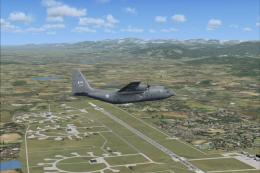
Lahr Airport (EDTL) scenery brings southern Germany to life with two tailored configurations, one for default terrain and one aligned with VFR Germany, in Microsoft Flight Simulator X. Expect enhanced hangars, cargo and jet areas, a turbine test bay, and a dedicated helicopter training section, plus realistic ILS, NDB, and DME support.
This freeware scenery add-on highlights Lahr Airport (EDTL) through two tailored configurations, one built for the standard Microsoft Flight Simulator X world and another aligned with VFR Germany. Developed by Peter der Ostfriese and brought to life alongside Jürgen Seidel, the package integrates imaginative enhancements that create a dynamic backdrop for both fixed-wing and rotary operations. It serves as a virtual hub for Pilots-Pub Phoenix, reflecting both creativity and functionality at this German airport.
Lahr Airport occupies a strategic swath of southern Germany near the A5 motorway. This setting grants quick access to a thriving industrial zone, enabling realistic cargo and passenger movements in the simulator. With short routes to France and Switzerland, the region is reputed for its automotive sector and advanced mechanical engineering. The airport itself is positioned to reflect these logistical strengths, catering to sim aviators seeking realistic cross-border operations.
The scenery is offered in two distinct flavors to suit various installation choices. One edition is optimized for default Microsoft Flight Simulator X environments, while the other integrates with detailed terrain provided by VFR Germany. Both variants preserve the same functional layout of Lahr, yet each includes terrain adjustments and visual refinements that match the chosen base scenery.
Lahr Airport features robust navigational aids essential for realistic IFR (Instrument Flight Rules) and VFR (Visual Flight Rules) operations:
These aids simplify both approach and departure procedures, enabling accurate training in diverse weather conditions.
To install, simply extract the compressed file and run the included setup.exe. Upon completion, open Microsoft Flight Simulator X and add the newly created scenery folder named “PPP_EDTL_02_2011” into the Scenery Library. Pilots-Pub Phoenix recommends validating compatibility with VFR Germany if you opt for that version. Once integrated, the enhanced airport surfaces and structures will appear upon loading into Lahr (EDTL).
The imaginative vision of Peter der Ostfriese brings multiple highlights, including hangars aligned for medium-sized aircraft, a power supply station, and a dedicated helicopter section with training areas. A test box for aircraft engine runs has also been placed, along with expanded cargo ramps. Such details contribute to a lively general aviation and commercial traffic environment.
PHOENIX_EDTL_1.2 refined the layout to avoid collision conflicts when taxiing. This update realigned lights, signs, and various parked items to improve ground clearance.
PHOENIX_EDTL_2.1 introduced a sample hangar near a hotel construction site, accommodating aircraft with spans up to 22 meters. This stage also brought new buildings at Winzeln Schramberg (EDTW), showcasing creative additions within the limits of default scenery objects.
PHOENIX_EDTL_2.2 adjusted nameplates and lowered hangars, continuing the commitment to realism and refined detailing throughout the airfield.
PPP_EDTL_02_2011 incorporated a helicopter training section, bolstered the VFR division, improved the power grid, and introduced a jet department. Additional cargo gates and a turbine test area further expand the airport’s operational capacity.
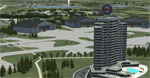
Screenshot of Lahr Airport.
A comprehensive documentation file is included to guide sim pilots through the fictional elements integrated into Lahr. Since certain areas are creatively modeled, references in the documentation ensure that users can fully explore the custom features. Pilots-Pub Phoenix continues expanding these elements over time, tying them to the distinctive character of the airport.
This package stands as a collaborative effort between Peter der Ostfriese and Jürgen Seidel, crafted specifically for Pilots-Pub Phoenix. It showcases an imaginative yet functional depiction of Lahr Airport, providing an immersive flight journey for both general aviation and commercial pilots within Microsoft Flight Simulator X.
Free for all simmers · 6.1 MB · Scanned clean Oct 2026
Download speed: Free tier is capped at 0.5 Mbps (this file takes approximately 2 mins at the cap). PRO members download at full line speed.
FSX\Addon Scenery\ containing scenery and texture sub-folders.readme.txt or README file. It tells you exactly where files go, what dependencies are needed, and any quirks specific to this add-on.Use these coordinates to fly directly to this location once the mod is installed.
48.36930000,7.82770000
Launch FSX or Prepar3D and use Flights → Load to open the downloaded .pln file. Your aircraft will be positioned at this location.
The archive pilotspub_phoenix_lahr_edtl.zip has 8 files and directories contained within it.
This list displays the first 500 files in the package. If the package has more, you will need to download it to view them.
| Filename/Directory | File Date | File Size |
|---|---|---|
| pilotspub_phoenix_lahr_edtl | 11.07.11 | 0 B |
| FILE_ID.DIZ | 11.07.11 | 153 B |
| lahr_for_standardscenery.exe | 11.02.11 | 3.05 MB |
| lahr_mit_vfr_germany.exe | 11.02.11 | 3.05 MB |
| readme.txt | 10.18.11 | 9.84 kB |
| thumbnail.gif | 11.02.11 | 11.60 kB |
| flyawaysimulation.txt | 10.29.13 | 959 B |
| Go to Fly Away Simulation.url | 01.22.16 | 52 B |
Only PRO members can place votes.
More FSX & P3D add-ons hand-picked based on this download.
FSX Scenery
V1. Lahr Air Base (EDTL) is located in southern Germany near the the city of …
 FSX Scenery
Lahr Air Base Runway Fix (EDTL), Germany. This file solves the problem with t…
 FSX Scenery
Princess Juliana International Airport (TNCM) in Saint Marteen, Netherlands A…
 FSX Scenery
Los Angeles Airport Scenery v3, California (CA). This photoreal scenery is a …
 FSX Scenery
Barbados International Airport (TBPB). Grantley Adams International Airport f…
 FSX Scenery
Paris Charles de Gaulle Airport (CDG, LFPG), France. The entire airport has b…
 FSX Scenery
John F. Kennedy Airport (KJFK), New York, NYU. This is a photoreal scenery re…
 FSX Scenery
Dubai International Airport (OMDB), Dubai. Includes a new passenger terminal …
Read what other simmers think, or add your own.

Hello Peter, I'm flying in Winzeln and still waiting for an update of the Airfields from FS9 to FSX. That will probably be nothing more. I have now downloaded your Lahr Scenery and EDTW is also there. Only the buildings are fictitious, Is it possible to use the Scenery and Texture file from the FS9 to take the original buildings into your scenery?
Greeting Dirk