

 FSX General Aviation Aircraft
Green And White Cessna 172 N7379G
Textures only for the default C172. Easy installation. Screen shots enclosed.…
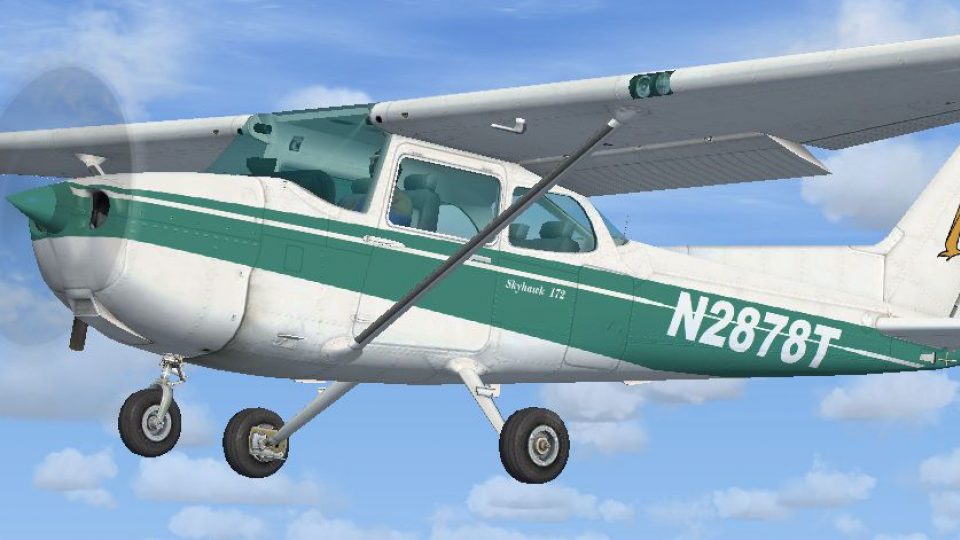
Green-and-white Cessna 172 N2878T textures get a polished update in FSX, eliminating fuselage-side bleed-through that appears when sunlight strikes during banking. Requires the Cessna_172_N2878T repaint package, and replaces the full texture.N2878T folder to deliver cleaner shading, sharper paintwork, and more consistent exterior visuals in flight.
 Rate
Rate

Green And White Cessna 172 Fix, for use with Cessna_172_N2878T.ZIP">FSX_DEFAULT_Cessna_172_N2878T.ZIP. This fixes the texture bleed through which can be seen on the fuselage sides when the sun hits the fuselage while banking. Simply replace the entire "texture.N2878T" folder with this new texture folder. By Tom Tiedman.
Green And White Cessna 172 in flight.
DESCRIPTION:
A fix for my FSX default Cessna 172 repaint uploaded on 8-20-11. This fixes the texture bleed through which can be seen on the fuselage sides when the sun hits the fuselage while banking. Simply replace the entire "texture.N2878T" folder with this new texture folder. Sorry for the inconvenience.
Free for all simmers · 15.84 MB · Scanned clean Oct 2026
Download speed: Free tier is capped at 0.5 Mbps (this file takes approximately 4 mins at the cap). PRO members download at full line speed.
FSX\SimObjects\Airplanes\. The folder must contain an aircraft.cfg file. Effects go into FSX\Effects\; gauges go into FSX\Gauges\.readme.txt or README file. It tells you exactly where files go, what dependencies are needed, and any quirks specific to this add-on.The archive fsx_default_cessna_172_n2878t_fix.zip has 27 files and directories contained within it.
This list displays the first 500 files in the package. If the package has more, you will need to download it to view them.
| Filename/Directory | File Date | File Size |
|---|---|---|
| file_id.diz | 08.21.11 | 372 B |
| READ ME and INSTALLATION.txt | 08.21.11 | 372 B |
| Screenshot.jpg | 08.20.11 | 136.85 kB |
| texture.N2878T | 08.21.11 | 0 B |
| C172_1_C.dds | 07.12.10 | 512.12 kB |
| C172_1_night_C.dds | 07.12.10 | 512.12 kB |
| C172_2_C.dds | 07.12.10 | 512.12 kB |
| C172_2_night_C.dds | 07.12.10 | 512.12 kB |
| C172_3_C.dds | 07.12.10 | 512.12 kB |
| C172_3_night_C.dds | 07.12.10 | 512.12 kB |
| C172_4_C.dds | 07.12.10 | 128.12 kB |
| C172_4_night_C.dds | 07.12.10 | 128.12 kB |
| c172_c.bmp | 05.12.06 | 170.74 kB |
| C172_Interior_T.dds | 07.12.10 | 256.12 kB |
| c172_interior_t_night.dds | 07.12.10 | 32.12 kB |
| C172_Pilot.dds | 07.12.10 | 512.12 kB |
| C172_reflection.dds | 07.12.10 | 128.12 kB |
| C172_T.bmp | 08.20.11 | 16.00 MB |
| C172_T.dds | 08.20.11 | 16.00 MB |
| c172_t_bump.dds | 07.12.10 | 1.00 MB |
| c172_t_spec.dds | 07.12.10 | 1.00 MB |
| fresnel_ramp.dds | 07.12.10 | 640 B |
| Prop_C172.dds | 07.12.10 | 64.12 kB |
| texture.cfg | 07.12.10 | 137 B |
| thumbnail.jpg | 08.20.11 | 136.85 kB |
| flyawaysimulation.txt | 10.29.13 | 959 B |
| Go to Fly Away Simulation.url | 01.22.16 | 52 B |
Only PRO members can place votes.
More FSX & P3D add-ons hand-picked based on this download.
FSX General Aviation Aircraft
Textures only for the default C172. Easy installation. Screen shots enclosed.…
 FSX General Aviation Aircraft
Default Cessna 172 repaint textures green and white 4-pack. Contains four rep…
 FSX General Aviation Aircraft
Enhance your hangar in Microsoft Flight Simulator X with this fictional N7279…
 FSX General Aviation Aircraft
Green And White Cessna 172SP repaint in 32 bit no mips 2048 x 2048 textures f…
 FSX General Aviation Aircraft
Blue And White Cessna 172. Default Cessna 172SP Skyhawk repaint textures for …
 FSX General Aviation Aircraft
Red And White Cessna 172. Default Cessna 172SP Skyhawk repaint textures for t…
 FSX General Aviation Aircraft
The default C172 with red and white textures as N1272T. Repaint by Tom Tiedma…
 FSX General Aviation Aircraft
Default Cessna 172SP Skyhawk repaint textures for the fictional N8643L, a tan…
Be the first to leave a comment on this download.
Be the first to share your thoughts on this download.