

 FSX Scenery
NL2000 V4.02 Rotterdam,The Hague Airport
Enhance your simulator’s portrayal of one of the Netherlands’ busiest regiona…
Teuge Airport (EHTE) arrives with crisp NL2000 v4 detailing, including accurate runway and taxiway markings, custom ground polygons, and faithfully placed hangars and local landmarks for convincing GA and skydiving operations. Built for Microsoft Flight Simulator X, it blends photoreal textures with refined day-to-night lighting and requires the NL2000 v4.0.20 installer.
 Rate
Rate
 Netherlands
Experience an expertly crafted representation of Teuge Airport, known in simulators as EHTE, in this comprehensive freeware add-on. Designed by The Netherlands 2000 Scenery Design Team, this package integrates flawlessly into the overarching NL2000 version 4 environment, bringing precise detail and immersive visuals to Microsoft Flight Simulator X.
Situated in the heart of the Netherlands, Teuge Airport serves general aviation and skydiving activities. With this expansion, you will see accurately placed structures, meticulously recreated ground polygons, and updated runway markings that reflect the real-world layout of EHTE. The surrounding neighborhoods and landmarks are modeled to blend seamlessly with the modular NL2000 framework.
This update leverages the FSX engine by adding high-resolution textures and improved lighting transitions. It refines both day and night environments, ensuring that dawn departures and dusk arrivals capture the ambiance of Teuge’s unique setting. The seamless transition between photo-based backdrops and dedicated 3D objects contributes to a well-rounded flight simulator experience.
To apply this package, you will need the NL2000 v4.0.20 installer, which handles the modular structure of the wider scenery suite. Once installed, the enhanced Teuge region slots directly into your existing NL2000 v4 library, synchronizing perfectly with other packages in the series. You can enable or disable individual modules in the configurator if you prefer to customize your coverage within the Netherlands.
The Netherlands 2000 development group has embraced a modular methodology to allow pilots to add only the regions and airfields they require. This modularity conserves system resources while still offering high-definition coverage of the entire country. Each airport fits into the main NL2000 package, letting simmers manage storage and performance according to their individual aircraft operations and flight schedules.
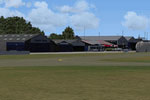
Screenshot of NL2000 V4 EHTE Scenery.
This expansion comes courtesy of The Netherlands 2000 Scenery Design Team, the same dedicated group responsible for other modules within the NL2000 family. Their expertise in photoreal ground imagery, building models, and specialized airport elements ensures you have a realistic environment every time you taxi for departure or line up for final approach at EHTE Teuge.
By employing this specifically tailored add-on, you can explore the central Netherlands with an extra level of realism. The sharp detail around the Teuge facilities, combined with the collaborative engineering of the NL2000 series, makes this download an excellent supplement for virtual aviators looking to refine their knowledge of Dutch airfields.
All credit goes to The Netherlands 2000 Scenery Design Team for this free addition, extending the capability of your FSX simulator and enhancing your vision of the Netherlands one airport at a time.
Free for all simmers · 22.17 MB · Scanned clean Oct 2026
Download speed: Free tier is capped at 0.5 Mbps (this file takes approximately 6 mins at the cap). PRO members download at full line speed.
FSX\Addon Scenery\ containing scenery and texture sub-folders.readme.txt or README file. It tells you exactly where files go, what dependencies are needed, and any quirks specific to this add-on.Use these coordinates to fly directly to this location once the mod is installed.
52.24470000,6.04640000
Launch FSX or Prepar3D and use Flights → Load to open the downloaded .pln file. Your aircraft will be positioned at this location.
The archive nl2k_v4_01_ehte.zip has 8 files and directories contained within it.
This list displays the first 500 files in the package. If the package has more, you will need to download it to view them.
| Filename/Directory | File Date | File Size |
|---|---|---|
| nl2k_v4.01_ehte.txt | 05.12.11 | 355 B |
| auteursrecht.txt | 05.24.10 | 5.06 kB |
| copyright.txt | 05.24.10 | 4.43 kB |
| FILE_ID.DIZ | 05.12.11 | 355 B |
| nl2k_v4.01_ehte.gif | 05.12.11 | 8.68 kB |
| nl2k_v4.01_ehte.nl2 | 03.27.11 | 22.27 MB |
| flyawaysimulation.txt | 10.29.13 | 959 B |
| Go to Fly Away Simulation.url | 01.22.16 | 52 B |
Only PRO members can place votes.
More FSX & P3D add-ons hand-picked based on this download.
FSX Scenery
Enhance your simulator’s portrayal of one of the Netherlands’ busiest regiona…
 FSX Scenery
This comprehensive scenery package brings an authentic representation of Eind…
 FSX Scenery
This free add-on offers a precisely modeled depiction of EHEH Eindhoven Airpo…
 FSX Scenery
Enhance your simulator with this free package dedicated to EHEH (Eindhoven Ai…
 FSX Scenery
This comprehensive package brings an updated rendition of Maastricht Aachen A…
 FSX Scenery
Scenery NL2000 V4.0. This is the NL2000 v4.0 Traffic package for the NL2000 s…
 FSX Scenery
Immerse yourself in a thoroughly revised depiction of Dutch landscapes using …
 FSX Scenery
This package provides a dedicated set of core libraries intended to enhance a…
Be the first to leave a comment on this download.
Be the first to share your thoughts on this download.