

 FSX Scenery
NL2000 V4.0 Rotterdam The Hague Airport
Enhance your virtual journey in FSX by adding a meticulously detailed renditi…
Rotterdam The Hague Airport (EHRD) gets a sharper, more authentic look with NL2000 v4.02, featuring refined terminal and hangar models, accurate layouts, crisp ground markings, and photoreal apron textures that blend into nearby roads and city landmarks for confident VFR flying in FSX; requires the NL2000 v4.0.20 base system.
 Rate
Rate
 Netherlands
Enhance your simulator’s portrayal of one of the Netherlands’ busiest regional hubs with this dedicated freeware package. This release focuses on EHRD Rotterdam The Hague Airport for the well-established NL2000 v4 system and delivers enhanced terrain features, refined building details, and accurate layouts that highlight the airport’s important role in Dutch aviation.
Rotterdam The Hague Airport (previously known as Zestienhoven) stands out as a key airport in the southwestern part of the Netherlands. In this scenery, the NL2000 V4.02 EHRD package implements meticulous modeling, including terminal architecture, hangars, and associated airport infrastructure. Users will observe carefully placed ground polygons and markings that combine well with surrounding buildings, providing an immersive flight environment. Photoreal textures, especially near apron areas, add more realism to the overall flights.
To preserve the distinctive Dutch setting, the developers integrated region-specific elements around the perimeter of Rotterdam The Hague Airport. The presence of nearby city structures, highways, and equally memorable landmarks results in a seamless fusion between runway boundaries and adjacent landscapes. With the use of high-quality aerial imagery, this add-on re-creates local surroundings clearly, which can be particularly useful when performing VFR circuits or transitions.
This freeware add-on belongs to the Netherlands 2000 v4 project, which offers a country-wide solution for virtual pilots seeking an authentic representation of Dutch territory. By remaining modular, each segment can be installed independently to cover selected areas across the Netherlands. Users are free to tailor their simulator to individual preferences, making efficient use of resources while retaining top-tier graphics.
In order to configure this Rotterdam The Hague Airport scenery correctly, you must install the NL2000 v4.0.20 scenery and use the appropriate installer. Once the main NL2000 framework is in place, simply add the EHRD package from the same interface. Follow any on-screen steps to finalize integration, and after launching FSX, the newly improved visuals should be immediately noticeable on approach into Rotterdam’s airspace.
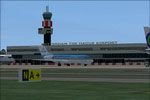
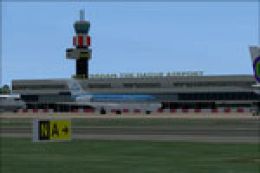
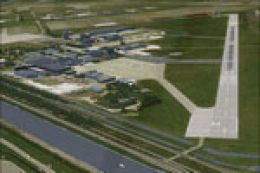
Screenshot of Rotterdam, The Hague Airport Scenery.
This package is the result of work by The Netherlands 2000 Scenery Design Team, who have contributed substantial resources to perfecting airports and landscapes across the entire region. With their consistent updates, they continue to refine flight simulator experiences throughout the Netherlands.
Free for all simmers · 182.98 MB · Scanned clean Oct 2026
Download speed: Free tier is capped at 0.5 Mbps (this file takes approximately 51 mins at the cap). PRO members download at full line speed.
FSX\Addon Scenery\ containing scenery and texture sub-folders.readme.txt or README file. It tells you exactly where files go, what dependencies are needed, and any quirks specific to this add-on.Use these coordinates to fly directly to this location once the mod is installed.
51.95694000,4.43722000
Launch FSX or Prepar3D and use Flights → Load to open the downloaded .pln file. Your aircraft will be positioned at this location.
The archive nl2k_v4_02_ehrd.zip has 8 files and directories contained within it.
This list displays the first 500 files in the package. If the package has more, you will need to download it to view them.
| Filename/Directory | File Date | File Size |
|---|---|---|
| copyright.txt | 05.24.10 | 4.43 kB |
| FILE_ID.DIZ | 12.22.11 | 369 B |
| nl2k_v4.02_ehrd.gif | 05.12.11 | 7.32 kB |
| nl2k_v4.02_ehrd.nl2 | 12.13.11 | 183.08 MB |
| nl2k_v4.02_ehrd.txt | 12.22.11 | 369 B |
| auteursrecht.txt | 05.24.10 | 5.06 kB |
| flyawaysimulation.txt | 10.29.13 | 959 B |
| Go to Fly Away Simulation.url | 01.22.16 | 52 B |
Only PRO members can place votes.
More FSX & P3D add-ons hand-picked based on this download.
FSX Scenery
Enhance your virtual journey in FSX by adding a meticulously detailed renditi…
 FSX Scenery
Immerse yourself in a meticulously crafted rendition of EHRD Rotterdam The Ha…
 FSX Scenery
This free add-on offers a precisely modeled depiction of EHEH Eindhoven Airpo…
 FSX Scenery
This comprehensive package brings an updated rendition of Maastricht Aachen A…
 FSX Scenery
This airport enhancement transforms Groningen Airport Eelde (EHGG) within Mic…
 FSX Scenery
Experience the intricacies of Den Helder Airport (EHKD) with this free FSX sc…
 FSX Scenery
This add-on enhances Microsoft Flight Simulator X with a finely detailed rend…
 FSX Scenery
This freeware add-on brings a fully updated rendition of Teuge Airport (EHTE)…
Be the first to leave a comment on this download.
Be the first to share your thoughts on this download.