

 FSX Scenery
NL2000 V4.02 EHSB Soesterberg Air Base
Experience an enhanced rendition of EHSB Soesterberg Air Base in your FSX env…
EHSB Soesterberg Air Base comes to life with NL2000 v4.01 scenery for Microsoft Flight Simulator X, delivering photoreal ground textures, accurate runway and taxiway markings, custom military buildings, and immersive night lighting based on the former Royal Netherlands Air Force layout. Requires the NL2000 v4.0.20 installer for proper modular integration.
 Rate
Rate
 Netherlands
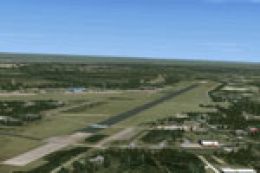
This freeware package offers a detailed rendition of EHSB Soesterberg Air Base, tailored for Microsoft Flight Simulator X. Developed by The Netherlands 2000 Scenery Design Team, it incorporates realistic ground markings, customized buildings, and accurate layout information for the former Royal Netherlands Air Force installation. This airfield played a significant historical role and is situated in the central region of the country, so its inclusion enhances any epic flight plan across the Dutch landscape.
The content included here represents the NL2000 v4.01 EHSB Soesterberg Air Base add-on. It has been meticulously crafted to align with the broader NL2000 v4 series—an intricate and modular scenery solution. The structures scattered throughout the air base capture the characteristic architectural style seen on Dutch military airfields, and the included textures highlight precise runway markings, taxi path details, and peripheral areas.
This NL2000 v4.01 package integrates seamlessly with the NL2000 v4.0.20 installer. Without that dedicated installer, the content will not deploy correctly. Because the NL2000 series is constructed in separate modules, you can choose specific regions or airfields to optimize performance and storage while attaining a high level of detail across the Netherlands. By focusing resources on Soesterberg Air Base, you can experience authentic aerial approaches and departures that reflect the site’s past operational characteristics.
Photoreal ground textures form one of the key highlights in this add-on. Enhanced imagery covers the runway environment and its surroundings, revealing an impressive visual transition between taxiways, borders, and any detailed parking ramps. Furthermore, the integration of realistic night lighting ensures that dusk or dawn operations remain immersive, allowing pilots to practice twilight training flights under near-authentic conditions.
Soesterberg Air Base, once known for its strategic military operations and unique atmosphere, features a single runway that saw service under various air force units. This version of the scenery captures the layout and environmental cues that made EHSB a notable point in Dutch aviation history. Modern flight simulator pilots can appreciate its legacy as they navigate this historically significant facility.
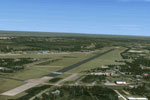
Screenshot of NL2000 V4 EHSB Scenery.
The Netherlands 2000 Scenery Design Team has dedicated extensive effort to produce this module. They have consistently refined textures, objects, and configurations to represent Dutch aviation spaces with a high level of fidelity. As a completely free release, this EHSB air base package significantly complements the rest of the NL2000 series for those who value authenticity in flight simulation environments.
Free for all simmers · 57.92 MB · Scanned clean Oct 2026
Download speed: Free tier is capped at 0.5 Mbps (this file takes approximately 16 mins at the cap). PRO members download at full line speed.
FSX\Addon Scenery\ containing scenery and texture sub-folders.readme.txt or README file. It tells you exactly where files go, what dependencies are needed, and any quirks specific to this add-on.Use these coordinates to fly directly to this location once the mod is installed.
52.13000000,5.28000000
Launch FSX or Prepar3D and use Flights → Load to open the downloaded .pln file. Your aircraft will be positioned at this location.
The archive nl2k_v4_01_ehsb.zip has 8 files and directories contained within it.
This list displays the first 500 files in the package. If the package has more, you will need to download it to view them.
| Filename/Directory | File Date | File Size |
|---|---|---|
| nl2k_v4.01_ehsb.txt | 05.12.11 | 362 B |
| auteursrecht.txt | 05.24.10 | 5.06 kB |
| copyright.txt | 05.24.10 | 4.43 kB |
| FILE_ID.DIZ | 05.12.11 | 362 B |
| nl2k_v4.01_ehsb.gif | 05.12.11 | 10.23 kB |
| nl2k_v4.01_ehsb.nl2 | 03.27.11 | 58.03 MB |
| flyawaysimulation.txt | 10.29.13 | 959 B |
| Go to Fly Away Simulation.url | 01.22.16 | 52 B |
Only PRO members can place votes.
More FSX & P3D add-ons hand-picked based on this download.
FSX Scenery
Experience an enhanced rendition of EHSB Soesterberg Air Base in your FSX env…
 FSX Scenery
NL2000 V4 EHSB 1980. This is the NL2000 v4.01 EHSB 1980 Soesterberg Air Base …
 FSX Scenery
Enhance your simulator’s portrayal of one of the Netherlands’ busiest regiona…
 FSX Scenery
This comprehensive scenery package brings an authentic representation of Eind…
 FSX Scenery
This free add-on offers a precisely modeled depiction of EHEH Eindhoven Airpo…
 FSX Scenery
Enhance your simulator with this free package dedicated to EHEH (Eindhoven Ai…
 FSX Scenery
This comprehensive package brings an updated rendition of Maastricht Aachen A…
 FSX Scenery
Scenery NL2000 V4.0. This is the NL2000 v4.0 Traffic package for the NL2000 s…
Be the first to leave a comment on this download.
Be the first to share your thoughts on this download.