

 FS2004 Civil Jet Aircraft
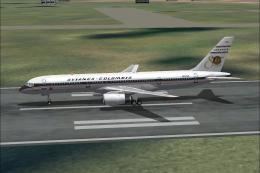
Avianca Colombia Boeing 757-200
Avianca Colombia Boeing 757-200 80 years celebration. Avianca is the first co…
Avianca’s Boeing 757-200 in Pratt & Whitney power brings authentic airline traffic to FS2004 with the respected AI Aardvark model and crisp Juan Sebastian Gonzalez textures. The package includes the full aircraft entry for quick sim recognition, delivering a clean external presentation and believable ATC details for scheduled operations.
 Rate
Rate
Boeing 757-200 PW. Model by AI Aardvark. Livery by Juan Sebastian Gonzalez.
Installation:
Just unzip the content of this file into the Aircraft folder in the FS9 root folder.
Flight Simulator should detect the airplane at once, and it may be selectable in the aircraft selection screen.
[fltsim.0]

	title=757 Avianca

	sim=aia_757_200_pw

	model=

	panel=

	sound=

	texture=

	kb_checklists=

	kb_reference=

	atc_id=

	atc_airline=Avianca

	atc_flight_number=1123

	ui_manufacturer=Boeing

	ui_type=757-200

	ui_variation=Avianca

	description=AI Aardvark 757-200 (P&W) Model by AI Aardvark. Textures by Juan Sebastian Gonzalez

	atc_id_color=0000000000

	visual_damage=0

	atc_heavy=1
Free for all simmers · 668.81 KB · Scanned clean Oct 2026
Download speed: Free tier is capped at 0.5 Mbps. PRO members download at full line speed.
FS9\Aircraft\, FS9\Addon Scenery\, FS9\Gauges\, or FS9\Effects\.readme.txt or README file. It tells you exactly where files go, what dependencies are needed, and any quirks specific to this add-on.The archive ai757avi.zip has 23 files and directories contained within it.
This list displays the first 500 files in the package. If the package has more, you will need to download it to view them.
| Filename/Directory | File Date | File Size |
|---|---|---|
| AIA_757_Avianca | 06.22.04 | 0 B |
| aia_757_200_pw.air | 09.19.01 | 8.90 kB |
| Aircraft.cfg | 06.22.04 | 13.86 kB |
| model | 06.22.04 | 0 B |
| aia_757_200_pw.mdl | 02.05.03 | 273.01 kB |
| model.cfg | 01.29.03 | 33 B |
| panel | 06.22.04 | 0 B |
| 737_compass.BMP | 04.17.01 | 95.51 kB |
| 737_Panel_Decals_2.bmp | 02.16.03 | 257.05 kB |
| main_1024.bmp | 07.06.01 | 502.05 kB |
| main_640.bmp | 04.17.01 | 196.68 kB |
| panel.cfg | 03.08.03 | 5.53 kB |
| Thumbs.db | 06.03.04 | 12.00 kB |
| upper_640.bmp | 04.17.01 | 18.99 kB |
| sound | 06.22.04 | 0 B |
| sound.cfg | 04.18.01 | 32 B |
| texture | 06.22.04 | 0 B |
| aia_757_200_pw_l.bmp | 06.21.04 | 170.75 kB |
| aia_757_200_pw_t.bmp | 06.22.04 | 682.75 kB |
| Thumbs.db | 06.17.04 | 13.00 kB |
| Readme.txt | 06.22.04 | 996 B |
| flyawaysimulation.txt | 10.29.13 | 959 B |
| Go to Fly Away Simulation.url | 01.22.16 | 52 B |
Only PRO members can place votes.
More FS2004 add-ons hand-picked based on this download.
FS2004 Civil Jet Aircraft
Avianca Colombia Boeing 757-200 80 years celebration. Avianca is the first co…
 FS2004 Civil Jet Aircraft
Boeing 757-200 in 1990 livery, registration EI-CEZ. Features accurate paint, …
 FS2004 Civil Jet Aircraft
Model by AI Aardvark. Painted by Juan Sebastian Gonzalez and Miguel Angel Mor…
 FS2004 Civil Jet Aircraft
This package portrays the Boeing 757-200 wearing Avianca’s distinctive “Alian…
 FS2004 Civil Jet Aircraft
This complete freeware package offers a detailed Avianca Colombia Boeing 757-…
 FS2004 Civil Jet Aircraft
AI-AARDVARK 727-200 Avianca livery. Model/Base Paint/FDE by: David Rawlins Pa…
 FS2004 Civil Jet Aircraft
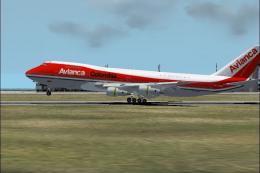
The Boeing 747-200 showcased here pays homage to Avianca’s historical use of …
 FS2004 Civil Jet Aircraft
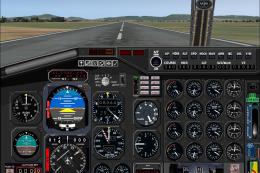
AI friendly Gmax model; panel and sounds included. Fuel dump and refuel gauge…
Be the first to leave a comment on this download.
Be the first to share your thoughts on this download.