

 FS2004 Civil Jet Aircraft
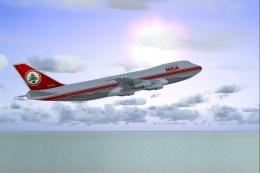
Middle East Airlines Boeing 747-2B4B OD-AGJ
Experience the timeless charm of a classic Boeing 747-2B4B in the iconic Midd…
Middle East Airlines’ Boeing 707 OD-AHC livery brings the airline’s 1996-era look to life with crisp markings, nuanced shading, and rivet-level surface detail that suits classic long-range jet flying. Built for Microsoft Flight Simulator 2004, it requires the Captain Sim 707 payware model and delivers high-quality textures tuned for smooth performance.
 Rate
Rate

Step back into the late 1990s and experience a faithful recreation of Middle East Airlines’ Boeing 707 (registration OD-AHC) rendered in vivid detail. Developed by the talented creator Mo Dezfouli, this repaint is designed exclusively for the Captain Sim B707 payware model, which needs to be acquired separately from a vendor like SimShack. Enthusiasts of Microsoft Flight Simulator 2004 will appreciate every rivet and panel line that reflects the historic charm of this long-range airliner.
The MEA Boeing 707 once formed a vital part of Middle East Airlines' fleet. During the mid-20th century, these four-engine jets offered extended routes connecting Beirut to prominent international destinations. With registration OD-AHC, the aircraft symbolized reliable service across diverse geographic regions. This specialized repaint meticulously captures that legacy with a nuanced color scheme that reflects MEA’s style at the time.
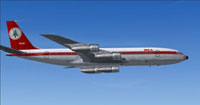
Visual depiction of the repainted Boeing 707 at cruising altitude.
Free for all simmers · 1.64 MB · Scanned clean Oct 2026
Download speed: Free tier is capped at 0.5 Mbps. PRO members download at full line speed.
FS9\Aircraft\, FS9\Addon Scenery\, FS9\Gauges\, or FS9\Effects\.readme.txt or README file. It tells you exactly where files go, what dependencies are needed, and any quirks specific to this add-on.The archive 707mea96.zip has 16 files and directories contained within it.
This list displays the first 500 files in the package. If the package has more, you will need to download it to view them.
| Filename/Directory | File Date | File Size |
|---|---|---|
| Read Me.txt | 11.30.04 | 1.30 kB |
| Thumbs.db | 11.30.04 | 6.50 kB |
| GCS0003.jpg | 11.30.04 | 13.50 kB |
| B707 MEA 1996 | 11.23.04 | 0 B |
| description.txt | 11.30.04 | 202 B |
| Thumbs.db | 11.30.04 | 10.00 kB |
| b707_4_t.bmp | 11.29.04 | 1.00 MB |
| b707_3_t.bmp | 11.29.04 | 1.00 MB |
| b707_b1_t.bmp | 11.30.04 | 1.00 MB |
| b707_b2_t.bmp | 11.30.04 | 1.00 MB |
| b707_b5_t.bmp | 11.30.04 | 1.00 MB |
| b707_b6_t.bmp | 11.30.04 | 1.00 MB |
| GCS0003.jpg | 11.30.04 | 13.50 kB |
| B707 MEA 1996 | 11.30.04 | 0 B |
| flyawaysimulation.txt | 10.29.13 | 959 B |
| Go to Fly Away Simulation.url | 01.22.16 | 52 B |
Only PRO members can place votes.
More FS2004 add-ons hand-picked based on this download.
FS2004 Civil Jet Aircraft
Experience the timeless charm of a classic Boeing 747-2B4B in the iconic Midd…
 FS2004 Civil Jet Aircraft
FS2004 Boeing 707-320. SkyHigh is proud to present their all new 707-320 prod…
 FS2004 Civil Jet Aircraft
For AI traffic. The 707-420 was a version of the Boeing 707 powered by Rolls …
 FS2004 Civil Jet Aircraft
Modified Boeing 707-436 BOAC Pack. By William Mac Kalon Junior Jeffries. Scre…
 FS2004 Civil Jet Aircraft
Original by Lou Voulland. Repaint by Hugo & Antonia Espinosa.
 FS2004 Civil Jet Aircraft
AI friendly Gmax model; panel and sounds included. Fuel dump and refuel gauge…
 FS2004 Civil Jet Aircraft
Old livery model. AI friendly Gmax model with panel and sounds included. Fuel…
 FS2004 Civil Jet Aircraft
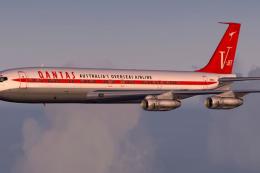
A repaint of the Captain Sim Legendary Boeing 707 in Qantas V-Jet colors. Thi…
Be the first to leave a comment on this download.
Be the first to share your thoughts on this download.