

 FS2004 Civil Jet Aircraft
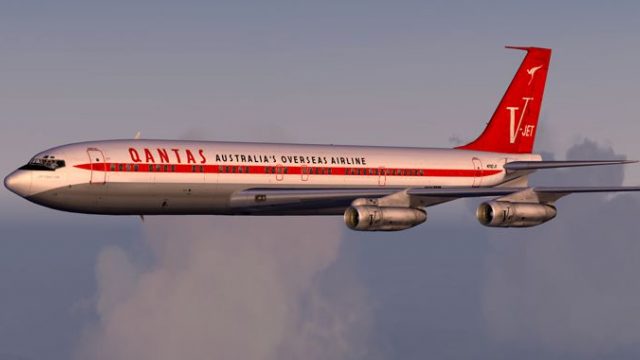
John Travolta's 707-138B "Jett Clipper Ella"
707-138B "Jett Clipper Ella" John Travolta's private toy! These are textures …
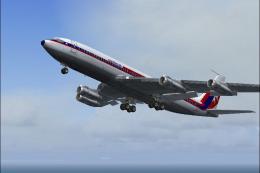
John Travolta’s Qantas V-Jet Boeing 707 livery for the Captain Sim Legendary 707 captures the 2002 Spirit of Friendship tour scheme with refreshed night lighting textures for cleaner after-dark flying in FS2004. Includes a complete, stand-alone texture set and works with Texture and Config Editor workflows; requires the Captain Sim 707 base aircraft.
 Rate
Rate
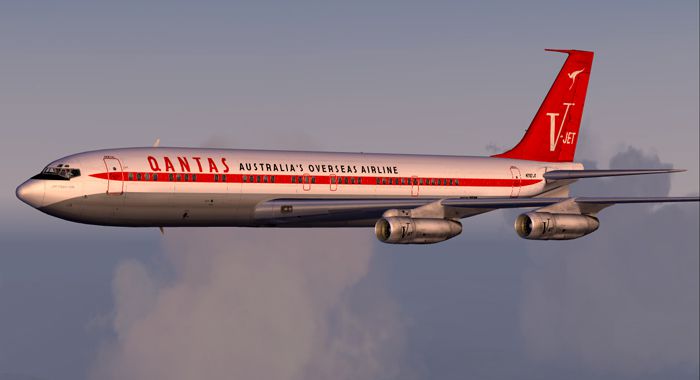
A repaint of the Captain Sim Legendary Boeing 707 in Qantas V-Jet colors. This represents John Travolta's 707 as painted for the 2002 Spirit of Friendship tour. Updated to fix the night textures. This is a full stand alone updated copy of the original repaint. TCE compliant or overwrite existing repaint. Textures only, by Ed Knapp.
Screenshot of Travolta Boeing 707 in flight.
If you have the orginal Travolta repaint already installed you can copy the files in "qan2ek" to the texture folder in FS9 for that repaint. The TCE numbers the added texture folders when you add new repaints, so the orginal Travolta repaint would be in a numbered texture folder. Check the aircraft.cfg file to see which texture folder the Travolta repaint is in.
Or you can uninstall the orginal and then install the update with TCE.
Installation using the Texture and Config Editor (TCE).
Free for all simmers · 1.08 MB · Scanned clean Oct 2026
Download speed: Free tier is capped at 0.5 Mbps. PRO members download at full line speed.
FS9\Aircraft\, FS9\Addon Scenery\, FS9\Gauges\, or FS9\Effects\.readme.txt or README file. It tells you exactly where files go, what dependencies are needed, and any quirks specific to this add-on.The archive qantasek.zip has 15 files and directories contained within it.
This list displays the first 500 files in the package. If the package has more, you will need to download it to view them.
| Filename/Directory | File Date | File Size |
|---|---|---|
| read me.txt | 10.06.04 | 1.39 kB |
| b707_1_L.BMP | 10.05.04 | 1.00 MB |
| b707_2_L.BMP | 10.05.04 | 1.00 MB |
| b707_a1_t.BMP | 10.05.04 | 1.00 MB |
| b707_a2_t.BMP | 10.04.04 | 1.00 MB |
| b707_a5_t.BMP | 10.04.04 | 1.00 MB |
| b707_a6_t.BMP | 09.30.04 | 1.00 MB |
| description.txt | 10.05.04 | 386 B |
| qan02ek.jpg | 10.04.04 | 14.61 kB |
| qan2ek | 10.06.04 | 0 B |
| File_id.diz | 10.07.04 | 381 B |
| qan02.gif | 10.04.04 | 8.17 kB |
| qan02.jpg | 10.04.04 | 93.04 kB |
| flyawaysimulation.txt | 10.29.13 | 959 B |
| Go to Fly Away Simulation.url | 01.22.16 | 52 B |
Only PRO members can place votes.
More FS2004 add-ons hand-picked based on this download.
FS2004 Civil Jet Aircraft
707-138B "Jett Clipper Ella" John Travolta's private toy! These are textures …
 FS2004 Civil Jet Aircraft
ADV Update, for use with AM7073AD.ZIP. Fixes the Maltese cross on the tail. B…
 FS2004 Civil Jet Aircraft
FS2004 Boeing 707-320. SkyHigh is proud to present their all new 707-320 prod…
 FS2004 Civil Jet Aircraft
For AI traffic. The 707-420 was a version of the Boeing 707 powered by Rolls …
 FS2004 Civil Jet Aircraft
Modified Boeing 707-436 BOAC Pack. By William Mac Kalon Junior Jeffries. Scre…
 FS2004 Civil Jet Aircraft
Original by Lou Voulland. Repaint by Hugo & Antonia Espinosa.
 FS2004 Civil Jet Aircraft
AI friendly Gmax model; panel and sounds included. Fuel dump and refuel gauge…
 FS2004 Civil Jet Aircraft
Old livery model. AI friendly Gmax model with panel and sounds included. Fuel…
Be the first to leave a comment on this download.
Be the first to share your thoughts on this download.