

 FS2004 Civil Jet Aircraft
Gmax Source Code For Boeing 707-420
For Boeing 707-420 visual model (B707-436.ZIP). By George Carty, modified fro…
Pan Am Boeing 707-420 AI traffic brings classic jetliner ambience to FS2004, featuring the Conway-powered variant with the taller fin and ventral strake introduced for CAA certification. Optimized for airline schedules and airport operations, it delivers authentic period presence and smooth performance, with model work by Hans Hermansson and Rok Dolenec.
 Rate
Rate
For AI traffic. The 707-420 was a version of the Boeing 707 powered by Rolls Royce Conway engines. Due to CAA certification requirements a tall vertical tail and ventral fin were introduced. By Hans Hermansson and Rok Dolenec.

Screenshot of Pan Am Boeing 707-420 on the ground.
[fltsim.0]

	title = Boeing 707-436 PAN AM

	sim=Boeing737-400

	model =

	panel =

	sound =

	texture =pan

	kb_checklists = Boeing707-420_check

	kb_reference = Boeing707-420_ref

	atc_id =0098

	atc_id_color =0xffffffff

	atc_parking_types =GATE

	atc_parking_code =

	ui_manufacturer = 707-420

	ui_type = 707-420

	ui_variation = PANAM

	description = The 707-420 was a version of the Boeing 707 powered by Rolls Royce Conway engines. Due to CAA certification requirements a tall vertical tail and ventral fin were introduced.

	atc_airline=PAN AM
Free for all simmers · 793 KB · Scanned clean Oct 2026
Download speed: Free tier is capped at 0.5 Mbps. PRO members download at full line speed.
FS9\Aircraft\, FS9\Addon Scenery\, FS9\Gauges\, or FS9\Effects\.readme.txt or README file. It tells you exactly where files go, what dependencies are needed, and any quirks specific to this add-on.The archive b707_420.zip has 14 files and directories contained within it.
This list displays the first 500 files in the package. If the package has more, you will need to download it to view them.
| Filename/Directory | File Date | File Size |
|---|---|---|
| B707_420 | 11.11.04 | 0 B |
| Aircraft.cfg | 11.29.04 | 9.38 kB |
| Boeing737-400.air | 06.13.03 | 8.69 kB |
| model | 11.08.04 | 0 B |
| b707-420.mdl | 11.08.04 | 580.15 kB |
| b707-420.mdl_BACKUP | 10.06.04 | 580.15 kB |
| Model.cfg | 09.11.04 | 27 B |
| panel | 11.08.04 | 0 B |
| panel.cfg | 09.16.00 | 44 B |
| texture.pan | 11.28.04 | 0 B |
| b707_420_L.bmp | 11.08.04 | 1.33 MB |
| b707_420_T.bmp | 11.28.04 | 1.33 MB |
| flyawaysimulation.txt | 10.29.13 | 959 B |
| Go to Fly Away Simulation.url | 01.22.16 | 52 B |
Only PRO members can place votes.
More FS2004 add-ons hand-picked based on this download.
FS2004 Civil Jet Aircraft
For Boeing 707-420 visual model (B707-436.ZIP). By George Carty, modified fro…
 FS2004 Civil Jet Aircraft
This freeware release introduces a meticulously reworked rendition of the Boe…
 FS2004 Civil Jet Aircraft
A repaint for Project Open Sky's B747-200 in Pan American's old colors. By Ji…
 FS2004 Civil Jet Aircraft
Experience the classic Pan Am Boeing 747-200 in its recognizable billboard pa…
 FS2004 Civil Jet Aircraft
Pan American never owned the B747-400 but this is how it might have looked in…
 FS2004 Civil Jet Aircraft
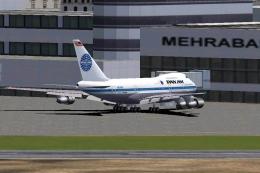
Pan Am Boeing 747 SP "Clipper Young America", registration N533PA, in old and…
 FS2004 Civil Jet Aircraft
This freeware release showcases a Boeing 727-200 carrying a Pan American pain…
 FS2004 Civil Jet Aircraft
This complete freeware package showcases a meticulously detailed Boeing 727-2…
Read what other simmers think, or add your own.

How do you install this? I've tried copying the main file into my Simobjects/Airplanes directory, but it doesn't show up in game.