

 FS2004 Civil Jet Aircraft
SMS Overland VASP MD-11
This freeware repaint showcases a VASP livery for the Overland SMS McDonnell …
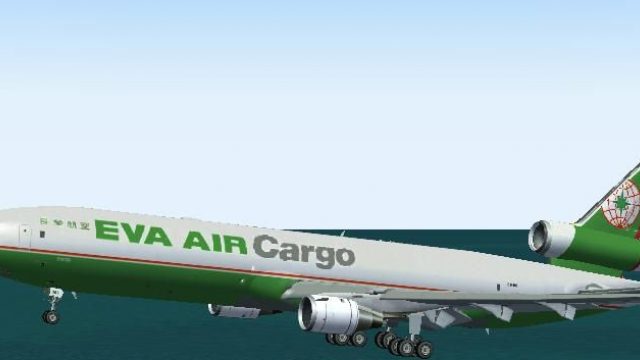
EVA Air Cargo’s distinctive tri-jet look comes alive on the SMS Overland MD-11 with crisp fuselage markings, tail logos, and carefully matched metallic and painted surfaces for authentic freight operations. Built for Microsoft Flight Simulator 2004, it requires the freeware SMS Overland MD-11 v2.0 base package with virtual cockpit.
 Rate
Rate
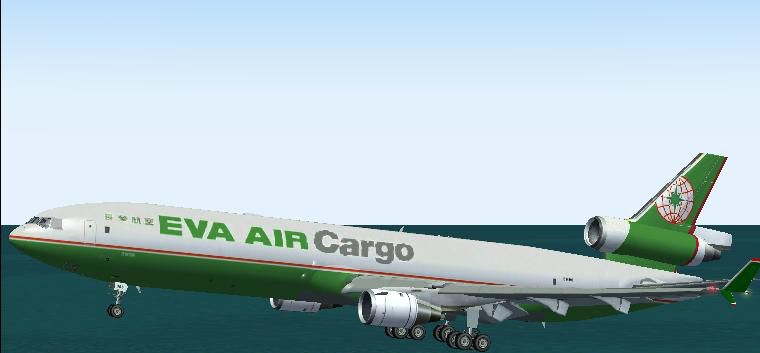
This repaint set brings EVA AIR Cargo’s distinctive livery to the SMS Overland MD-11 for Microsoft Flight Simulator 2004. Created by Jim Waters, this package contains only texture files designed to integrate seamlessly with the existing freeware SMS Overland MD-11 version 2.0 (which includes the Virtual Cockpit). It requires that you already have the base MD-11 installed. Readers should note that the original model can be found within the Fly Away Simulation file library.
This repaint accurately reflects EVA AIR Cargo’s familiar tri-jet operations. EVA AIR Cargo, operated by Taiwan-based EVA Air, has a longstanding history of global freight transport employing various widebody aircraft. The MD-11’s roomy cargo hold and reliable long-range performance make it ideal for heavy-haul routes. To replicate these real-world visuals, Jim Waters meticulously crafted the fuselage markings, tail logos, and other airline-specific details. The refined textures capture both the metallic and painted surfaces that are characteristic of the MD-11’s design.
Screenshot of SMS Overland EVA AIR Cargo MD-11 in flight.
Before integrating these textures, ensure the base aircraft model is already present. Specifically, you must have the SMS Overland MD-11 version 2.0 with Virtual Cockpit installed.
texture folder with the new ones, allowing the prompt to overwrite as necessary.texture folder inside the MD-11 directory, rename it (for example, Texture.EVA-cargo), and then paste the provided texture files into this new location.To finalize the process, append a new entry in aircraft.cfg. Assign the next sequential fltsim number and match the texture folder name accordingly. For reference, see the sample block below, which can be tailored to your specific configuration:
[fltsim.X]
title=FSP Advanced Products MD-11 EVA AIR Cargo
sim=md11
model=vc
panel=
sound=
texture=EVA
atc_id=EVA
atc_airline=EVA AIR CARGO
atc_flight_number=922
ui_manufacturer=Boeing/McDonnell-Douglas
ui_type=McDonnell Douglas MD-11
ui_variation=EVA Air Cargo V2 No VC
description=Overland Co.,Ltd. Products --- McDonnell Douglas MD-11

L1 L2 Cabin Door [Shift+E] then [1]
Cargo Door [Shift+E] then [2]
L4/R4 Cabin Door Wing Fold/Extend
Replace “X” with the next available index. If your aircraft collection already has one entry, you would use [fltsim.1] for your new lines. Make sure the texture=EVA parameter matches the folder name you used.
This addition enriches any virtual cargo fleet by simulating EVA AIR Cargo’s global logistics service. The detail level is high, and once applied, it accurately portrays the tri-engine MD-11 in classic EVA AIR Cargo fashion.
Free for all simmers · 2.16 MB · Scanned clean Oct 2026
Download speed: Free tier is capped at 0.5 Mbps. PRO members download at full line speed.
FS9\Aircraft\, FS9\Addon Scenery\, FS9\Gauges\, or FS9\Effects\.readme.txt or README file. It tells you exactly where files go, what dependencies are needed, and any quirks specific to this add-on.The archive sms11eva.zip has 14 files and directories contained within it.
This list displays the first 500 files in the package. If the package has more, you will need to download it to view them.
| Filename/Directory | File Date | File Size |
|---|---|---|
| file_id.diz | 12.08.04 | 90 B |
| pic.JPG | 12.08.04 | 23.15 kB |
| readme.txt | 12.08.04 | 1.68 kB |
| TEXTURE.EVA | 12.08.04 | 0 B |
| fspap_md11fuseL_l.bmp | 12.08.04 | 1.33 MB |
| fspap_md11fuseL_t.bmp | 12.08.04 | 1.33 MB |
| fspap_md11fuseR_l.bmp | 12.08.04 | 1.33 MB |
| fspap_md11fuseR_t.bmp | 12.08.04 | 1.33 MB |
| fspap_md11tail_t.bmp | 12.08.04 | 1.33 MB |
| fspap_md11wingL_t.bmp | 12.08.04 | 1.33 MB |
| fspap_md11wingR_t.bmp | 12.08.04 | 1.33 MB |
| Thumbs.db | 10.06.04 | 47.50 kB |
| flyawaysimulation.txt | 10.29.13 | 959 B |
| Go to Fly Away Simulation.url | 01.22.16 | 52 B |
Only PRO members can place votes.
More FS2004 add-ons hand-picked based on this download.
FS2004 Civil Jet Aircraft
This freeware repaint showcases a VASP livery for the Overland SMS McDonnell …
 FS2004 Civil Jet Aircraft
V2.0 - United NOC. Textures only - fix right wing and aft right panel. By Jam…
 FS2004 Civil Jet Aircraft
MD-11 with functional virtual cockpit in old Delta colors. Repainted by Jim W…
 FS2004 Civil Jet Aircraft
SMS McDonnell Dougls MD-11 v2 with virtual cockpit, repainted to old Continen…
 FS2004 Civil Jet Aircraft
FSPainter Advanced Products MD-11 Overland Co.,Ltd "Simmer's Sky" base pack. …
 FS2004 Civil Jet Aircraft
Mriya ("Dream"). One of the world's largest and heaviest aircraft. Model by T…
 FS2004 Civil Jet Aircraft
Textures only; requires SMD90.ZIP. Model by Mike Stone. Livery by Garry Kentz…
 FS2004 Civil Jet Aircraft
This complete freeware package showcases EVA Air Cargo’s Boeing 747-45EF/SCD …
Be the first to leave a comment on this download.
Be the first to share your thoughts on this download.