


 FSX Scenery
Tuamotu Archipelago Part A
French Polynesia Tuamotu Archipelago Scenery Part B. This scenery improves th…
Tuamotu Archipelago scenery update restores correct object transparency and runway flattening for French Polynesia islands in Microsoft Flight Simulator X SP2, keeping coastal detail and airport surfaces visually consistent. Designed as a compatibility patch, it requires Tuamotu-X_A (FPTA-XA.ZIP) and Tuamotu-X_B (FPTA-XB.ZIP) for full coverage.
 Rate
Rate
 French Polynesia
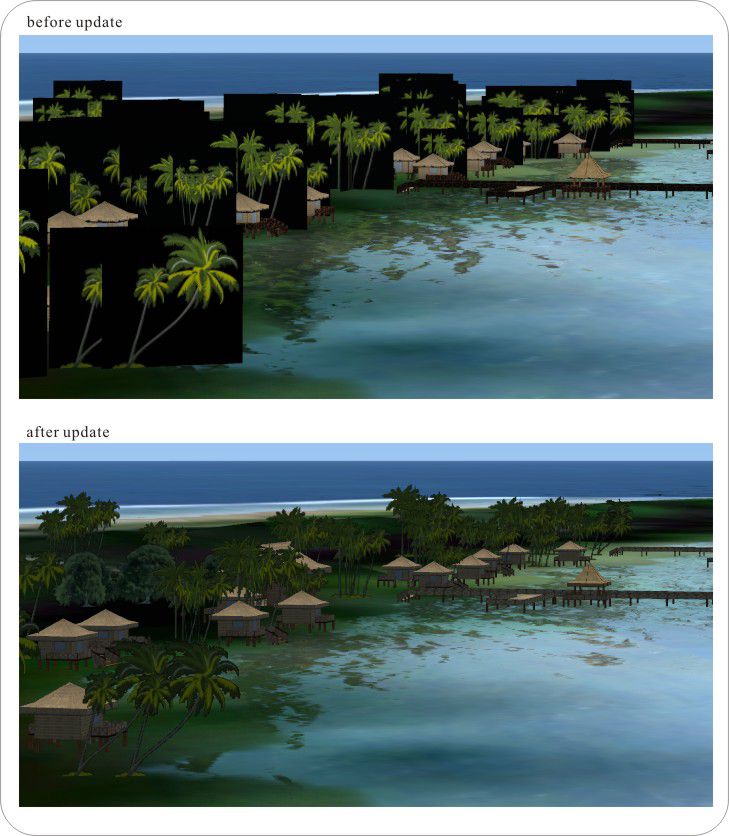
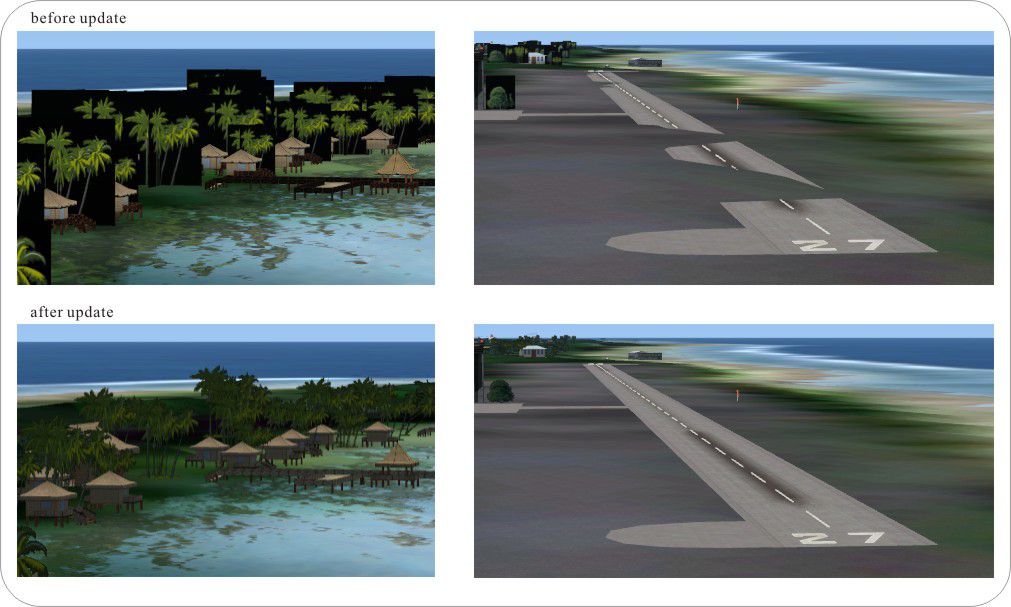
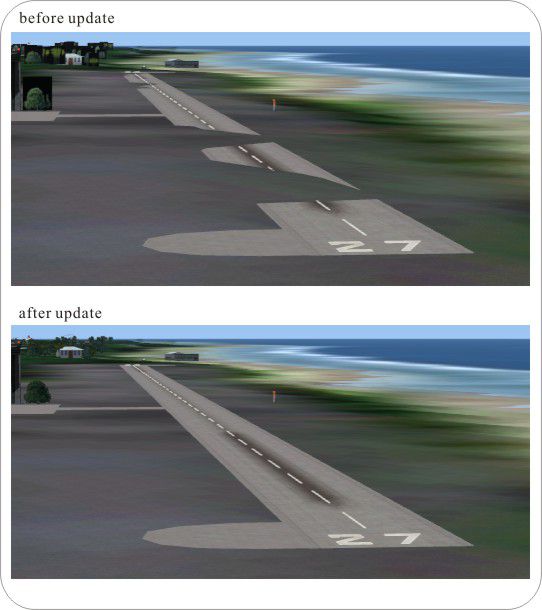
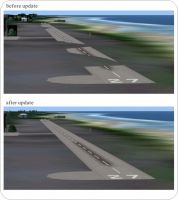
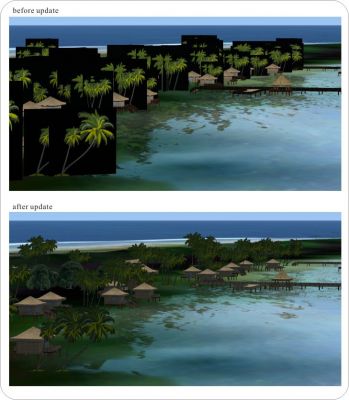
French Polynesia Tuamotu Archipelago Scenery update for SP2. This patch improves the issues introduced by FSX SP2. The issues of the scenery are as follows: 1. The transparency of 3D objects don't work; 2. The flatten of runways doesn't function correctly. This patch requires the Tuamotu-X_A (FPTA-XA.ZIP) and Tuamotu-X_B (FPTA-XB.ZIP). By Kazuo Kawamura.
French Polynesia Tuamotu Scenery.
Note: This patch works in FSX with SP2.
This patch improves the issues introduced by FSX SP2.
The issues of my scenery are as follows:
1. The transparency of 3 objects don' work.
2. The flatten of runways doesn' function correctly.
INSTALLATION:
Tuamotu-X_update_for_FSX_SP2: FILES INCLUDED.
[Tuamotu-X_SP2] - [X_A_sp2] - [X_A_sp2_scenery] - *.bgl scenery files.
- [X_A_sp2_texture] - *.* texture files.
- [X_B_sp2] - [X_B_sp2_scenery] - *.bgl scenery files.
- [X_B_sp2_texture] - *.* texture files.
Tuamotu-X_AtoSP2.bat batch file.
Tuamotu-X_BtoSP2.bat batch file.
Tuamotu-X_update_for_FSX_SP2.html document file (html).
Tuamotu-X_update_for_FSX_SP2.txt document file (txt).
[image] image files for html document.
INSTALLATION PROCEDURE:
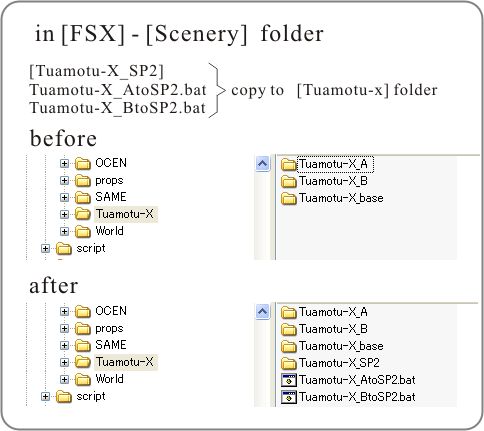
1. Copy [Tuamotu-X_SP2] folder, Tuamotu-X_AtoSP2.bat and Tuamotu-X_BtoSP2.bat to [Tuamotu-] folder.
===like this===
[FSX] - [Scenery] - [Tuamotu-] - [Tuamotu-X_A] <- previous folder
- [Tuamotu-X_B] <- previous folder
- [Tuamotu-X_base] <- previous folder
- [Tuamotu-X_SP2] <- new folder
- Tuamotu-X_AtoSP2.bat <- new file
- Tuamotu-X_BtoSP2.bat <- new file
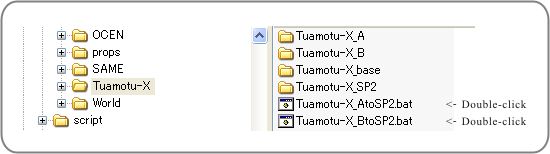
2. Double-click the Tuamotu-X_AtoSP2.bat. This batch file is operated as follows.
It makes [BackUp] folders into [Tuamotu-X_A]-[Scenery] and [Tuamotu-X_A]-[Texture] folders.
The files that became unnecessary because of this update are moved to the [BackUp] folder.
Then, new files are copied from [Tuamotu-X_SP2] folder to [Tuamotu-X_A]-[Scenery] and [Tuamotu-X_A]-[Texture] folders.
3. Double-click the Tuamotu-X_BtoSP2.bat the same.
Now...
[Tuamotu-X_A] - [Scenery] <- total 143 objects
- [Texture] <- total 28 objects
[Tuamotu-X_B] - [Scenery] <- total 160 objects
- [Texture] <- total 26 objects
4. That' all. The update was completed.
DISCLAIMER
Accept absolutely no responsibility for any problems arising from use of this scenery. This includes any hardware or software problems. If you can not accept it, do not use this scenery.
SPECIAL THANKS:
Mr. Kamui and Mr. Porco
ACKNOWLEDGMENTS:
Coast-Line-Maker ver2.1.1 Iain Murray
AFCAD2 ver2.21 Lee Swordy
SCASM ver2.90 Manfred Moldenhauer
DP-JAM ver1.1.0.1 Masakazu Irie
Flight Simulator SDK SP2 Microsoft
SBuilder ver.3.0.0.0 PTSIM
SceneGenX ver.1.1.0.100 Tom Hiscox
gmax ver.1.2 discreet
Thanks wonderfull tools!!!
Kazuo Kawamura.
French Polynesia Tuamotu Scenery.
Free for all simmers · 1.41 MB · Scanned clean Oct 2026
Download speed: Free tier is capped at 0.5 Mbps. PRO members download at full line speed.
This add-on may require the following files to function properly. If this is a repaint, the dependency below is likely the base aircraft package.
FSX\Addon Scenery\ containing scenery and texture sub-folders.readme.txt or README file. It tells you exactly where files go, what dependencies are needed, and any quirks specific to this add-on.Use these coordinates to fly directly to this location once the mod is installed.
-16.30000000,-145.60000000
Launch FSX or Prepar3D and use Flights → Load to open the downloaded .pln file. Your aircraft will be positioned at this location.
The archive fpta-sp2.zip has 130 files and directories contained within it.
This list displays the first 500 files in the package. If the package has more, you will need to download it to view them.
| Filename/Directory | File Date | File Size |
|---|---|---|
| Tuamotu-X_update_for_FSX_SP2.txt | 01.26.08 | 3.89 kB |
| sp2_flatten.jpg | 01.26.08 | 52.04 kB |
| sp2_transparency.jpg | 01.26.08 | 121.46 kB |
| sp2_transparency_flatten.jpg | 01.26.08 | 114.58 kB |
| sp2_tutorial01.gif | 01.26.08 | 20.33 kB |
| sp2_tutorial02.gif | 01.26.08 | 7.88 kB |
| image | 01.26.08 | 0 B |
| X_A_sp2 | 01.24.08 | 0 B |
| X_A_sp2_scenery | 01.24.08 | 0 B |
| 2k7Ahe_3D_sp2.BGL | 01.23.08 | 4.37 kB |
| 2k7Ahe_tree_sp2.BGL | 01.20.08 | 48.64 kB |
| 2k7Apataki_tree_sp2.BGL | 01.20.08 | 43.50 kB |
| 2k7Aratika_tree_sp2.BGL | 01.20.08 | 42.75 kB |
| 2k7Arutua_tree_sp2.BGL | 01.20.08 | 51.43 kB |
| 2k7Fakarava_tree_sp2.BGL | 01.20.08 | 42.43 kB |
| 2k7Kauehi_tree_sp2.BGL | 01.20.08 | 51.68 kB |
| 2k7Kaukura_3D_sp2.BGL | 01.23.08 | 10.20 kB |
| 2k7Kaukura_tree_sp2.BGL | 01.20.08 | 44.93 kB |
| 2k7Manihi_tree_sp2.BGL | 01.20.08 | 47.87 kB |
| 2k7Mataiva_3D_sp2.BGL | 01.23.08 | 33.73 kB |
| 2k7Mataiva_tree_sp2.BGL | 01.20.08 | 60.25 kB |
| 2k7Rangiroa_Airport_3D_sp2.BGL | 01.23.08 | 20.26 kB |
| 2k7Rangiroa_Airport_tree_sp2.BGL | 01.21.08 | 27.75 kB |
| 2k7Rangiroa_Avatoru_3D_sp2.BGL | 01.23.08 | 70.57 kB |
| 2k7Rangiroa_Avatoru_tree_sp2.BGL | 01.20.08 | 38.06 kB |
| 2k7Rangiroa_Kiaora_mod_3D_sp2.BGL | 01.23.08 | 287.21 kB |
| 2k7Rangiroa_Kiaora_mod_tree_sp2.BGL | 01.20.08 | 36.62 kB |
| 2k7Rangiroa_Kiaora_MyFam_sp2.BGL | 01.21.08 | 6.18 kB |
| 2k7Rangiroa_Motu0_tree_sp2.BGL | 01.21.08 | 42.37 kB |
| 2k7Rangiroa_Motu3_mod_3D_sp2.BGL | 01.23.08 | 9.92 kB |
| 2k7Rangiroa_Motu3_mod_tree_sp2.BGL | 01.20.08 | 44.25 kB |
| 2k7Rangiroa_Raira_3D_sp2.BGL | 01.23.08 | 54.02 kB |
| 2k7Rangiroa_Raira_tree_sp2.BGL | 01.20.08 | 34.18 kB |
| 2k7Rangiroa_Sauvage_3D_sp2.BGL | 01.23.08 | 72.47 kB |
| 2k7Rangiroa_Sauvage_tree_sp2.BGL | 01.20.08 | 36.37 kB |
| 2k7Rangiroa_Tipta_3D_sp2.BGL | 01.23.08 | 62.01 kB |
| 2k7Rangiroa_Tiputa_tree_sp2.BGL | 01.20.08 | 35.75 kB |
| 2k7Rangiroa_Yacht_Motu_mod_3D_sp2.BGL | 01.23.08 | 9.92 kB |
| 2k7Rangiroa_Yacht_Motu_mod_tree_sp2.BGL | 01.20.08 | 44.25 kB |
| 2k7Takapoto_ap_3D_sp2.BGL | 01.23.08 | 4.37 kB |
| 2k7Takapoto_tree_sp2.BGL | 01.20.08 | 45.81 kB |
| 2k7Takaroa_ap_3D_sp2.BGL | 01.23.08 | 10.20 kB |
| 2k7Takaroa_tree_sp2.BGL | 01.20.08 | 42.62 kB |
| 2k7Tikehau_ap_3D_sp2.BGL | 01.21.08 | 4.37 kB |
| 2k7Tikehau_tree_sp2.BGL | 01.20.08 | 58.14 kB |
| CVX_2k7Apataki_flatten.BGL | 01.23.08 | 265 B |
| CVX_2k7Fakarava_flatten.BGL | 01.23.08 | 247 B |
| CVX_2k7Kaukura_flatten.BGL | 01.23.08 | 254 B |
| CVX_2k7Rangiroa_flatten.BGL | 01.21.08 | 412 B |
| CVX_2k7Takapoto_flatten.BGL | 01.21.08 | 237 B |
| CVX_2k7Takaroa_flatten.BGL | 01.23.08 | 247 B |
| CVX_2k7Tikehau_flatten.BGL | 01.21.08 | 262 B |
| CVX_Arutua_flatten.BGL | 01.23.08 | 244 B |
| X_A_sp2_texture | 01.24.08 | 0 B |
| MyFamily1.dds | 01.20.08 | 42.80 kB |
| MyFamily2.dds | 01.20.08 | 42.80 kB |
| RanH1.bmp | 01.19.08 | 65.05 kB |
| RanH12c.bmp | 01.20.08 | 65.05 kB |
| RanH12d.bmp | 01.20.08 | 65.05 kB |
| RanH12e.bmp | 01.20.08 | 65.05 kB |
| RanH2.bmp | 01.19.08 | 65.05 kB |
| RanH27.bmp | 01.20.08 | 65.05 kB |
| RanH27a.bmp | 01.20.08 | 65.05 kB |
| RanH4.bmp | 01.20.08 | 65.05 kB |
| RanH5.bmp | 01.20.08 | 65.05 kB |
| RanP1.dds | 01.06.08 | 42.80 kB |
| RanP1G.dds | 01.18.08 | 42.80 kB |
| RanP2G.dds | 01.18.08 | 42.80 kB |
| RanP3G.dds | 01.18.08 | 42.80 kB |
| RanT1G.dds | 01.18.08 | 42.80 kB |
| RanT2G.dds | 01.17.08 | 42.80 kB |
| RanT3aG.dds | 01.20.08 | 42.80 kB |
| RanT5G.dds | 01.18.08 | 42.80 kB |
| RanT6G.dds | 01.18.08 | 42.80 kB |
| RaS1a.bmp | 01.19.08 | 65.05 kB |
| X_B_sp2 | 01.24.08 | 0 B |
| X_B_sp2_scenery | 01.24.08 | 0 B |
| 2k7Anaa_tree_sp2.BGL | 01.20.08 | 39.56 kB |
| 2k7Faaite_tree_sp2.BGL | 01.20.08 | 48.06 kB |
| 2k7Fakahina_tree_sp2.BGL | 01.20.08 | 48.81 kB |
| 2k7Fangatau_tree_sp2.BGL | 01.20.08 | 43.01 kB |
| 2k7Hao_tree_sp2.BGL | 01.20.08 | 41.18 kB |
| 2k7Hikueru_tree_sp2.BGL | 01.20.08 | 38.68 kB |
| 2k7Katiu_tree_sp2.BGL | 01.20.08 | 48.93 kB |
| 2k7Makemo_tree_sp2.BGL | 01.20.08 | 42.06 kB |
| 2k7Napuka_tree_sp2.BGL | 01.20.08 | 39.93 kB |
| 2k7Nukutavake_tree_sp2.BGL | 01.20.08 | 46.75 kB |
| 2k7Takaroa_3D_sp2.BGL | 01.21.08 | 10.20 kB |
| 2k7Takume_ap_3D_sp2.BGL | 01.21.08 | 11.97 kB |
| 2k7Takume_tree_sp2.BGL | 01.20.08 | 52.07 kB |
| 2k7Tikehau_ap_3D_sp2.BGL | 01.23.08 | 4.37 kB |
| 2k7Vahitahi_ap_3D_sp2.BGL | 01.23.08 | 4.37 kB |
| 2k7Vahitahi_tree_sp2.BGL | 01.20.08 | 40.93 kB |
| CVX_2k7Faaite_flatten.BGL | 01.21.08 | 269 B |
| CVX_2k7Fakahina_flatten.BGL | 01.23.08 | 247 B |
| CVX_2k7Hikueru_flatten.BGL | 01.23.08 | 251 B |
| CVX_2k7Makemo_flatten.BGL | 01.23.08 | 251 B |
| CVX_2k7Napuka_flatten.BGL | 01.23.08 | 248 B |
| CVX_2k7Nukutavake_flatten.BGL | 01.23.08 | 254 B |
| CVX_2k7Takume_flatten.BGL | 01.23.08 | 404 B |
| CVX_2k7Vahitahi_flatten.BGL | 01.23.08 | 251 B |
| CVX_Anaa_flatten.BGL | 01.21.08 | 265 B |
| X_B_sp2_texture | 01.24.08 | 0 B |
| RanH1.bmp | 01.19.08 | 65.05 kB |
| RanH12c.bmp | 01.20.08 | 65.05 kB |
| RanH12d.bmp | 01.20.08 | 65.05 kB |
| RanH12e.bmp | 01.20.08 | 65.05 kB |
| RanH2.bmp | 01.19.08 | 65.05 kB |
| RanH27.bmp | 01.20.08 | 65.05 kB |
| RanH27a.bmp | 01.20.08 | 65.05 kB |
| RanH4.bmp | 01.20.08 | 65.05 kB |
| RanH5.bmp | 01.20.08 | 65.05 kB |
| RanP1.dds | 01.06.08 | 42.80 kB |
| RanP1G.dds | 01.18.08 | 42.80 kB |
| RanP2G.dds | 01.18.08 | 42.80 kB |
| RanP3G.dds | 01.18.08 | 42.80 kB |
| RanT1G.dds | 01.18.08 | 42.80 kB |
| RanT2G.dds | 01.17.08 | 42.80 kB |
| RanT3aG.dds | 01.20.08 | 42.80 kB |
| RanT5G.dds | 01.18.08 | 42.80 kB |
| RanT6G.dds | 01.18.08 | 42.80 kB |
| RaS1a.bmp | 01.19.08 | 65.05 kB |
| Tuamotu-X_SP2 | 01.24.08 | 0 B |
| Tuamotu-X_AtoSP2.bat | 01.24.08 | 3.50 kB |
| Tuamotu-X_BtoSP2.bat | 01.24.08 | 2.58 kB |
| Tuamotu-X_update_for_FSX_SP2.html | 01.26.08 | 6.33 kB |
| File_id.diz | 01.27.08 | 378 B |
| fpta-sp2.gif | 01.27.08 | 15.71 kB |
| flyawaysimulation.txt | 10.29.13 | 959 B |
| Go to Fly Away Simulation.url | 01.22.16 | 52 B |
Only PRO members can place votes.
More FSX & P3D add-ons hand-picked based on this download.
FSX Scenery
French Polynesia Tuamotu Archipelago Scenery Part B. This scenery improves th…
 FSX Scenery
French Polynesia Tuamotu Archipelago Scenery Part B. This scenery improves th…
 FSX Scenery
French Alps Altiports, v2.0. This scenery provides four French altiports with…
 FSX Scenery
Saul French Guyana (SOOS). This place exists! At the very heart of French Guy…
 FSX Scenery
Finding the"Arapaima" A French Expedition scenery and flights. The arapaima, …
 FSX Scenery
Skara Scenery Bonaire X. Flamingo International Airport or Bonaire Internatio…
 FSX Scenery
Iwo Jima Scenery 1945 Update. This is a complete scenery with added effects a…
FSX Scenery
Kjeller Area Scenery X, Norway. Scenery around Kjeller airport with photoreal…
Be the first to leave a comment on this download.
Be the first to share your thoughts on this download.