

 FSX Scenery
NL2000 V4.02 Rotterdam,The Hague Airport
Enhance your simulator’s portrayal of one of the Netherlands’ busiest regiona…
EHBD Kempen Airport (Budel) gets a full visual refresh with accurate building placement, updated ground textures, refined taxiways, apron surfaces, and runway markings for more believable low-altitude GA operations near the Belgium–Netherlands border in Microsoft Flight Simulator X. Seamless modular integration requires the NL2000 v4 series, adding detailed landmarks, fencing, and airport facilities.
 Rate
Rate
 Netherlands
This freeware scenery package completely refines the EHBD Kempen Airport (Budel) area for Microsoft Flight Simulator X, bringing in detailed ground textures, accurate building placements, and intricate elements to reflect the real-world aerodrome environment. It is designed to integrate seamlessly with other modules in the NL2000 v4 series and provides an immersive low-altitude flying experience for general aviation pilots and enthusiasts.
The designers have recreated Kempen Airport (EHBD) with precision-based modeling of hangars, fuel stations, and surrounding structures. They used updated aerial imagery to align taxiways, apron surfaces, and runway markings. Consequently, this freeware add-on offers an opportunity to engage with more authentic flight operations and realistic approach scenarios near the Belgium–Netherlands border.
This package relies on the NL2000 v4.0.20 installer for a seamless setup process. Simply launch the NL2000 installer, select the EHBD Kempen Airport scenery module, and proceed through the normal installation steps. Since NL2000 v4 features a modular system, each area of the Netherlands can be installed, updated, or removed independently, allowing you to tailor the scenery to your desired coverage area.
EHBD Kempen Airport is well-known as a general aviation facility situated in the southern region of the Netherlands. Its runway layout supports a variety of light aircraft operations, and its closeness to international borders makes cross-country flights an appealing option for flight simulation enthusiasts. The location also serves as a training ground for many private pilots, making it a prime spot for single-engine and twin-engine practice flights in the sim.
All elements in this add-on are crafted by The Netherlands 2000 Scenery Design Team, noted for their commitment to high-quality freeware expansions. Their continued dedication enhances the overall realism of Dutch airspace within Flight Simulator, providing aviation aficionados with vivid landscapes and on-ground details throughout the country.
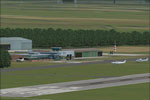
Screenshot of NL2000 V4 EHBD Scenery.
Free for all simmers · 21.22 MB · Scanned clean Oct 2026
Download speed: Free tier is capped at 0.5 Mbps (this file takes approximately 6 mins at the cap). PRO members download at full line speed.
FSX\Addon Scenery\ containing scenery and texture sub-folders.readme.txt or README file. It tells you exactly where files go, what dependencies are needed, and any quirks specific to this add-on.Use these coordinates to fly directly to this location once the mod is installed.
51.26560000,5.60250000
Launch FSX or Prepar3D and use Flights → Load to open the downloaded .pln file. Your aircraft will be positioned at this location.
The archive nl2k_v4_01_ehbd.zip has 8 files and directories contained within it.
This list displays the first 500 files in the package. If the package has more, you will need to download it to view them.
| Filename/Directory | File Date | File Size |
|---|---|---|
| copyright.txt | 05.24.10 | 4.43 kB |
| FILE_ID.DIZ | 05.12.11 | 363 B |
| nl2k_v4.01_ehbd.gif | 05.12.11 | 8.28 kB |
| nl2k_v4.01_ehbd.nl2 | 03.27.11 | 21.23 MB |
| nl2k_v4.01_ehbd.txt | 05.12.11 | 363 B |
| auteursrecht.txt | 05.24.10 | 5.06 kB |
| flyawaysimulation.txt | 10.29.13 | 959 B |
| Go to Fly Away Simulation.url | 01.22.16 | 52 B |
Only PRO members can place votes.
More FSX & P3D add-ons hand-picked based on this download.
FSX Scenery
Enhance your simulator’s portrayal of one of the Netherlands’ busiest regiona…
 FSX Scenery
This comprehensive scenery package brings an authentic representation of Eind…
 FSX Scenery
This free add-on offers a precisely modeled depiction of EHEH Eindhoven Airpo…
 FSX Scenery
Enhance your simulator with this free package dedicated to EHEH (Eindhoven Ai…
 FSX Scenery
This comprehensive package brings an updated rendition of Maastricht Aachen A…
 FSX Scenery
Scenery NL2000 V4.0. This is the NL2000 v4.0 Traffic package for the NL2000 s…
 FSX Scenery
Immerse yourself in a thoroughly revised depiction of Dutch landscapes using …
 FSX Scenery
This package provides a dedicated set of core libraries intended to enhance a…
Be the first to leave a comment on this download.
Be the first to share your thoughts on this download.