

 FS2004 Civil Jet Aircraft
Saudia Lockheed L1011-200 TriStar
This freeware repaint showcases Saudia’s L-1011-200 TriStar in its 1983 liver…
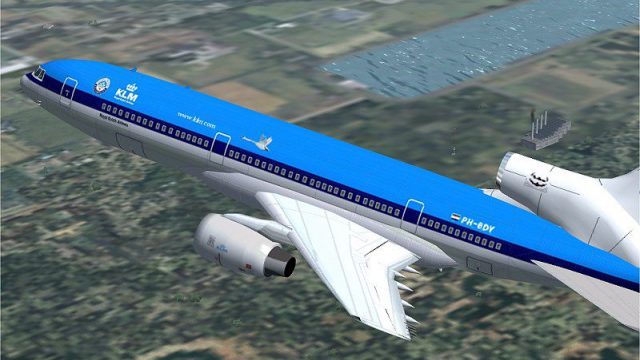
KLM’s iconic blue and bold lettering wrap the Lockheed L-1011 TriStar in a polished fictional repaint for Microsoft Flight Simulator 2004, giving the classic wide-body trijet a fresh, retro-inspired look. The package includes exterior textures plus an updated aircraft.cfg, and requires ADSL1011.ZIP for full compatibility.
 Rate
Rate

This custom repaint places the Lockheed L1011 TriStar in a fictional KLM scheme, reflecting the airline’s characteristic blue and bold lettering in a setting designed for Microsoft Flight Simulator 2004. Despite KLM never operating the TriStar, the visual appeal of this wide-body aircraft in these colors provides a distinctive addition to any virtual hangar. Created by Rey Lopez, this freeware package delivers a fully realized exterior texture and includes an aircraft.cfg update, so additional modifications are not necessary. Below, you will find further details, installation steps, and various notes that cater to experienced flight simulation enthusiasts looking for authenticity in their aircraft library.
The repaint captures the renowned KLM aesthetic by integrating carefully laid-out markings and appropriate airline branding across the fuselage and tail. This layout preserves the fundamental design of the L1011, a trijet recognized for its advanced avionics and distinctive S-duct inlet at the center engine. KLM’s timeless livery, known for its subtle cheatlines and bright palette, is seamlessly carried across the Lockheed frame, giving simmers a pleasing blend of retro style and imaginative realism.
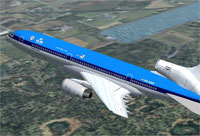
Screenshot of KLM Lockheed L1011 Tristar in flight.
Once the archive is extracted, move its contents directly into your existing ADSL1011 folder. The package installs smoothly into Microsoft Flight Simulator 2004, and no additional mods or complex file adjustments are required. By following this straightforward procedure, you can rapidly get the L1011 repainted in KLM colors airborne.
The Lockheed L1011 TriStar, first introduced in the early 1970s, was renowned for its wide-body cabin, efficient wing design, and cutting-edge flight systems for its time. Rey Lopez’s repaint channels the spirit of KLM Royal Dutch Airlines, the flag carrier of the Netherlands, even though this airline did not include the L1011 in its actual fleet. Through this freeware offering, simmers can enjoy a unique representation of a tri-engine masterpiece wrapped in an iconic KLM exterior. Please note that no modifications are allowed without consent from Rey Lopez, except for additional user-created repaints.
This repaint has undergone thorough flight testing and should integrate flawlessly with most setups. However, be aware that every system is unique, and the developer and creator, Rey Lopez, shall not be held liable for any issues that may arise from its use on individual hardware or software configurations.
Free for all simmers · 1.95 MB · Scanned clean Oct 2026
Download speed: Free tier is capped at 0.5 Mbps. PRO members download at full line speed.
This add-on may require the following files to function properly. If this is a repaint, the dependency below is likely the base aircraft package.
FS9\Aircraft\, FS9\Addon Scenery\, FS9\Gauges\, or FS9\Effects\.readme.txt or README file. It tells you exactly where files go, what dependencies are needed, and any quirks specific to this add-on.The archive texklm.zip has 21 files and directories contained within it.
This list displays the first 500 files in the package. If the package has more, you will need to download it to view them.
| Filename/Directory | File Date | File Size |
|---|---|---|
| Aircraft.cfg | 04.14.04 | 41.74 kB |
| File_id.diz | 04.15.04 | 218 B |
| klm final.jpg | 04.15.04 | 91.32 kB |
| Must_read.txt | 04.04.04 | 1006 B |
| texture.klm | 04.15.04 | 0 B |
| CHROME.bmp | 04.14.04 | 32.07 kB |
| COCKPIT_MISC.bmp | 04.14.04 | 1.00 MB |
| FUSE.bmp | 04.15.04 | 1.00 MB |
| fuse.psp | 04.14.04 | 822.96 kB |
| HOR_STAB.bmp | 04.14.04 | 1.00 MB |
| MISC.bmp | 04.14.04 | 1.00 MB |
| PANEL.bmp | 01.04.04 | 1.00 MB |
| pilot.bmp | 04.14.04 | 65.05 kB |
| pspbrwse.jbf | 04.15.04 | 30.63 kB |
| TIRE.bmp | 04.14.04 | 257.05 kB |
| VERT STAB.psp | 12.29.03 | 148.43 kB |
| WINGS.bmp | 04.14.04 | 1.00 MB |
| WINGS.psp | 12.30.03 | 231.91 kB |
| TEXKLM | 04.15.04 | 0 B |
| flyawaysimulation.txt | 10.29.13 | 959 B |
| Go to Fly Away Simulation.url | 01.22.16 | 52 B |
Only PRO members can place votes.
More FS2004 add-ons hand-picked based on this download.
FS2004 Civil Jet Aircraft
This freeware repaint showcases Saudia’s L-1011-200 TriStar in its 1983 liver…
 FS2004 Civil Jet Aircraft
Textures only for Charles Dayhuff's Lockeed L-1011 TriStar. Paint by Dave Eva…
 FS2004 Civil Jet Aircraft
designed for AI traffic. Designed with FSDS2 by Charles Dayhuff. FDE by Sam C…
 FS2004 Civil Jet Aircraft
Air Transat Lockheed L1011 TriStar. New suggested look for the Air Transat Lo…
 FS2004 Civil Jet Aircraft
A PhotoTex Pro repaint of Mike Stone's L-1011. Requires SL10115.ZIP. Features…
 FS2004 Civil Jet Aircraft
This freeware repaint package offers an accurate depiction of the Lockheed L1…
 FS2004 Civil Jet Aircraft
Repainted by Andrew Jarvis. This is a L-1011-385 Tristar 500 in the colours o…
 FS2004 Civil Jet Aircraft
This freeware package features a set of high-fidelity textures capturing the …
Be the first to leave a comment on this download.
Be the first to share your thoughts on this download.