

 FS2004 Civil Jet Aircraft
Air Pacific Boeing 747-412
A semi-photorealistic repaint of Air Pacific's DQ-FJL Boeing 747-412, adorned…
Air Pacific’s classic livery returns on a Boeing 747-200 repaint tailored for AI traffic, pairing crisp airline branding with an efficient multi-LOD setup for smooth performance at busy hubs. Built for Microsoft Flight Simulator 2004, it requires the freeware AI Aardvark 747-200 PW base model.
 Rate
Rate
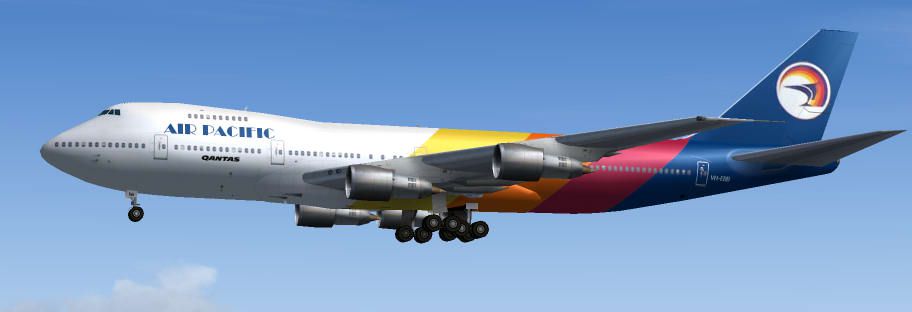
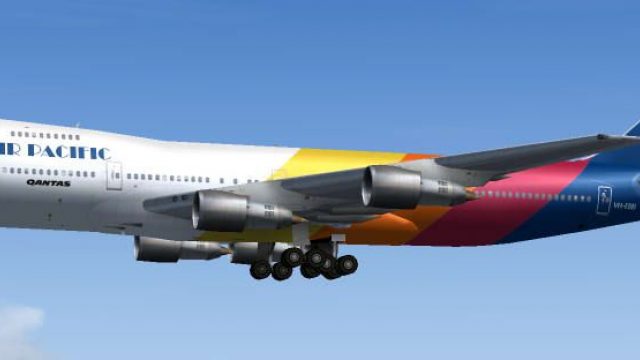
Experience a classic representation of Air Pacific’s old livery on this Boeing 747-200 repaint built specifically for Microsoft Flight Simulator 2004 enthusiasts. Air Pacific once served as Fiji’s flag carrier, and this texture set aims to capture the airline’s original branding with a high level of detail. Created for AI use, this repaint leverages an optimized model to ensure smooth performance at airports while retaining the signature look of this iconic second-generation 747 series aircraft. Model development was headed by AI Aardvark, while the repaint itself was produced by Pantee Farhangi. Before proceeding, remember that this package only offers textures and requires the freeware AI Aardvark Boeing 747-200 PW base model, which is available in the Fly Away Simulation file library.
Aircraft Focus: Boeing 747-200
Airline Background: Air Pacific (older color scheme)
Model Provider: AI Aardvark
Repaint By: Pantee Farhangi
Compatibility: Designed for AI traffic in Microsoft Flight Simulator 2004, with optional files for compatibility in FS2002
Screenshot showing the Air Pacific Boeing 747-200 repaint traveling above the clouds.
If you intend to run these textures in FS2002, refer to the “fs2002fde” folder and substitute the original files (aia_747_200.air and aircraft.cfg) with those optimized for FS2002 flight dynamics.
This Boeing 747-200 repaint and model combination is expressly crafted for non-user-controlled traffic. It implements as many as 16 distinct LOD (Levels of Detail), thereby reducing resource usage when multiple AI aircraft appear simultaneously. Each progressive LOD lowers polygon counts, resulting in improved overall performance without compromising visual fidelity when viewed at close range on taxiways or runways.
LOD-capable add-ons minimize the performance impact by rendering fewer polygons as the aircraft recedes in view. Conversely, many high-polygon Gmax models skip LOD features and can cause noticeable frame rate drops if multiple instances coexist at busy airports.
These flight files strike a balance between smooth AI takeoff and efficient landing behaviors. AIA flight dynamics typically minimize runway occupancy by prompting the aircraft to touch down near the runway threshold and exit briskly, facilitating orderly traffic flow. If you prefer extended landing roll or additional float, you can fine-tune parameters such as cruise lift, parasite drag, or induced drag within the aircraft.cfg file. This adaptability ensures you can synchronize the performance to your preferred AI traffic environment.
This repaint package is wholly freeware. It commemorates a classic Air Pacific scheme while offering a historically significant twist to traffic in Microsoft Flight Simulator 2004. To use it, obtain the necessary freeware base model by AI Aardvark from the Fly Away Simulation library, install everything accordingly, and then enjoy spotting one of aviation’s most recognizable high-capacity transports in your own virtual skies.
Free for all simmers · 277.92 KB · Scanned clean Oct 2026
Download speed: Free tier is capped at 0.5 Mbps. PRO members download at full line speed.
FS9\Aircraft\, FS9\Addon Scenery\, FS9\Gauges\, or FS9\Effects\.readme.txt or README file. It tells you exactly where files go, what dependencies are needed, and any quirks specific to this add-on.The archive ai742pap.zip has 10 files and directories contained within it.
This list displays the first 500 files in the package. If the package has more, you will need to download it to view them.
| Filename/Directory | File Date | File Size |
|---|---|---|
| aia_747_200_pw_airpacific | 11.16.04 | 0 B |
| [flightsim.x].txt | 11.16.04 | 453 B |
| texture.pacific | 11.16.04 | 0 B |
| Thumbs.db | 11.16.04 | 30.00 kB |
| aia_747_200_pw_t.bmp | 11.15.04 | 1.00 MB |
| aia_747_200_pw_l.bmp | 07.18.04 | 1.00 MB |
| AIA 747-200 Air Pacifc (VH-EBB).txt | 11.16.04 | 5.86 kB |
| pacif2.JPG | 11.16.04 | 22.76 kB |
| flyawaysimulation.txt | 10.29.13 | 959 B |
| Go to Fly Away Simulation.url | 01.22.16 | 52 B |
Only PRO members can place votes.
More FS2004 add-ons hand-picked based on this download.
FS2004 Civil Jet Aircraft
A semi-photorealistic repaint of Air Pacific's DQ-FJL Boeing 747-412, adorned…
 FS2004 Civil Jet Aircraft
Original aircraft model by Project Open Sky. Livery by Praveen Pillai and Rog…
 FS2004 Civil Jet Aircraft
Cathay Pacific Boeing 777-200, two FDs into one folder. After unzip you can i…
 FS2004 Civil Jet Aircraft
Textures only for the Kittyhawk B737-200 by Erick Cantu. DXT3 with no mipmaps…
 FS2004 Civil Jet Aircraft
A repaint of Project Open Sky's B757 in Cebu Pacific regular colors. The regi…
 FS2004 Civil Jet Aircraft
This freeware package features a fully integrated Air Pacific Boeing 767-300 …
 FS2004 Civil Jet Aircraft
Air Pacific Boeing 737-700 and -800 (next generation). Includes two complete …
 FS2004 Civil Jet Aircraft
This freeware repaint provides a vivid representation of the Canadia Pacific …
Be the first to leave a comment on this download.
Be the first to share your thoughts on this download.