

 FS2004 Civil Jet Aircraft
KLM Boeing 747-400 Combi
FS2004 KLM Boeing 747-400 Combi GE (new colors), registration PH-BFO. Model b…
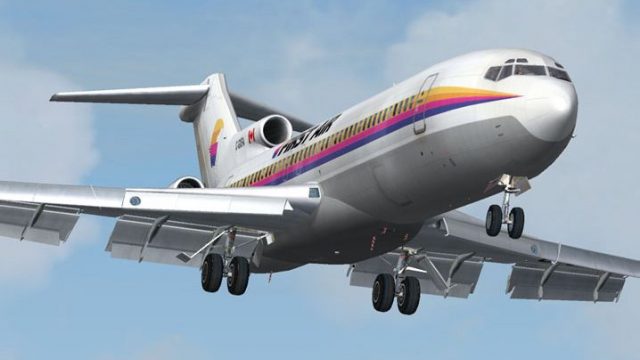
First Air Boeing 727-200 Combi repaint captures C-GCPA’s classic CP Air-era markings with crisp colors, accurate logos, and period-correct registration details, bringing the trijet’s passenger-and-cargo character to life in Microsoft Flight Simulator 2004. It requires the freeware Vistaliners 727-200 base model for full visual fidelity.
 Rate
Rate
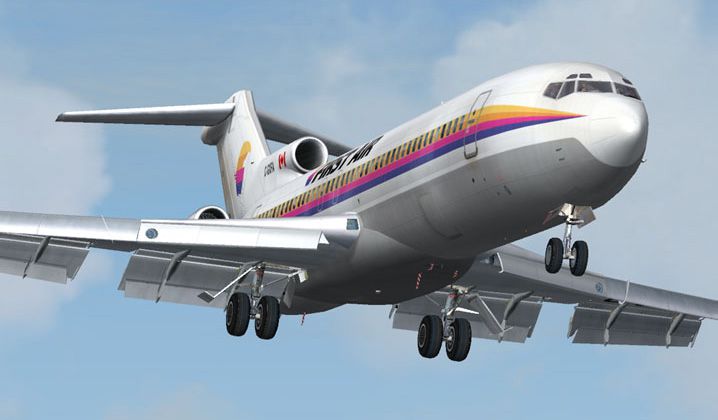
Add a faithful representation of the Boeing 727-200 Combi to your Microsoft Flight Simulator 2004 setup with this free repaint by Frank Idone. This texture set pays detailed attention to markings, colors, and intricate design elements of C-GCPA (line number 45783/128), which originally flew under CP Air. Incorporate the distinctive layout into your simulator’s hangar and experience the classic combination of passenger and cargo capacity that the trijet was famous for.
Boeing’s 727-200 Combi variant merged both passenger seating and cargo capability within one airframe, making it a versatile solution for airlines globally. CP Air, later merging into other Canadian carriers, utilized these advanced medium-range trijets for daily operations, frequently serving northern routes with challenging conditions. The external paint reflects the jet’s unique heritage, featuring correct placement of logos, titling, and registration details.
This repaint requires the freeware Vistaliners base model of the 727-200 (file name B72720VL.ZIP), which is available in the Fly Away Simulation file library. All texture work is presented by Frank Idone, who focused on replicating the CP Air color scheme in high detail. Ensure you have the latest version of the Vistaliners model installed before adding this repaint skin for proper visual fidelity.
Screenshot showcasing the Boeing 727-200 Combi in flight.
Begin by extracting the included texture files to the folder of the Vistaliners 727 within your FS2004 installation. Then, modify the aircraft configuration file by adding the following data block (adjust “[fltsim.XX]” as needed to fit your sequence):
[fltsim.XX]

title=Boeing 727-200 CP Air

sim=B727200_VL

model=

panel=

sound=

texture=cp

atc_id=C-GCPA

atc_heavy=0

atc_flight_number=722

atc_airline=CP Air

ui_manufacturer=Boeing

ui_type=727-200 Adv

ui_variation=CP Air

description=One of the most successful commercial jet airliners ever designed. Production totaled 1,831 aircraft between the early 1960's and 1984.

visual_damage=1

atc_id_color=0x00000000

atc_id_font=Verdana,-11,1,600,0
Free for all simmers · 3.3 MB · Scanned clean Oct 2026
Download speed: Free tier is capped at 0.5 Mbps. PRO members download at full line speed.
This file is a repaint — the package below is the base model it paints onto. Install it first, or the textures will have nothing to load onto.
FS9\Aircraft\, FS9\Addon Scenery\, FS9\Gauges\, or FS9\Effects\.readme.txt or README file. It tells you exactly where files go, what dependencies are needed, and any quirks specific to this add-on.The archive fa722cfi.zip has 13 files and directories contained within it.
This list displays the first 500 files in the package. If the package has more, you will need to download it to view them.
| Filename/Directory | File Date | File Size |
|---|---|---|
| Texture.fa | 11.30.04 | 0 B |
| B727_A_L.BMP | 11.30.04 | 256.07 kB |
| B727_A_T.BMP | 11.30.04 | 4.00 MB |
| B727_B_L.BMP | 11.30.04 | 256.07 kB |
| B727_B_T.BMP | 11.30.04 | 4.00 MB |
| B727_C_L.BMP | 11.17.04 | 256.07 kB |
| B727_C_T.BMP | 11.29.04 | 1.00 MB |
| Install.txt | 11.26.04 | 1.43 kB |
| 727 readme.pdf | 11.17.04 | 223.69 kB |
| file_id.diz | 12.01.04 | 146 B |
| fa.jpg | 12.02.04 | 73.56 kB |
| flyawaysimulation.txt | 10.29.13 | 959 B |
| Go to Fly Away Simulation.url | 01.22.16 | 52 B |
Only PRO members can place votes.
More FS2004 add-ons hand-picked based on this download.
FS2004 Civil Jet Aircraft
FS2004 KLM Boeing 747-400 Combi GE (new colors), registration PH-BFO. Model b…
 FS2004 Civil Jet Aircraft
Model Designer : C. Vincent Cho, Yosuke Ube. Flight Dynamics Designer : Nick …
 FS2004 Civil Jet Aircraft
Surinam Airways Boeing 747-300 Combi (GE engines), registration PZ-TCM. Textu…
 FS2004 Civil Jet Aircraft
Special edition. Textures only. Model by Project Open Sky. Livery by Rene Bru…
 FS2004 Civil Jet Aircraft
Based on photographs. Textures only. Model by AI Aardvark. Livery by Stephen …
 FS2004 Civil Jet Aircraft
Textures only. Model by Project Open Sky. Livery by Cameron Davies. Screensho…
 FS2004 Civil Jet Aircraft
The First Choice Boeing 767-300 freeware package for FS2004 combines a high-q…
 FS2004 Civil Jet Aircraft
(Previously Air 2000). The aircraft is a repainted version of FSPainter's mod…
Be the first to leave a comment on this download.
Be the first to share your thoughts on this download.