

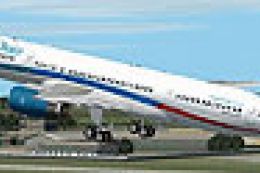
 FS2004 Civil Jet Aircraft
First Choice Airways Boeing 757-200 G-OOBG
Textures only. Model by Project Open Sky. Livery by Cameron Davies. Screensho…
First Choice Boeing 767-300 brings authentic UK holiday-charter traffic to FS2004 using an AI Aardvark widebody model with a crisp A. Rochard repaint. Ten-level LOD optimization keeps busy airports smooth, while AI-tuned flight dynamics improve runway behavior; optional reflective and non-reflective model variants let the livery fit different visual preferences.
 Rate
Rate
The First Choice Boeing 767-300 freeware package for FS2004 combines a high-quality AI Aardvark base model and a precise repaint by A. Rochard, delivering a realistic holiday charter appearance often associated with First Choice’s mid-to-long-haul services. Enthusiasts seeking a reliable AI traffic aircraft that remains efficient and visually appealing in diverse airport scenarios will find this add-on particularly useful.
Model Developer: AI Aardvark
Texture Artist: A. Rochard
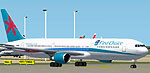
Screenshot of First Choice Boeing 767-300 on the ground.
This virtual rendition of the Boeing 767-300 reflects the capabilities of a wide-body twin-engine jet renowned for efficient holiday flights. First Choice, originating in the United Kingdom, often deployed this iconic twin-aisle design on various transatlantic and leisure routes. Within the simulator, the aircraft is optimized for AI traffic usage. Furthermore, it employs proven 10-level LOD (Levels of Detail) modeling to sustain performance in busy airspace.
The developer integrated multiple LOD models to balance visuals and frame rates effectively. As the jet moves further away, the system replaces higher-polygon models with simpler ones. This ensures smoother performance at crowded gates, especially when multiple 767-300s are active.
AIA_767_300_GE_FCA into your simulator’s aircraft directory.By default, this add-on uses a non-reflective model. If you prefer the reflective variant, open the aircraft.cfg file and adjust the line from model=no_refl to model=reflective. Keep in mind that the packaged texture lacks an explicit reflective channel, so external appearance remains similar with either model.
These custom flight dynamics (sometimes noted as FDE) balance takeoff performance and efficient runway utilization. The aircraft normally touches down near the runway’s threshold and exits promptly, helping manage high-traffic conditions. If you prefer extended landing floats, consider modifying parameters in the aircraft.cfg, such as cruise lift, parasite drag, and induced drag.
AI traffic can significantly reduce simulator frame rates if models lack appropriate LOD or proper flight characteristics. By leveraging consistent flight dynamics and multi-LOD structures, the AI Aardvark 767-300 avoids such performance pitfalls. This design choice helps maintain immersion while showcasing First Choice’s signature paint scheme in the virtual airport environment.
Free for all simmers · 552.96 KB · Scanned clean Oct 2026
Download speed: Free tier is capped at 0.5 Mbps. PRO members download at full line speed.
FS9\Aircraft\, FS9\Addon Scenery\, FS9\Gauges\, or FS9\Effects\.readme.txt or README file. It tells you exactly where files go, what dependencies are needed, and any quirks specific to this add-on.The archive ai763fca.zip has 10 files and directories contained within it.
This list displays the first 500 files in the package. If the package has more, you will need to download it to view them.
| Filename/Directory | File Date | File Size |
|---|---|---|
| texture.firstchoice | 04.23.04 | 0 B |
| aia_767_300_ge_L.bmp | 10.10.03 | 256.07 kB |
| aia_767_300_ge_t.bmp | 04.22.04 | 4.00 MB |
| Thumbs.db | 04.22.04 | 11.50 kB |
| aia_767_300_ge.air | 06.12.03 | 8.69 kB |
| Aircraft.cfg | 04.23.04 | 13.62 kB |
| AIA First Choice 767-300_README.txt | 04.23.04 | 4.64 kB |
| AIA_767_300_GE_FCA | 04.23.04 | 0 B |
| flyawaysimulation.txt | 10.29.13 | 959 B |
| Go to Fly Away Simulation.url | 01.22.16 | 52 B |
Only PRO members can place votes.
More FS2004 add-ons hand-picked based on this download.
FS2004 Civil Jet Aircraft
Textures only. Model by Project Open Sky. Livery by Cameron Davies. Screensho…
 FS2004 Civil Jet Aircraft
(Previously Air 2000). The aircraft is a repainted version of FSPainter's mod…
 FS2004 Civil Jet Aircraft
Add a faithful representation of the Boeing 727-200 Combi to your Microsoft F…
 FS2004 Civil Jet Aircraft
Based on photographs. Textures only. Model by AI Aardvark. Livery by Stephen …
 FS2004 Civil Jet Aircraft
The following download is compatible with Flight Simulator 2004. This downloa…
 FS2004 Civil Jet Aircraft
using iFDG's incredible 767-300 aircraft; registration TF-ARB. This is a very…
 FS2004 Civil Jet Aircraft
This freeware package features a fully integrated Air Pacific Boeing 767-300 …
 FS2004 Civil Jet Aircraft
This enhanced rendition of the iFDG Gmax Boeing 767-300 includes an Aeroflot …
Be the first to leave a comment on this download.
Be the first to share your thoughts on this download.