


 FS2004 Civil Jet Aircraft
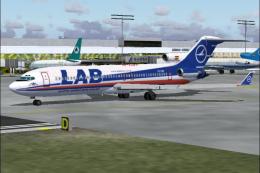
Lloyd Aereo Boliviano Boeing 727-200 CP-1367
Lloyd Aereo Boliviano Boeing 727-200 (new colors), registration CP-1367. Text…
CP Air’s Boeing 727-200 Adv livery recreates the Canadian carrier’s vibrant classic scheme on registration C-GCPA, with crisp tail markings and carefully matched fuselage and wing detailing that suits retro route flying. Designed for Microsoft Flight Simulator 2004, it requires the Vistaliners 727-200 base model package (B72720VL.ZIP).
 Rate
Rate
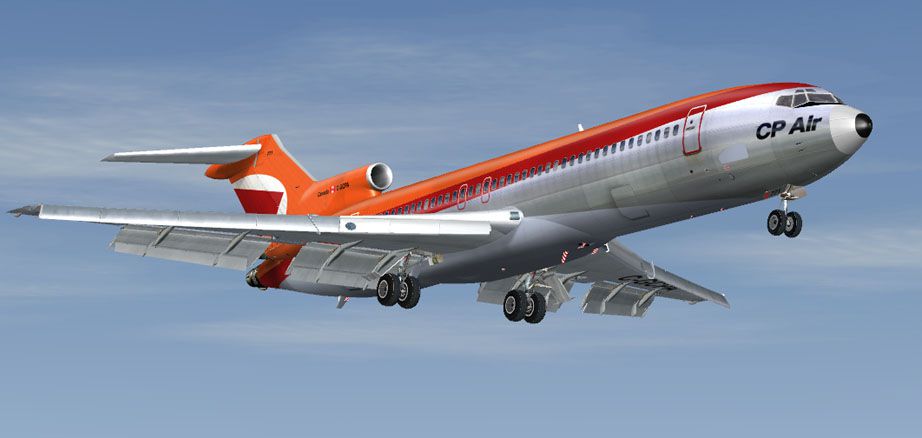
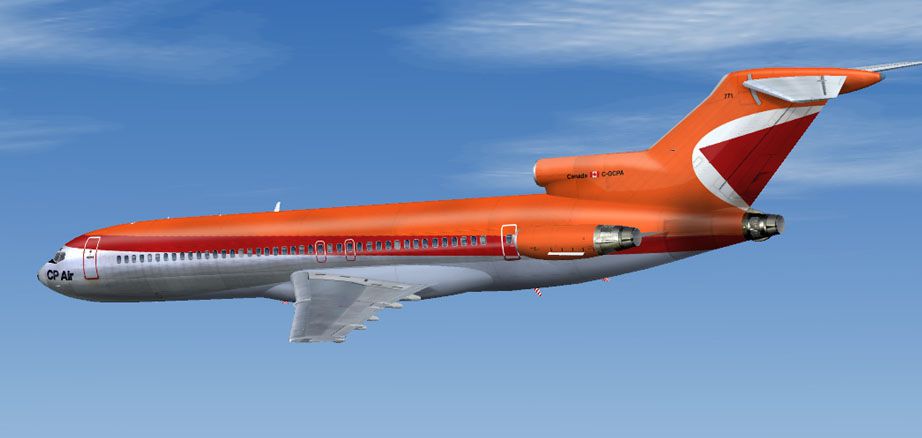
Upgrade your Microsoft Flight Simulator 2004 environment with a carefully crafted CP Air Boeing 727-200 repaint, capturing the notable trijet design and unique styling once flown by this Canadian carrier. Created by developer Frank Idone, these textures bring a historic touch to your collection, reflecting Boeing 727 registration C-GCPA (45783/128) as it appeared during CP Air’s operational era. While originally released as freeware, you will need to download the base Vistaliners package (B72720VL.ZIP) from the Fly Away Simulation mod library separately.
This aircraft repaint accurately represents CP Air’s striking finish, known for its vibrant colors and eye-catching tail markings. Integrated onto the Boeing 727-200 Adv airframe, the textures highlight the trijet’s signature tail-mounted powerplants, which provided exceptional short- to medium-haul performance. Both the wings and fuselage have been carefully detailed to reflect the real-world aesthetic employed by CP Air during the 727’s active service window.

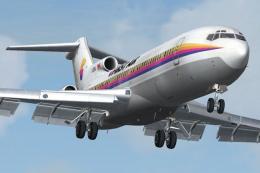
Screenshot of CP Air Boeing 727-200 in flight.
The Boeing 727 family proved extremely popular worldwide, with production approaching 1,831 units before concluding in 1984. CP Air, a prominent Canadian airline, harnessed the 727’s efficiency and robust capabilities on routes connecting major domestic and regional destinations. The narrow-body layout, coupled with three rear-mounted engines, enabled hot-and-high runway operations and dependable flight performance under diverse conditions.
Begin by extracting this repaint directly into the “aircraft” folder within your simulator’s main directory. Make sure you have already installed the freeware base model package from Vistaliners, as these files only include the external textures. Once the folder is in place, locate and modify your aircraft configuration in the appropriate aircraft.cfg file. Add the following entry (inserting the correct [fltsim.XX] sequence number) to activate the CP Air repaint:
[fltsim.XX] title=Boeing 727-200 CP Air sim=B727200_VL model= panel= sound= texture=cp atc_id=C-GCPA atc_heavy=0 atc_flight_number=722 atc_airline=CP Air ui_manufacturer=Boeing ui_type=727-200 Adv ui_variation=CP Air description=One of the most successful commercial jet airliners ever designed. Production totaled 1,831 aircraft between the early 1960's and 1984. visual_damage=1 atc_id_color=0x00000000 atc_id_font=Verdana,-11,1,600,0
aircraft.cfg file beforehand, ensuring minimal risk if edits need to be reverted.sim=B727200_VL aligns with the Vistaliners package (B72720VL.ZIP) you have installed.This repaint was produced by Frank Idone, who has meticulously reproduced the design to reflect CP Air’s distinctive Boeing 727 visuals. It stands as a freeware add-on to enhance any retro-themed virtual hangar. By combining the authentic trijet exterior with refined detailing, simmers can experience a charming piece of Canadian aviation history in Microsoft Flight Simulator 2004.
Free for all simmers · 3.62 MB · Scanned clean Oct 2026
Download speed: Free tier is capped at 0.5 Mbps (this file takes approximately 1 min at the cap). PRO members download at full line speed.
This file is a repaint — the package below is the base model it paints onto. Install it first, or the textures will have nothing to load onto.
FS9\Aircraft\, FS9\Addon Scenery\, FS9\Gauges\, or FS9\Effects\.readme.txt or README file. It tells you exactly where files go, what dependencies are needed, and any quirks specific to this add-on.The archive cp722fi.zip has 14 files and directories contained within it.
This list displays the first 500 files in the package. If the package has more, you will need to download it to view them.
| Filename/Directory | File Date | File Size |
|---|---|---|
| texture.cp | 11.25.04 | 0 B |
| B727_A_L.BMP | 11.25.04 | 256.07 kB |
| B727_A_T.bmp | 11.25.04 | 4.00 MB |
| B727_B_L.BMP | 11.25.04 | 256.07 kB |
| B727_B_T.bmp | 11.25.04 | 4.00 MB |
| B727_C_L.BMP | 11.17.04 | 256.07 kB |
| B727_C_T.BMP | 11.25.04 | 1.00 MB |
| 727 readme.pdf | 11.17.04 | 223.69 kB |
| cp_04_4.jpg | 11.25.04 | 51.29 kB |
| cp_01_1.jpg | 11.25.04 | 55.94 kB |
| Install.txt | 11.26.04 | 1.43 kB |
| file_id.diz | 12.01.04 | 134 B |
| flyawaysimulation.txt | 10.29.13 | 959 B |
| Go to Fly Away Simulation.url | 01.22.16 | 52 B |
Only PRO members can place votes.
More FS2004 add-ons hand-picked based on this download.
FS2004 Civil Jet Aircraft
Lloyd Aereo Boliviano Boeing 727-200 (new colors), registration CP-1367. Text…
 FS2004 Civil Jet Aircraft
This remarkable Air Florida Boeing 727-200 rendition brings the classic tri-j…
 FS2004 Civil Jet Aircraft
This comprehensive freeware package showcases Air France’s legacy paint schem…
 FS2004 Civil Jet Aircraft
Textures only. A repaint by Luiz Foernges of Varig B727-200, based on FlightF…
 FS2004 Civil Jet Aircraft
FS2004 Air Tahiti Nui Boeing 727-200. A repaint of the Vistaliners B727 model…
 FS2004 Civil Jet Aircraft
Vistaliners SilverJet B727 Air France textures. Textures only for Vistaliners…
 FS2004 Civil Jet Aircraft
A repaint of AI Aardvark's B727-200 in the colors of Air Santo Domingo. By Ja…
 FS2004 Civil Jet Aircraft
Add a faithful representation of the Boeing 727-200 Combi to your Microsoft F…
Be the first to leave a comment on this download.
Be the first to share your thoughts on this download.