

 FS2004 Civil Jet Aircraft
TWA Boeing 727-200
This complete freeware package brings you a meticulously recreated TWA Boeing…
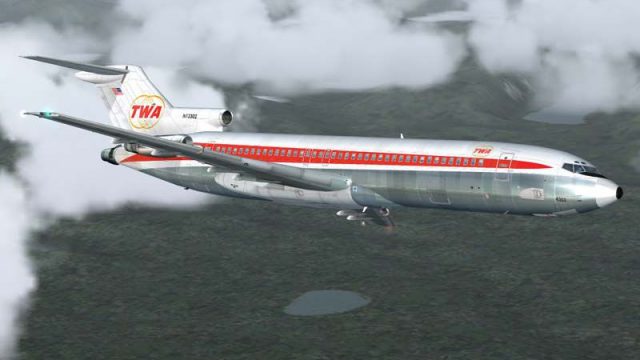
TWA’s classic Boeing 727-200 livery returns with an authentic 1960s look, recreating period tail markings, fuselage fonts, and the tri-jet’s golden-age styling for Microsoft Flight Simulator 2004 via Flight1’s Text-O-Matic template. Requires Flight1 and DreamFleet Greatest Airliners: 727 Whisperjet to build and fly the repaint.
 Rate
Rate
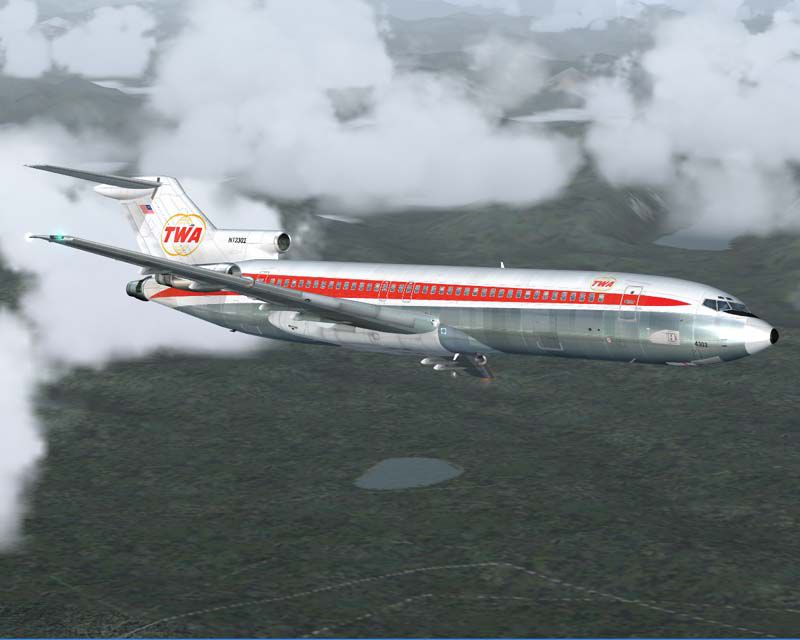
Experience a vintage touch of Trans World Airlines in Microsoft Flight Simulator 2004 with this specialized template, meticulously designed to produce an authentic TWA Boeing 727-200 repaint through Flight 1’s Text-O-Matic tool. It draws inspiration from the tri-engine aircraft’s golden age, showcasing a classic scheme once common on TWA’s short-to-medium haul routes during the 1960s. This repaint comes courtesy of the skilled creator Paul Golding and leverages the Flight 1 and DreamFleet payware Greatest Airliners: 727 Whisperjet.
Trans World Airlines (often known as TWA) operated a notable fleet of Boeing 727s in the 1960s. These three-engine jets combined aerodynamic performance with reliable short-field capabilities, making them well-suited for a diverse range of airport operations. This free repaint lets enthusiasts recreate that era’s unique cabin and exterior aesthetic. By applying this template to your existing payware 727 Whisperjet, you can capture the spirit of TWA’s timeless livery, including iconic tail markings and fuselage fonts that pay homage to the airline’s storied heritage.
This TWA livery is more than a simple texture adjustment; it represents a respectful nod to one of the cornerstones of post-war commercial aviation. The Boeing 727-200, featuring its distinctive tri-engine layout housed at the rear, provided operators with superb performance and range options. TWA’s memorable color palette and streamlined design evoke a nostalgic period when jet travel was both novel and sophisticated.
Visual reference of the TWA Boeing 727-200 soaring through the skies.
This repaint relies on the Greatest Airliners: 727 Whisperjet by Flight 1 and DreamFleet. Please note that you must already own that payware product to fully utilize the TWA texture in your virtual hangar. The download itself does not include the actual 727 model.
By Paul Golding
Free for all simmers · 9.46 MB · Scanned clean Oct 2026
Download speed: Free tier is capped at 0.5 Mbps (this file takes approximately 3 mins at the cap). PRO members download at full line speed.
FS9\Aircraft\, FS9\Addon Scenery\, FS9\Gauges\, or FS9\Effects\.readme.txt or README file. It tells you exactly where files go, what dependencies are needed, and any quirks specific to this add-on.The archive ga727twa.zip has 8 files and directories contained within it.
This list displays the first 500 files in the package. If the package has more, you will need to download it to view them.
| Filename/Directory | File Date | File Size |
|---|---|---|
| 727_TWA60.bmp | 12.15.04 | 22.85 MB |
| 727_TWA60_A.bmp | 12.15.04 | 7.62 MB |
| GA727TWA.gif | 12.18.04 | 11.15 kB |
| GA727TWA.jpg | 12.18.04 | 56.26 kB |
| FILE_ID.DIZ | 12.18.04 | 269 B |
| READ_ME.txt | 12.18.04 | 1.34 kB |
| flyawaysimulation.txt | 10.29.13 | 959 B |
| Go to Fly Away Simulation.url | 01.22.16 | 52 B |
Only PRO members can place votes.
More FS2004 add-ons hand-picked based on this download.
FS2004 Civil Jet Aircraft
This complete freeware package brings you a meticulously recreated TWA Boeing…
 FS2004 Civil Jet Aircraft
This release offers a freeware Boeing 727-200 in Trans World Airlines’ 1971 p…
 FS2004 Civil Jet Aircraft
Old colors with PW engines. Textures only; requires B747V482.ZIP. Repainted b…
 FS2004 Civil Jet Aircraft
Flight Dynamics and Sound Upgrade for FFX / Vistaliner models. Package contai…
 FS2004 Civil Jet Aircraft
This freeware repaint package provides a faithful representation of the final…
 FS2004 Civil Jet Aircraft
Repaint textures for use with the Flight 1 "Text-O-Matic" utility. Requires G…
 FS2004 Civil Jet Aircraft
This freeware package adds a distinctive Trans World Airlines (TWA) repaint f…
 FS2004 Civil Jet Aircraft
Trans World Airlines textures only for SGA's latest Douglas DC9 series releas…
Be the first to leave a comment on this download.
Be the first to share your thoughts on this download.