

 FSX Scenery
NL2000 V4.02 Maastricht Aachen Airport
This comprehensive package brings an updated rendition of Maastricht Aachen A…
Maastricht Aachen Airport (EHBK) brings the Dutch border region to life with accurate taxiways and aprons, photoreal ground imagery, bespoke terminals and cargo facilities, realistic signage, and convincing night lighting for IFR arrivals. Designed for FSX, it integrates with the NL2000 v4 modular scenery system and requires the NL2000 v4.0.32 installer.
 Rate
Rate
 Netherlands
Expand your virtual exploration of the Dutch border region by installing this specialized add-on featuring EHBK Maastricht Aachen Airport, meticulously crafted by The Netherlands 2000 Scenery Design Team. This package, compatible with FSX, integrates seamlessly into the larger modular framework of the NL2000 v4 series. Enthusiasts seeking a comprehensive representation of this dynamic European airport will appreciate the precision of its ground layouts, distinctive 3D structures, and authentic signage, all rendered to match local topography and architectural nuances.
Maastricht Aachen Airport serves as a noteworthy regional gateway located near the intersection of Dutch, Belgian, and German borders. In this add-on, taxiways and aprons are accurately reproduced to reflect real-world configurations. The runway markings (which denote touchdown zones and centerlines) are clearly depicted, enabling flight sim enthusiasts to perform realistic takeoffs and landings. Additionally, surrounding cargo facilities, passenger terminals, and administrative buildings (structures that handle logistics and traveler processing) are accurately modeled, lending authenticity to every approach.
This release falls under the NL2000 v4.03 designation. To install, ensure you have the NL2000 v4.0.32 installer (a dedicated tool that oversees the modular setup process). The broader NL2000 landscape covers numerous Dutch regions, granting uniform photoreal textures across various airports, cities, and rural landscapes. By focusing on individual packages like this Maastricht add-on, the development team has allowed users to tailor their simulation experience to specific locales without overburdening system performance.
From the ground polygon (the layered visual representation of airport surfaces) to minor details such as taxiway edge lights, this package is optimized for smooth frame rates in FSX. Leveraging custom texture sets (graphic files depicting real-world imagery), it ensures minimal performance overhead. The modular approach simplifies updates, so future improvements to EHBK and other Dutch airports can be conveniently slotted in, enhancing the already robust feature set of the NL2000 suite.
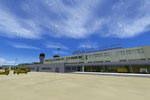
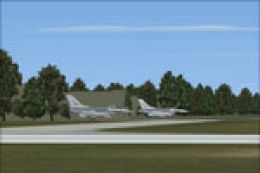
Screenshot of Maastricht Airport.
This freeware offering showcases the collaborative efforts of The Netherlands 2000 Scenery Design Team. Their dedication ensures EHBK Maastricht Aachen Airport stands out with reliable visuals, matching the quality standard that flight simmers associate with the broader NL2000 series. You can likewise explore additional modules from the same developers to round out your Dutch flight simulation portfolio.
Free for all simmers · 150.04 MB · Scanned clean Oct 2026
Download speed: Free tier is capped at 0.5 Mbps (this file takes approximately 42 mins at the cap). PRO members download at full line speed.
FSX\Addon Scenery\ containing scenery and texture sub-folders.readme.txt or README file. It tells you exactly where files go, what dependencies are needed, and any quirks specific to this add-on.Use these coordinates to fly directly to this location once the mod is installed.
50.90140000,5.77250000
Launch FSX or Prepar3D and use Flights → Load to open the downloaded .pln file. Your aircraft will be positioned at this location.
The archive nl2k_v4_03_ehbk.zip has 8 files and directories contained within it.
This list displays the first 500 files in the package. If the package has more, you will need to download it to view them.
| Filename/Directory | File Date | File Size |
|---|---|---|
| auteursrecht.txt | 05.24.10 | 5.06 kB |
| copyright.txt | 05.24.10 | 4.43 kB |
| FILE_ID.DIZ | 10.06.12 | 368 B |
| nl2k_v4.03_ehbk.gif | 05.12.11 | 9.25 kB |
| nl2k_v4.03_ehbk.nl2 | 10.06.12 | 150.03 MB |
| nl2k_v4.03_ehbk.txt | 10.06.12 | 367 B |
| flyawaysimulation.txt | 10.29.13 | 959 B |
| Go to Fly Away Simulation.url | 01.22.16 | 52 B |
Only PRO members can place votes.
More FSX & P3D add-ons hand-picked based on this download.
FSX Scenery
This comprehensive package brings an updated rendition of Maastricht Aachen A…
 FSX Scenery
This release provides a highly detailed representation of Maastricht Aachen A…
 FSX Scenery
Immerse yourself in a meticulously crafted rendition of EHRD Rotterdam The Ha…
 FSX Scenery
This freeware release brings a refined rendition of Groningen Airport Eelde (…
 FSX Scenery
Expand your Microsoft Flight Simulator X experience with a highly detailed re…
 FSX Scenery
This is the NL2000 v4.03 EHMZ Zeeland Airport package for the NL2000 scenery …
 FSX Scenery
Enhance your simulation environment with a meticulously crafted rendition of …
 FSX Scenery
Enhance your freeware collection with a detailed rendition of Teuge Airport (…
Be the first to leave a comment on this download.
Be the first to share your thoughts on this download.