

 FSX Historic & Vintage Aircraft
Guy Gibson's DeHavilland Mosquito
A repaint for the de Havilland Mosquito BIV from Dave Garwood at Classic Brit…
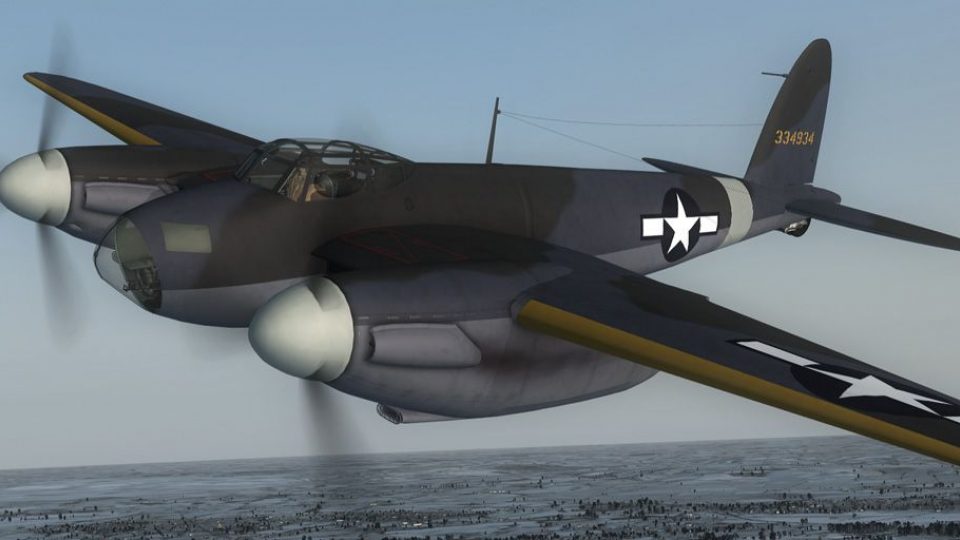
USAAF De Havilland Mosquito PR livery for the 3rd Photographic Group (R), 12th Air Force, brings authentic reconnaissance markings and a period-correct finish to the Dave Garwood B.IV in FSX. Designed as textures only, it requires the CBFS Mosquito B.IV base aircraft and integrates cleanly with the virtual cockpit model set.
 Rate
Rate

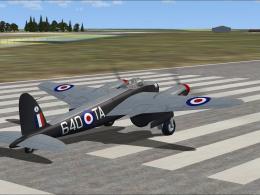
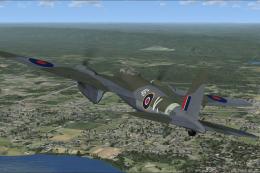
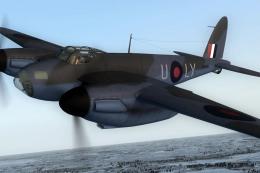
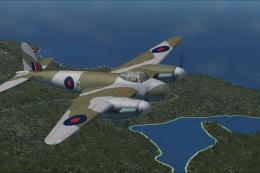
Textures only for the Dave Garwood B.IV Mosquito. This paint depicts a PR Mossie of the 3rd Photographic Group (R), 12th Air Force, USAAF. Repaint by Todd Disrud.
Screenshot of USAAF DeHavilland Mosquito in flight.
Put the 'texture.3PG' folder in your 'CBFS_Mosquito B.IV' folder. Add the following [fltsim.X] entry to your aircraft.cfg file, substituting X for a consecutive number:
[fltsim.X]

	title = CBFS Mosquito Mk BIV 3rd PG, 12th AF, USAAF

	sim = dh98BIV

	model = biv

	panel =

	sound =

	texture = 3PG

	panel_alias =

	sound_alias =

	kb_checklists =

	kb_reference =

	atc_id = 334934

	atc_id_color =

	atc_parking_types =

	atc_parking_code =

	atc_airline=

	atc_flight_number= 934

	ui_manufacturer = de Havilland

	ui_type = Mosquito B.Mk IV

	ui_variation = 3rd Photographic Group (R), 12th Air Force, USAAF

	description = de Havilland Mosquito B.Mk IV

	visual_damage = 0
Special thanks to Dave Garwood & Derek Palmer for such a gorgeous aircraft and great paint kit. I would encourage a donation for such a quality aircraft.
Free for all simmers · 2.75 MB · Scanned clean Oct 2026
Download speed: Free tier is capped at 0.5 Mbps. PRO members download at full line speed.
texture.{airline}) inside FSX\SimObjects\Airplanes\{base-aircraft}\.aircraft.cfg in Notepad. Add a new [fltsim.X] section per the readme.readme.txt or README file. It tells you exactly where files go, what dependencies are needed, and any quirks specific to this add-on.The archive 3pg_cbfgs_mossie.zip has 14 files and directories contained within it.
This list displays the first 500 files in the package. If the package has more, you will need to download it to view them.
| Filename/Directory | File Date | File Size |
|---|---|---|
| 3pg_mossie_td.gif | 01.21.13 | 9.40 kB |
| 3pg_mossie_td.jpg | 01.21.13 | 116.75 kB |
| FILE_ID.DIZ | 01.21.13 | 233 B |
| Read Me.txt | 01.21.13 | 1.21 kB |
| texture.3PG | 01.21.13 | 0 B |
| dh98_fus.dds | 01.21.13 | 4.00 MB |
| dh98_L_wing.dds | 01.21.13 | 4.00 MB |
| dh98_R_wing.dds | 01.21.13 | 4.00 MB |
| pilotnew.dds | 12.29.12 | 1.00 MB |
| spinners.dds | 01.20.13 | 256.12 kB |
| texture.cfg | 05.06.08 | 37 B |
| thumbnail.jpg | 01.21.13 | 17.81 kB |
| flyawaysimulation.txt | 10.29.13 | 959 B |
| Go to Fly Away Simulation.url | 01.22.16 | 52 B |
Only PRO members can place votes.
More FSX & P3D add-ons hand-picked based on this download.
FSX Historic & Vintage Aircraft
A repaint for the de Havilland Mosquito BIV from Dave Garwood at Classic Brit…
 FSX Historic & Vintage Aircraft
A repaint for the de Havilland Mosquito BIV from Dave Garwood at Classic Brit…
 FSX Historic & Vintage Aircraft
A repaint for the de Havilland Mosquito BIV from Dave Garwood at Classic Brit…
 FSX Historic & Vintage Aircraft
A repaint for the de Havilland Mosquito BIV from Dave Garwood at Classic Brit…
 FSX Historic & Vintage Aircraft
Textures only for the Dave Garwood de Havilland B.IV Mosquito. This paint dep…
 FSX Historic & Vintage Aircraft
A repaint for the de Havilland Mosquito BIV from Dave Garwood at Classic Brit…
 FSX Historic & Vintage Aircraft
A repaint for the de Havilland Mosquito BIV from Dave Garwood at Classic Brit…
 FSX Historic & Vintage Aircraft
Textures only for the Dave Garwood de Havilland B.IV Mosquito. This paint dep…
Be the first to leave a comment on this download.
Be the first to share your thoughts on this download.