

 FSX Misc
Revised Sky Textures (Corrected)
This file replaces the earlier "revised sky textures for FSX". It fixes an er…
Revised ground textures refresh taxiways and ramps with sharper asphalt and concrete, cleaner detail that removes unwanted expansion joints, and updated taxiway markings with FAA-style black backgrounds. Built for Microsoft Flight Simulator X, the high-resolution DDS conversions improve surface realism across most airports while allowing flexible mixing with default detail textures.
 Rate
Rate
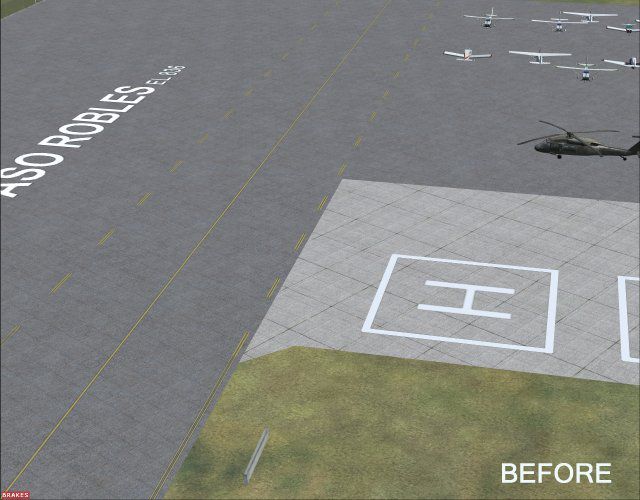


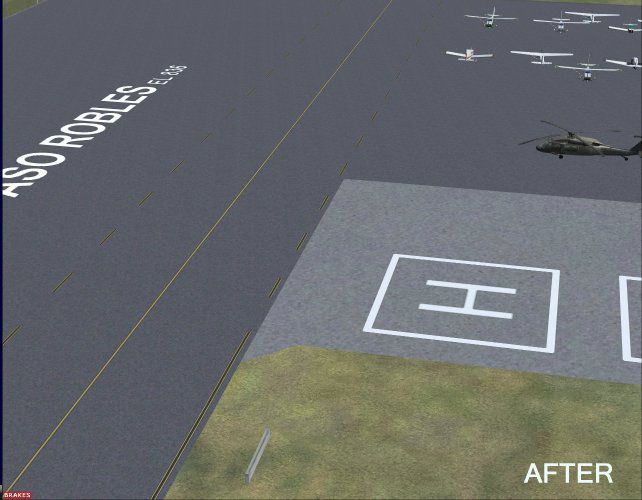
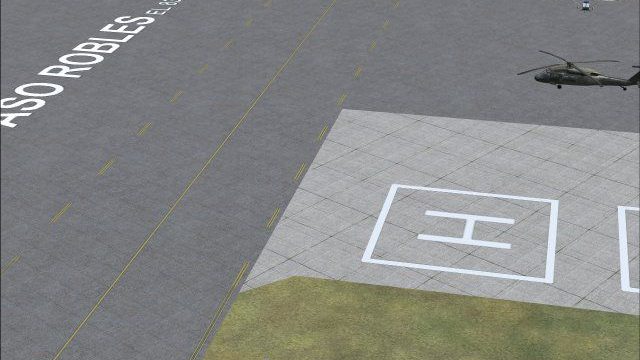
Revised asphalt, concrete and marking taxiway and ramp textures. By Al Wheeler and Miguel Zafra.
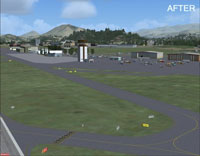
Screenshot showing some of the revised textures.
I've used Paulo Mauricio and Miguel Zafra's improved asphalt taxiway texture for FS9 and have recommended it in my FS9 version of California Central Coast scenery readme.txt file. I recently finished and uploaded an FSX version of that scenery and found that with a little modification that improved taxiway texture would work with FSX. Mr. Zafra has given me permission to use his texture in an upload so that other's can use it in FSX if they like. It has been converted from a 512x512 BMP file to a 1024x1024 DDS file.
In this upload I'm also including a revised concrete taxiway texture file and a revised taxiway_detail.bmp file that removes the asphalt texture expansion joint lines. The revised concrete file also has expansion joint lines removed and brightness reduced. The reason I removed these lines is that when using these textures for ramps as I have in my scenery these cardinal oriented lines in many cases do not register with the predominant orientation of the ramps. As a result there are expansion joint lines occurring at unrealistic angles.
Also included is a revised taxiway_marks.dds texture file. This texture adds black backgrounds to taxiway markings to conform to current FAA regulations.
Any or all of these textures can be used in combination. For example: For asphalt and concrete with revised textures but WITH expansion joints, you could continue to use the default taxiway_detail.bmp. The included "after" JPG's show all four revised textures in use. Be aware that changing these textures will revise most taxiways and ramps in FSX.
Free for all simmers · 663.69 KB · Scanned clean Oct 2026
Download speed: Free tier is capped at 0.5 Mbps. PRO members download at full line speed.
SimObjects\Airplanes\, Addon Scenery\, Effects\, or Gauges\.readme.txt or README file. It tells you exactly where files go, what dependencies are needed, and any quirks specific to this add-on.The archive taxitext.zip has 14 files and directories contained within it.
This list displays the first 500 files in the package. If the package has more, you will need to download it to view them.
| Filename/Directory | File Date | File Size |
|---|---|---|
| 1SBPBEFORE.jpg | 05.06.08 | 53.89 kB |
| 2SBPAFTER.jpg | 05.06.08 | 50.52 kB |
| 3PRBBEFORE.jpg | 05.06.08 | 54.95 kB |
| 4PRBAFTER.jpg | 05.06.08 | 47.72 kB |
| File_ID.DIZ | 05.06.08 | 124 B |
| License.TXT | 05.06.08 | 899 B |
| Readme.txt | 05.06.08 | 2.94 kB |
| taxi_asphalt.dds | 05.03.08 | 682.80 kB |
| taxi_concrete.dds | 05.05.08 | 682.80 kB |
| TAXITEXTUREX.jpg | 05.06.08 | 3.13 kB |
| taxiway_detail.bmp | 05.02.08 | 17.05 kB |
| taxiway_marks.dds | 05.06.08 | 341.48 kB |
| flyawaysimulation.txt | 10.29.13 | 959 B |
| Go to Fly Away Simulation.url | 01.22.16 | 52 B |
Only PRO members can place votes.
More FSX & P3D add-ons hand-picked based on this download.
FSX Misc
This file replaces the earlier "revised sky textures for FSX". It fixes an er…
 FSX Misc
Converted for FSX. These files act as HDE sky texture replacements for import…
 FSX Misc
These textures take the place of default water textures by changing the botto…
 FSX Misc
For those of you who are annoyed by the very bright blue of FSX shallow water…
 FSX Misc
Textures found to offer best performance in FSX/SP2. Textures are in 8x8 bit …
 FSX Misc
It is very easy to create your very own high-resolution, custom (photoreal) g…
 FSX Misc
Replacement back country grass runway textures. By Brent Ludlow. Screenshot o…
 FSX Misc
The original autogen building textures are 638 kb. These textures are reduced…
Be the first to leave a comment on this download.
Be the first to share your thoughts on this download.