

 FS2004 Vintage Aircraft
B-17F Memphis Belle
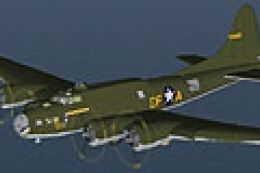
FS2004 B-17F Memphis Belle. One of the most famous aircraft to come out of WW…
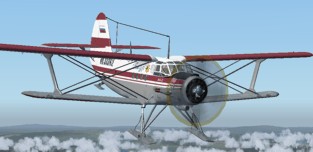
Antonov An-2 brings the iconic Soviet workhorse biplane to FS2004 with wheel and ski variants, a refreshed model, and an immersive virtual cockpit and panel using authentic Russian gauges. Expect full animations including visible pilots, a clear operating manual, and three custom effects that enhance startup, flight, and atmosphere.
 Rate
Rate
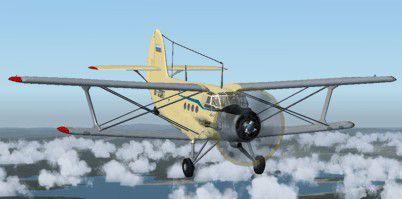
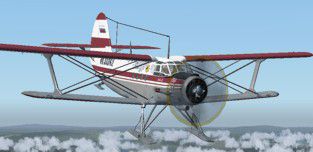
FS2004/FSX Antonov An-2 (wheel and ski). Legendary multi-purpose Russian biplane, the first creation of the legendary designer Oleg Antonov.
The model is compiled in Gmax MDL - 2004 but almost is completely adapted for use in FSX, including Russian original gauges, full animation (completely animation the pilots in exterior and co-pilot in VC), completely new model and VC, panel.
The detailed manual for use of the given model and gauges. Three new effects are applied.
Developer: Vladimir Zhyhulskiy.
Free for all simmers · 6.69 MB · Scanned clean Oct 2026
Download speed: Free tier is capped at 0.5 Mbps (this file takes approximately 2 mins at the cap). PRO members download at full line speed.
FS9\Aircraft\, FS9\Addon Scenery\, FS9\Gauges\, or FS9\Effects\.readme.txt or README file. It tells you exactly where files go, what dependencies are needed, and any quirks specific to this add-on.The archive an2t_07.zip has 52 files and directories contained within it.
This list displays the first 500 files in the package. If the package has more, you will need to download it to view them.
| Filename/Directory | File Date | File Size |
|---|---|---|
| Effect | 05.13.07 | 0 B |
| An2_land.fx | 02.05.04 | 6.81 kB |
| FX_An2dust.fx | 04.19.07 | 6.08 kB |
| FX_An2snow.fx | 05.09.07 | 6.11 kB |
| fx_An2start.fx | 04.18.07 | 1.17 kB |
| AN2_manual.doc | 05.14.07 | 477.00 kB |
| Readme.txt | 05.13.07 | 1.00 kB |
| An2TS | 05.09.07 | 0 B |
| Aircraft.cfg | 05.12.07 | 19.87 kB |
| An2Tski.air | 02.08.04 | 6.57 kB |
| model | 05.14.07 | 0 B |
| An2Tski.mdl | 05.12.07 | 2.83 MB |
| Model.cfg | 05.09.07 | 26 B |
| panel | 05.14.07 | 0 B |
| panel.cfg | 05.09.07 | 27 B |
| sound | 05.14.07 | 0 B |
| Sound.cfg | 05.13.07 | 28 B |
| Texture.amur | 05.14.07 | 0 B |
| AN2zh_1.bmp | 05.13.07 | 1.00 MB |
| AN2zh_2.bmp | 05.12.07 | 1.00 MB |
| An2zh_w1.bmp | 05.13.07 | 1.00 MB |
| An2zh_w2.bmp | 05.13.07 | 1.00 MB |
| thumbnail.jpg | 05.13.07 | 13.78 kB |
| An2TW | 05.13.07 | 0 B |
| Aircraft.cfg | 05.14.07 | 19.86 kB |
| An2T.air | 02.08.04 | 6.57 kB |
| model | 05.14.07 | 0 B |
| An2T.mdl | 05.12.07 | 2.81 MB |
| Model.cfg | 03.08.07 | 23 B |
| PANEL | 05.14.07 | 0 B |
| An2Tpan.bmp | 05.12.07 | 2.25 MB |
| An2zh.cab | 05.12.07 | 868.81 kB |
| panel.cfg | 05.13.07 | 5.03 kB |
| Sound | 05.14.07 | 0 B |
| Sound.cfg | 05.13.07 | 28 B |
| TEXTURE.AFL | 05.14.07 | 0 B |
| An2box.bmp | 04.18.07 | 257.05 kB |
| AN2zh_1.bmp | 05.12.07 | 1.00 MB |
| AN2zh_2.bmp | 04.18.07 | 1.00 MB |
| An2zh_w1.bmp | 04.14.07 | 1.00 MB |
| An2zh_w2.bmp | 05.12.07 | 1.00 MB |
| An2_floor.bmp | 04.20.07 | 257.05 kB |
| An2_glas.bmp | 03.10.07 | 256.25 kB |
| AN2_INT.bmp | 05.06.07 | 1.00 MB |
| AN2_INT1.bmp | 05.03.07 | 1.00 MB |
| An2_prop.bmp | 01.13.06 | 65.05 kB |
| AN2_vc1.bmp | 05.06.07 | 1.00 MB |
| AN2_welv.bmp | 04.20.07 | 17.05 kB |
| An_barrel.bmp | 04.18.07 | 257.05 kB |
| thumbnail.jpg | 05.13.07 | 19.98 kB |
| flyawaysimulation.txt | 10.29.13 | 959 B |
| Go to Fly Away Simulation.url | 01.22.16 | 52 B |
Only PRO members can place votes.
More FS2004 add-ons hand-picked based on this download.
FS2004 Vintage Aircraft
FS2004 B-17F Memphis Belle. One of the most famous aircraft to come out of WW…
 FS2004 Vintage Aircraft
FS2004 Boeing B-17E Flying Fortress "Thunderbird" WWII era four engine prop b…
 FS2004 Vintage Aircraft
This was a German built airship. This airship has been redesigned with a new …
 FS2004 Vintage Aircraft
FS2002/FS2004 DeHavilland DH82a Tiger Moth biplane. This classic British trai…
 FS2004 Vintage Aircraft
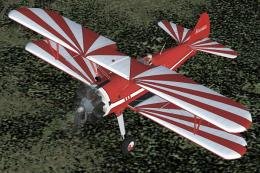
FS2004 Stearman Kaydet and Eagle Field scenery. This is a mostly new model fo…
 FS2004 Vintage Aircraft
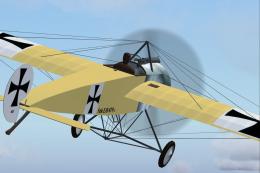
This is a Fokker Eindecker E.III fighter in the typical livery of German Air …
 FS2004 Vintage Aircraft
P-47D-30 from the 509th Fighter Squadron, 405th Fighter Group during the spri…
 FS2004 Vintage Aircraft
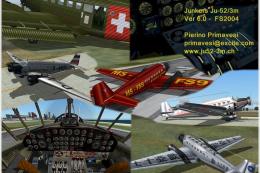
Animated model, flight model, 2D-panel, XML-metric-gauges, virtual cockpit an…
Read what other simmers think, or add your own.

Hello, i downloaded plane and i do not know how to start engine up. When i press ctr+E engine is few seconds rolling and nothing happen. How can i start the engine?

Got working on fsx:se, just extract whole zip in fsx main folder, and then move both aircrafts that appear in main folder to simObjects/airplanes, bug with prop is easily removed, by following propfix.zip can be downloaded from this site.
