

 FSX Civil Aircraft
Air Canada Bombardier CRJ-700 C-FWRR
Enjoy a carefully crafted repaint capturing Air Canada’s earlier design on a …
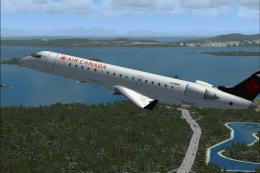
Air Canada’s Bombardier CRJ-700 registration C-FWRR comes to life with crisp, updated exterior textures, accurate markings, and balanced shading for a more convincing ramp-to-runway look in Microsoft Flight Simulator X. Designed as a texture-only repaint, it requires the freeware CRJ-700 base model to display correctly.
 Rate
Rate
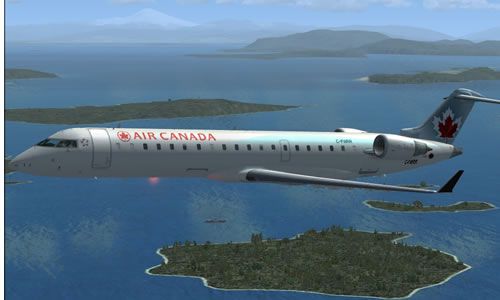
This repaint package offers an updated Air Canada livery for the Bombardier CRJ-700 in Microsoft Flight Simulator X. It reflects registration C-FWRR and is intended only as a texture set. You will need the freeware base CRJ-700 model, which can be acquired from the Fly Away Simulation mod library. Developed by James Landes, this repaint enhances the standard CRJ flight experience with authentic airline markings.
The Bombardier CRJ (Canadair Regional Jet) lineage originally evolved from the Challenger series of business jets, and the CRJ-700 stands out due to its extended fuselage and enlarged wingspan over the earlier CRJ100/200 variants. This extended version typically seats between 65 and 70 passengers, making it ideal for regional routes in Canada and beyond. Air Canada’s adaptation of the CRJ-700 incorporates a cost-effective operating profile and a modern “glass cockpit” flight deck (meaning it employs advanced LCD screens instead of traditional analog gauges) for more streamlined operations.
This repaint focuses on Air Canada’s newer installments, featuring distinctive color accents and registration details labeled as C-FWRR. The design integrates realistic shading and alignment on the fuselage and tail, giving sim pilots both an accurate visual model and enhanced immersion during taxiing, takeoffs, and landings.
[fltsim.X]
title=Bombardier CRJ 700 Air Canada New
sim=Bombardier_CRJ_700
model=
panel=
sound=
texture=acn
kb_checklists=BombardierCRJ700_check
kb_reference=BombardierCRJ700_ref
atc_id=C-FWRR
atc_parking_types=GATE,RAMP
atc_airline=Air Canada
atc_flight_number=9635
ui_manufacturer="Bombardier"
ui_type="CRJ700"
ui_variation="Air Canada New"
ui_typerole="Regional Jet"
ui_createdby="Microsoft Corporation"
description="The CRJ (Canadair Regional Jet) family ... glass cockpit instrumentation."
After saving the aircraft.cfg, your new Air Canada livery will become selectable within FSX.
This texture set does not include the original Bombardier CRJ-700 model files, as it is a repaint add-on. To ensure everything displays properly, obtain the freeware CRJ-700 from the Fly Away Simulation library if you have not already done so.
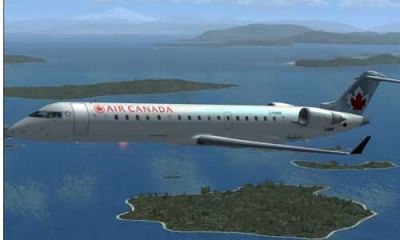
Air Canada Bombardier CRJ-700 flying over water.
This repaint was created by James Landes. Enjoy exploring short to mid-range routes with the Air Canada branding on your Bombardier CRJ-700.
Free for all simmers · 1.42 MB · Scanned clean Oct 2026
Download speed: Free tier is capped at 0.5 Mbps. PRO members download at full line speed.
texture.{airline}) inside FSX\SimObjects\Airplanes\{base-aircraft}\.aircraft.cfg in Notepad. Add a new [fltsim.X] section per the readme.readme.txt or README file. It tells you exactly where files go, what dependencies are needed, and any quirks specific to this add-on.The archive acn700.zip has 10 files and directories contained within it.
This list displays the first 500 files in the package. If the package has more, you will need to download it to view them.
| Filename/Directory | File Date | File Size |
|---|---|---|
| CRJ_700_1_spec.dds | 09.04.06 | 1.33 MB |
| CRJ_700_1_T.dds | 08.24.09 | 1.33 MB |
| CRJ_700_2_spec.dds | 09.04.06 | 1.33 MB |
| CRJ_700_2_T.dds | 08.24.09 | 1.33 MB |
| Fresnel_Ramp.dds | 07.18.06 | 640 B |
| texture.cfg | 08.14.06 | 137 B |
| thumbnail.jpg | 08.25.09 | 22.22 kB |
| readme.txt | 08.25.09 | 1.33 kB |
| flyawaysimulation.txt | 10.29.13 | 959 B |
| Go to Fly Away Simulation.url | 01.22.16 | 52 B |
Only PRO members can place votes.
More FSX & P3D add-ons hand-picked based on this download.
FSX Civil Aircraft
Enjoy a carefully crafted repaint capturing Air Canada’s earlier design on a …
 FSX Civil Aircraft
FSX Air Canada Bombardier CRJ-700. Textures only for the default CRJ700 inclu…
 FSX Civil Aircraft
Textures only for the default CRJ700. Repaint by Dwight Estey. Screenshot of …
 FSX Civil Aircraft
A repaint of the FSX default CRJ700 aircraft. Textures only. Painted in the n…
 FSX Civil Aircraft
Repainting of the Bombardier CRJ 700 FSX default included in the colors of Ai…
 FSX Civil Aircraft
Model by Project Open Sky. Full package included. By Brenden Geiselhardt. Scr…
 FSX Civil Aircraft
FSX Air Canada CRJ-700 circa 1994-2004. A repaint for the default Bombardier …
 FSX Civil Aircraft
Textures only for the default CRJ700. Screenshot of Air Canada Jazz CRJ 700 i…
Be the first to leave a comment on this download.
Be the first to share your thoughts on this download.