

 FSX General Aviation Aircraft
- I.C.P. Savannah UltraLight package
The ICP Savannah is one of the top selling ultralights in Europe. It is depen…
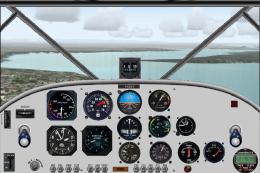
ICP Savannah C-ITAA brings a real-world Baldwin, Ontario ultralight livery to the Savannah’s high-wing STOL profile, matching authentic markings and colors for bush strips or cross-country hops. Designed for Microsoft Flight Simulator X, it requires Massimo Taccoli’s freeware ICP Savannah v3.8 base model for the full exterior and virtual cockpit experience.
 Rate
Rate
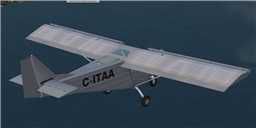
This repaint showcases a real-world ICP Savannah livery registered as C-ITAA, operating from Baldwin Airport in Ontario. Created by Bob Azzaro, the add-on is designed for Massimo Taccoli’s ICP Savannah v3.8 package (SAVANNAH38.ZIP). The liveries replicate the aesthetics of an ultralight widely praised for its responsive handling and dependable short-field performance in various flight scenarios. You will need the freeware base model of the Savannah v3.8 to enable this repaint within Microsoft Flight Simulator X.
The C-ITAA paint pattern accurately depicts an actual ultralight from Baldwin, Ontario. It incorporates the distinctive markings and coloration of the real aircraft, highlighting the Savannah’s characteristic high-wing configuration. This ultralight is renowned in Europe for ease of operation and its STOL (Short Takeoff and Landing) capabilities, making it suitable for smaller or remote fields.
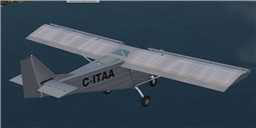
Savannah C-ITAA in flight.
To fully utilize this texture pack, it is crucial to install the ICP Savannah v3.8 base model (also created by Massimo Taccoli, with sounds contributed by Mike Hambly). Verify that the downloaded Savannah folder is present within your FSX SimObjects\Airplanes directory. This framework provides the core 3D model, panels, and behavior files needed for a seamless integration of the new repaint.
savannah38 aircraft folder within your FSX\SimObjects\Airplanes directory.texture.C-ITAA folder into FSX\SimObjects\Airplanes\savannah38.aircraft.cfg file (inside the savannah38 folder) with a text editor.---------------------------------------
[fltsim.X]

title = Savannah C-ITAA

sim = Savannah

model = 1

panel =

sound =

texture= C-ITAA

visual_damage = 0

kb_checklists= Savannah_check

kb_reference = Savannah_ref

atc_heavy = 0

atc_airline =

atc_flight_number= 2230

atc_id_enable = 1

atc_id = C-ITAA

atc_id_color = 0x00000000

atc_id_font = Verdana,-11,1,600,0

ui_manufacturer= ICP Italy

ui_type = Savannah

ui_variation = C-ITAA

ui_typerole = Ultralight

ui_createdby = Massimo Taccoli

Description=The ICP Savannah is one of the top selling ultralights in Europe. It is dependable and easy to fly. Its STOL performance makes it easy to operate from any airfield. The Savannah is also a very good airplane for cross-country flights, offering superb stability. This FS aircraft represents an Italian version.\n\nAircraft design:\nMassimo Taccoli\nSounds: Mike Hambly\nRepaint by Bob Azzaro
---------------------------------------
Keep in mind that [fltsim.X] must reflect the subsequent number. For instance, if your existing entries conclude at [fltsim.3], you should replace X with 4. After these edits, save your changes, and the new livery will appear as an additional selection within your aircraft menu in Microsoft Flight Simulator X.
Free for all simmers · 1.06 MB · Scanned clean Oct 2026
Download speed: Free tier is capped at 0.5 Mbps. PRO members download at full line speed.
This file is a repaint — the package below is the base model it paints onto. Install it first, or the textures will have nothing to load onto.
texture.{airline}) inside FSX\SimObjects\Airplanes\{base-aircraft}\.aircraft.cfg in Notepad. Add a new [fltsim.X] section per the readme.readme.txt or README file. It tells you exactly where files go, what dependencies are needed, and any quirks specific to this add-on.The archive savannah38_c-itaa.zip has 25 files and directories contained within it.
This list displays the first 500 files in the package. If the package has more, you will need to download it to view them.
| Filename/Directory | File Date | File Size |
|---|---|---|
| $savan_vc_l | 10.23.09 | 1.00 MB |
| glass_L.bmp | 10.23.09 | 1.07 kB |
| glass_t.bmp | 10.23.09 | 64.07 kB |
| lights_L.bmp | 10.23.09 | 4.07 kB |
| lights_T.bmp | 10.23.09 | 4.07 kB |
| pilot.bmp | 11.05.10 | 170.75 kB |
| prop_blurred.bmp | 10.24.09 | 341.43 kB |
| prop_blurred1.bmp | 10.24.09 | 85.43 kB |
| savannah1_L.bmp | 10.23.09 | 1.07 kB |
| savannah1_T.bmp | 10.29.10 | 1.33 MB |
| savannah2_L.bmp | 10.23.09 | 1.07 kB |
| savannah2_T.bmp | 10.28.10 | 1.33 MB |
| savannah3_L.bmp | 10.23.09 | 1.07 kB |
| savannah3_T.bmp | 10.23.09 | 64.07 kB |
| savannah4_L.bmp | 10.23.09 | 1.07 kB |
| savannah4_T.bmp | 10.29.10 | 682.78 kB |
| savannah5_L.bmp | 10.26.10 | 1.07 kB |
| savannah5_t.bmp | 10.12.10 | 1.33 MB |
| thumbnail.jpg | 10.29.10 | 3.12 kB |
| vcpanel_L.bmp | 10.23.09 | 1.07 kB |
| VCpanel_T.bmp | 10.23.09 | 512.07 kB |
| thumbnail.jpg | 10.29.10 | 3.12 kB |
| readme.txt | 11.05.10 | 1.55 kB |
| flyawaysimulation.txt | 10.29.13 | 959 B |
| Go to Fly Away Simulation.url | 01.22.16 | 52 B |
Only PRO members can place votes.
More FSX & P3D add-ons hand-picked based on this download.
FSX General Aviation Aircraft
The ICP Savannah is one of the top selling ultralights in Europe. It is depen…
 FSX General Aviation Aircraft
SP2 Acceleration I.C.P. Savannah UltraLight v3.8. The ICP Savannah is one of …
 FSX General Aviation Aircraft
I.C.P. Savannah UltraLight (file version 3.7.1). The ICP Savannah is one of t…
 FSX General Aviation Aircraft
I.C.P. Savannah UltraLight. The ICP Savannah is one of the top selling ultral…
 FSX General Aviation Aircraft
I.C.P. Savannah UltraLight File Fix, for use with SAV_FSX.ZIP. This file fixe…
 FSX General Aviation Aircraft
US And FR Savannah. Repaint of Massimo Taccoli's ICP Savannah. Textures only;…
 FSX General Aviation Aircraft
This free enhancement for Microsoft Flight Simulator X introduces an inventiv…
 FSX General Aviation Aircraft
This add-on introduces a fictional Peerhoven Airlines repaint for the ICP Sav…
Read what other simmers think, or add your own.
