

 FSX Scenery
NL2000 V4.02 Rotterdam,The Hague Airport
Enhance your simulator’s portrayal of one of the Netherlands’ busiest regiona…
NL2000 v4.2 Heliports Scenery expands Dutch rotorcraft flying with accurately placed hospital, corporate, and industrial helipads that blend into the NL2000 landscape, complete with crisp markings, localized objects, and believable night approach lighting. Built for FSX, it requires the NL2000 v4.0.20 installer for seamless modular integration.
 Rate
Rate
 Netherlands
This focused heliport expansion integrates seamlessly with the broader NL2000 v4 suite, enhancing helicopter operations across the Dutch landscape. It introduces a meticulous arrangement of helipads, reflecting real-world configurations found at hospitals, corporate facilities, and industrial sites. Developed with modular precision by The Netherlands 2000 Scenery Design Team, the package requires the NL2000 v4.0.20 installer and is available as freeware for FSX enthusiasts.
The included heliports add depth to the existing NL2000 environment by targeting locations that play significant roles in civil, administrative, and offshore functions within the Netherlands. Many of these installations are located near major urban centers, while others serve coastal or remote locales, replicating diverse helipad placements. This ensures helicopter pilots benefit from authentic touchdown positions and visually consistent surroundings.
Designed exclusively for integration with NL2000 v4.2, this add-on leverages all existing architectural data and ground textures relevant to rotorcraft operations. Each heliport model aligns with precise coordinates, matching local structures to satellite references where possible. This approach leads to consistent imagery when combined with the other NL2000 scenery segments. Users who already rely on the main NL2000 environment will find this expansion a natural addition, with minimal configuration required.
Each heliport component encompasses detailed polygons, high-resolution textures, and localized objects to accurately depict ground markings and facility boundaries. These details capture the variety of helicopter-specific sites in the Netherlands, whether they be hospital rooftops in city centers or private pads near the North Sea coastline. In addition, local references guide the portrayal of approach lighting, ensuring realistic night-flying conditions.
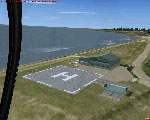
Screenshot of NL2000 V4.2 Heliports Scenery.
Utilizing local topographic data, the developers paid close attention to approach paths and altitude constraints around these helipads. As a result, rotorcraft flight planning benefits from a closer approximation to real-world procedures commonly experienced in the Netherlands. The add-on’s fidelity aims to satisfy pilots who engage in search and rescue drills, medical transport training, or offshore flights.
By The Netherlands 2000 Scenery Design Team
Free for all simmers · 22.69 MB · Scanned clean Oct 2026
Download speed: Free tier is capped at 0.5 Mbps (this file takes approximately 6 mins at the cap). PRO members download at full line speed.
FSX\Addon Scenery\ containing scenery and texture sub-folders.readme.txt or README file. It tells you exactly where files go, what dependencies are needed, and any quirks specific to this add-on.Use these coordinates to fly directly to this location once the mod is installed.
52.36760000,4.90410000
Launch FSX or Prepar3D and use Flights → Load to open the downloaded .pln file. Your aircraft will be positioned at this location.
The archive nl2k_v4_02_heliports.zip has 8 files and directories contained within it.
This list displays the first 500 files in the package. If the package has more, you will need to download it to view them.
| Filename/Directory | File Date | File Size |
|---|---|---|
| copyright.txt | 05.24.10 | 4.43 kB |
| FILE_ID.DIZ | 12.22.11 | 345 B |
| nl2k_v4.02_heliports.gif | 05.14.11 | 11.96 kB |
| nl2k_v4.02_heliports.nl2 | 12.17.11 | 22.70 MB |
| nl2k_v4.02_heliports.txt | 12.22.11 | 345 B |
| auteursrecht.txt | 05.24.10 | 5.06 kB |
| flyawaysimulation.txt | 10.29.13 | 959 B |
| Go to Fly Away Simulation.url | 01.22.16 | 52 B |
Only PRO members can place votes.
More FSX & P3D add-ons hand-picked based on this download.
FSX Scenery
Enhance your simulator’s portrayal of one of the Netherlands’ busiest regiona…
 FSX Scenery
This comprehensive scenery package brings an authentic representation of Eind…
 FSX Scenery
This free add-on offers a precisely modeled depiction of EHEH Eindhoven Airpo…
 FSX Scenery
Enhance your simulator with this free package dedicated to EHEH (Eindhoven Ai…
 FSX Scenery
This comprehensive package brings an updated rendition of Maastricht Aachen A…
 FSX Scenery
Scenery NL2000 V4.0. This is the NL2000 v4.0 Traffic package for the NL2000 s…
 FSX Scenery
Immerse yourself in a thoroughly revised depiction of Dutch landscapes using …
 FSX Scenery
This package provides a dedicated set of core libraries intended to enhance a…
Be the first to leave a comment on this download.
Be the first to share your thoughts on this download.