

 FSX AFCAD Files
AFCAD London Heathrow (EGLL)
London Heathrow International Airport version 2a includes some minor fixes to…
Twenthe Airport (EHTW) returns as a carefully tuned AFCAD update, capturing the airfield’s real-world layout with accurate parking, taxi routing, and apron geometry for smoother AI traffic and ground operations. Built with Airport Design Editor, it enhances runway markings and surface detail in Microsoft Flight Simulator X.
 Rate
Rate
 Netherlands
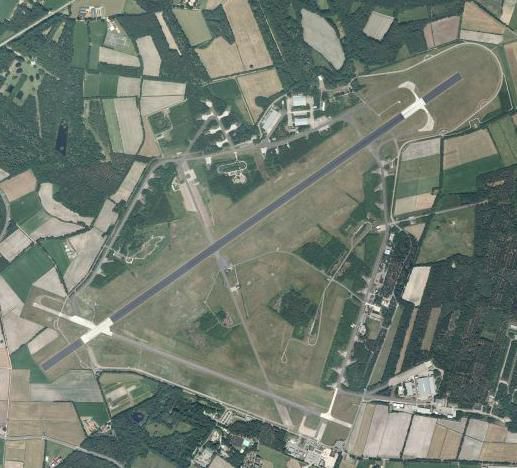
This freeware release brings a meticulously refined rendition of Twenthe Airport (EHTW) in the eastern Netherlands, expertly developed by Joost de Wit. Although the real-world airfield has been decommissioned, this adaptation for Microsoft Flight Simulator X offers simmers a chance to explore a classic Dutch facility that once served both military and civil operations. This package uses AFCAD (Airport Facility Data) files enhanced with Airport Design Editor (ADE) to provide accurate layout data, including parking positions and taxi networks, for a realistic experience.
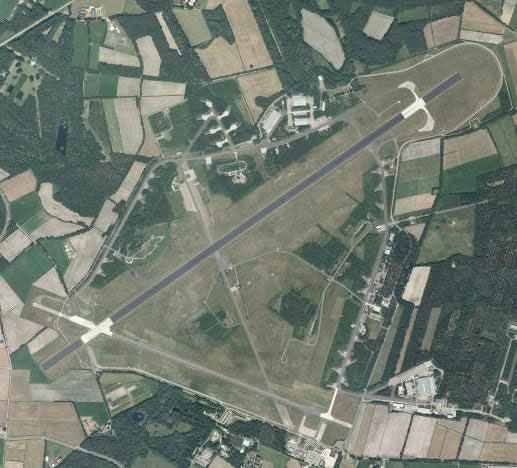
Aerial view of Twenthe Airport.
Formerly located near Enschede, Twenthe Airport was once an active air base under the Royal Netherlands Air Force. Over time, it supported various types of traffic, from military jets to occasional civilian flights. Since its closure, local authorities have debated the site’s future, yet it remains a notable piece of Dutch aviation heritage.
This freeware add-on was compiled by Joost de Wit, bringing a classic Dutch airport back to life in your flight simulator environment. Enjoy exploring the preserved details of this historically significant aerodrome, and feel free to share any feedback with the creator if you encounter compatibility issues or other concerns.
Free for all simmers · 53.18 KB · Scanned clean Oct 2026
Download speed: Free tier is capped at 0.5 Mbps. PRO members download at full line speed.
AF2_*.bgl or AFX_*.bgl) go into FSX\Addon Scenery\Scenery\ or a dedicated AFCAD folder you create.readme.txt or README file. It tells you exactly where files go, what dependencies are needed, and any quirks specific to this add-on.Use these coordinates to fly directly to this location once the mod is installed.
52.27580000,6.88920000
Launch FSX or Prepar3D and use Flights → Load to open the downloaded .pln file. Your aircraft will be positioned at this location.
The archive ehtw.zip has 5 files and directories contained within it.
This list displays the first 500 files in the package. If the package has more, you will need to download it to view them.
| Filename/Directory | File Date | File Size |
|---|---|---|
| EHTW.JPG | 11.19.08 | 49.68 kB |
| EHTW_ADE_JDW.BGL | 11.19.08 | 3.61 kB |
| readme.txt | 11.19.08 | 1.27 kB |
| flyawaysimulation.txt | 10.29.13 | 959 B |
| Go to Fly Away Simulation.url | 01.22.16 | 52 B |
Only PRO members can place votes.
More FSX & P3D add-ons hand-picked based on this download.
FSX AFCAD Files
London Heathrow International Airport version 2a includes some minor fixes to…
 FSX AFCAD Files
This pack includes every single AFCAD package released by Smith Graphics for …
 FSX AFCAD Files
Elevate Microsoft Flight Simulator X with a refined rendition of Lisbon Inter…
 FSX AFCAD Files
John F. Kennedy International Airport, New York, NY, USA, v2. This airport up…
 FSX AFCAD Files
This enhanced AFCAD file updates the runway numbers at Princess Juliana Inter…
 FSX AFCAD Files
Dubai International Airport, United Arab Emirates (UAE). This airport update …
 FSX AFCAD Files
Los Angeles International Airport (LAX), California (CA), USA. This airport u…
 FSX AFCAD Files
This freeware package modernizes Zurich International Airport (LSZH) in Micro…
Be the first to leave a comment on this download.
Be the first to share your thoughts on this download.