

 FS2004 Civil Jet Aircraft
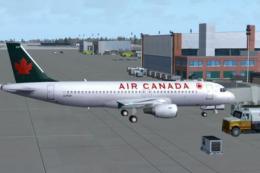
Air Canada Airbus A320-200 V2
A complete AI Airbus model set featuring LOD and dynamic shine. Painted by Sh…
Tango-liveried Airbus A320-200 V2 delivers an efficient, traffic-friendly airliner model with multiple LOD stages, convincing dynamic shine, and crisp repaints that capture Air Canada’s Tango branding. Built for Microsoft Flight Simulator 2004, it pairs the FSPainter base model with Hiro’s AI flight dynamics for smooth, float-free performance in busy skies.
 Rate
Rate
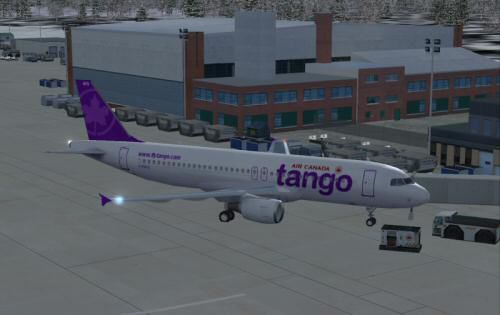
This package presents a detailed rendition of the Tango-themed Airbus A320-200, meticulously crafted for flight simulation enthusiasts seeking a refined and authentic visual and operational experience. Designed for Microsoft Flight Simulator 2004, it includes both the original FSPainter base model and high-quality repaints by Shane Strong, bringing forward a complete, freeware-ready option. With distinct AI flight dynamics by Hiro, this release supports seamless performance and float-free rendering within virtual skies.
Level of Detail (LOD): LOD refers to progressive model detail changes as distance varies, enhancing performance by minimizing system strain. This package integrates multiple LOD steps, ensuring efficient rendering in crowded airspaces.
Dynamic Shine: The exterior surfaces adopt a reflective property (sometimes referred to as “dynamic sheen”) that adeptly responds to environmental lighting conditions, replicating real-world Airbus A320 metallic features for a photoreal finish.

Representation of the Tango Airbus A320-200 at the gate, showcasing surface fidelity and vibrant fuselage colors.
The Airbus A320-200 is a single-aisle, short-to-medium range airliner often utilized for rapid turnarounds. In this texture set, the Tango livery—an offshoot brand used by Air Canada—introduces a unique color palette and branding elements. As an actual carrier concept, Tango historically offered focused services at cost-effective rates. These repaint details are exclusively produced by Shane Strong, reflecting close attention to the airline’s signature accents and insignia.
FSPainter is the primary developer behind the base model, recognized for creating visually accurate and system-friendly AI aircraft. Meanwhile, the polished texture layers, including every fuselage marking and tail detail, have been hand-painted by Shane Strong. Air Canada’s distinctive trademarks remain the property of their respective owner, and reuse of Shane Strong’s custom textures without consent is not permitted.
According to the authors—FSPainter, Shane Strong, and Hiro—this model set remains freeware for the community. Users are requested to maintain proper credits and refrain from any commercial distribution. The Air Canada trademark is fully owned by Air Canada, and any depiction of their branding in these textures is for simulation purposes only.
Free for all simmers · 481.2 KB · Scanned clean Oct 2026
Download speed: Free tier is capped at 0.5 Mbps. PRO members download at full line speed.
FS9\Aircraft\, FS9\Addon Scenery\, FS9\Gauges\, or FS9\Effects\.readme.txt or README file. It tells you exactly where files go, what dependencies are needed, and any quirks specific to this add-on.The archive aitan320.zip has 13 files and directories contained within it.
This list displays the first 500 files in the package. If the package has more, you will need to download it to view them.
| Filename/Directory | File Date | File Size |
|---|---|---|
| aircraft.cfg | 12.04.03 | 14.07 kB |
| file_id.diz | 12.04.03 | 201 B |
| fsp_a320.air | 10.16.03 | 8.47 kB |
| fsp_a320cfm.mdl | 06.17.03 | 480.62 kB |
| model.cfg | 06.07.03 | 30 B |
| readme.txt | 12.04.03 | 996 B |
| sound.cfg | 06.17.02 | 34 B |
| tango.gif | 12.04.03 | 6.04 kB |
| tango.jpg | 12.04.03 | 19.48 kB |
| fsp_a320cfm_l.bmp | 12.03.03 | 1.33 MB |
| fsp_a320cfm_t.bmp | 12.03.03 | 1.00 MB |
| flyawaysimulation.txt | 10.29.13 | 959 B |
| Go to Fly Away Simulation.url | 01.22.16 | 52 B |
Only PRO members can place votes.
More FS2004 add-ons hand-picked based on this download.
FS2004 Civil Jet Aircraft
A complete AI Airbus model set featuring LOD and dynamic shine. Painted by Sh…
 FS2004 Civil Jet Aircraft
A complete AI Airbus model set. All models having LOD and dynamic shine. Pain…
 FS2004 Civil Jet Aircraft
This package delivers a robust AI rendition of the Airbus A320-200, customize…
 FS2004 Civil Jet Aircraft
This add-on provides realistic AI functionality for an Airbus A321-200 in the…
 FS2004 Civil Jet Aircraft
The first Italian virtual airline since 1996. Updated visual model originally…
 FS2004 Civil Jet Aircraft
This repaint showcases a classic USAir Boeing 727-200 bare metal fuselage ren…
 FS2004 Civil Jet Aircraft
This updated release brings an authentic Eastern Air Lines Boeing 727-200 fro…
 FS2004 Civil Jet Aircraft
Airbus A320-200 CFM56-5B4 CFM, a compilation of the best A320 modules. Compil…
Be the first to leave a comment on this download.
Be the first to share your thoughts on this download.