

 FS2004 Civil Jet Aircraft
Aer Lingus Boeing 747-400 EI-DFW
This freeware package features Aer Lingus’s Boeing 747-400 registration EI-DF…
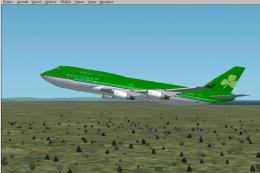
Aer Lingus Boeing 747-200 EI-BED brings classic Irish long-haul style to Microsoft Flight Simulator 2004 with the Project Open Sky wide-body model, accurate Aer Lingus textures, and period-correct details. Expect a lively virtual cockpit, reflective exterior, wing flex, animated gear and doors, night lighting, and flight dynamics tuned for convincing transatlantic operations.
 Rate
Rate
Experience the Irish flag carrier’s iconic wide-body operations with this freeware Boeing 747-200 EI-BED, released for Microsoft Flight Simulator 2004. This complete package features a high-fidelity base model by Project Open Sky, complemented by a carefully developed Aer Lingus livery from Rene Bruun. It brings authentic visual fidelity and precise handling to virtual transatlantic routes, reflecting the era when Aer Lingus maintained a distinguished long-haul presence with the 747 series.
The Boeing 747-200 is a classic variant of the renowned “Queen of the Skies.” Powered by four high-bypass turbofan engines, it introduced enhanced range capabilities that were central to Aer Lingus transatlantic flights in previous decades. This specific repaint depicts EI-BED, incorporating subtle livery details that reference the airline’s strategic operations across North America from its Dublin hub.
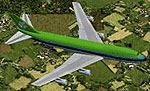
Visual rendering of the Aer Lingus Boeing 747-200 at cruising altitude.
Model by: Project Open Sky
Livery by: Rene Bruun
Model Designers: C. Vincent Cho, Yosuke Ube
Flight Dynamics Designer: Nick Peterson
FDE Advisors: Warren C, Daniel, Simon Ng Hin Tat
Quality Control: Simon Ng Hin Tat
Testing: Project Open Sky Members
Master Textures: C. Vincent Cho, Yosuke Ube
Painted by: Steve Drabek & Daniel Halpern
Aer Lingus historically utilized the Boeing 747 to serve various intercontinental destinations, marking its transition into wide-body long-haul service. This painting captures the trademark green tail and fuselage elements, providing enthusiasts with a nostalgic view into the airline’s legacy fleet.
For enhanced realism, this model supports specialized animations:
All these functional details highlight the meticulous effort invested by Project Open Sky and the repaint developers. This freeware release is an excellent showcase of the Boeing 747-200 and its significance within Aer Lingus operations, now ready to enhance your virtual flights on Fly Away Simulation.
Free for all simmers · 2.86 MB · Scanned clean Oct 2026
Download speed: Free tier is capped at 0.5 Mbps. PRO members download at full line speed.
FS9\Aircraft\, FS9\Addon Scenery\, FS9\Gauges\, or FS9\Effects\.readme.txt or README file. It tells you exactly where files go, what dependencies are needed, and any quirks specific to this add-on.The archive psr7471.zip has 37 files and directories contained within it.
This list displays the first 500 files in the package. If the package has more, you will need to download it to view them.
| Filename/Directory | File Date | File Size |
|---|---|---|
| 747-200FPW.air | 03.05.04 | 10.30 kB |
| Aircraft.cfg | 06.04.04 | 13.78 kB |
| Project Shamrock.txt | 06.04.04 | 161 B |
| readme742.txt | 04.06.04 | 2.85 kB |
| texture.ein | 06.04.04 | 0 B |
| posky_tire1.bmp | 02.19.04 | 257.05 kB |
| posky_tire2.bmp | 02.19.04 | 257.05 kB |
| posky_tire3.bmp | 01.19.03 | 64.07 kB |
| posky742_bodyl_L.bmp | 06.03.04 | 1.00 MB |
| posky742_bodyl_t.bmp | 06.03.04 | 1.00 MB |
| posky742_bodyr_L.bmp | 06.03.04 | 1.00 MB |
| posky742_bodyr_t.bmp | 06.03.04 | 1.00 MB |
| posky742_cargo_interior_L.bmp | 10.13.02 | 64.06 kB |
| posky742_cargo_interior_t.bmp | 12.11.02 | 1.00 MB |
| posky742_doors_l.bmp | 01.01.03 | 1.00 MB |
| posky742_doors_t.bmp | 06.04.04 | 1.33 MB |
| posky742_eng_JT9D_l.bmp | 04.04.04 | 1.00 MB |
| posky742_eng_JT9D_t.bmp | 04.24.04 | 1.00 MB |
| posky742_gear_l.bmp | 10.14.02 | 64.07 kB |
| posky742_gear_t.bmp | 08.14.02 | 128.08 kB |
| posky742_misc_l.bmp | 01.01.03 | 1.00 MB |
| posky742_misc_t.bmp | 04.04.04 | 1.00 MB |
| posky742_pax_interior_t.bmp | 12.29.03 | 682.75 kB |
| posky742_vertical_l.bmp | 09.28.02 | 256.07 kB |
| posky742_vertical_t.bmp | 06.03.04 | 256.07 kB |
| posky742_window_L.bmp | 09.27.02 | 17.05 kB |
| posky742_window_t.bmp | 09.09.02 | 170.75 kB |
| posky742_wingbottom_l.bmp | 12.30.02 | 64.06 kB |
| posky742_wingbottom_t.bmp | 03.20.04 | 4.00 MB |
| posky742_wingtop_l.bmp | 12.31.02 | 1.00 MB |
| posky742_wingtop_t.bmp | 05.28.03 | 4.00 MB |
| posky742fan.bmp | 03.20.04 | 17.07 kB |
| posky742fanfast.bmp | 03.20.04 | 17.07 kB |
| posky747cabina1.bmp | 12.30.03 | 682.75 kB |
| Thumbs.db | 04.26.04 | 201.00 kB |
| flyawaysimulation.txt | 10.29.13 | 959 B |
| Go to Fly Away Simulation.url | 01.22.16 | 52 B |
Only PRO members can place votes.
More FS2004 add-ons hand-picked based on this download.
FS2004 Civil Jet Aircraft
This freeware package features Aer Lingus’s Boeing 747-400 registration EI-DF…
 FS2004 Civil Jet Aircraft
Model by FSPainter. Repaint by Rene Bruun. Screenshot of Aer Lingus Boeing 77…
 FS2004 Civil Jet Aircraft
Experience Aer Lingus colors on a fully realized Boeing 767-400 that blends h…
 FS2004 Civil Jet Aircraft
Model by FFX. Repainted by Rene Bruun. Screenshot of Aer Lingus Boeing 737-50…
 FS2004 Civil Jet Aircraft
Textures only; requires KH737800.ZIP Model by Kittyhawk Productions. Livery b…
 FS2004 Civil Jet Aircraft
Textures only. Model by iFDG. Painted by Rene Bruun. Screenshot of Aer Lingus…
 FS2004 Civil Jet Aircraft
Textures only. Model by Melvin Rafi. Livery by Rene Bruun. Screenshot of Aer …
 FS2004 Civil Jet Aircraft
Aer Lingus Boeing 737-800NG, registration EI-DCC (fictional), "St. Michael". …
Be the first to leave a comment on this download.
Be the first to share your thoughts on this download.