

 FS2004 Civil Jet Aircraft
Air Canada Boeing 757-200
This B757-200 has been painted with the new Air Canada scheme, even though th…
Air Greenland’s Boeing 757-200 repaint brings crisp red markings and accurate tail branding to AI traffic, tuned for smooth visuals across lighting angles and camera views in Microsoft Flight Simulator 2004. Textures integrate cleanly with the AI Aardvark 757-200 model and require AIAFS9UP.ZIP for the aircraft base.
 Rate
Rate
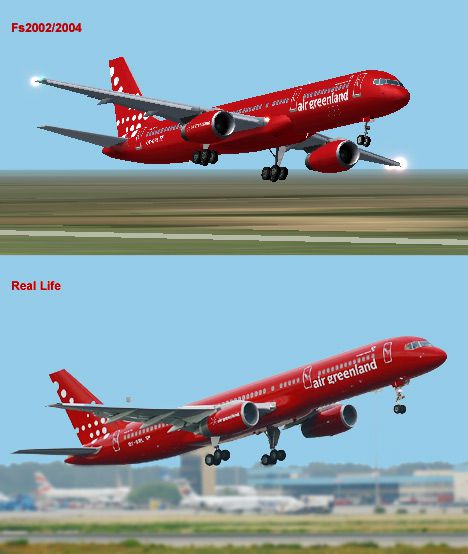
This freeware repaint offers a fresh presentation of Air Greenland’s Boeing 757-200, exclusively for Microsoft Flight Simulator 2004. Designed to enhance AI traffic realism, it incorporates vibrant airline markings and accurate color schemes. The included texture set merges seamlessly with the well-regarded AI Aardvark model, resulting in a precise visual match for enthusiasts seeking an authentic experience.
This repaint is meticulously crafted by Rasmus Riemann, capturing the bold Air Greenland branding in every detail. The underlying aircraft model, developed by AI Aardvark, must be obtained separately through the file AIAFS9UP.ZIP. Once integrated, this livery conveys the airline’s unique cultural flair while respecting the standard aerodynamic outlines of the Boeing 757-200.
Boeing’s 757 line was introduced as a narrow-body, twin-engine solution for medium-range operations. Air Greenland adopted this type to handle distinct routes, including those serving remote parts of Greenland. The airline has made the most of the 757’s efficient design, leveraging short-field performance and reliable powerplants to handle the challenging terrain and weather conditions prevalent in the region.
In this livery, the fuselage boasts the iconic red exterior with the trademark insignia carefully placed for optimum realism. Specific attention is paid to the tail fin, ensuring authentic curvature alignment and symbol placement. Each texture file is tailored to deliver a high-quality finish under varying light conditions and angles within the simulator environment.
Because these are textures only, install them into the AI Aardvark Boeing 757-200 folder after downloading AIAFS9UP.ZIP from the Fly Away Simulation mod library. The texture configuration entries must be added to the aircraft configuration file, matching proper titles and texture folder references.
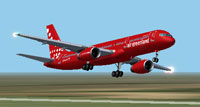
Screenshot showcasing Air Greenland Boeing 757-200 in flight.
This repaint captures the hallmark charm of Air Greenland’s 757 operations, bringing color and authenticity to busy virtual airports. Rasmus Riemann and AI Aardvark have collaborated to ensure smooth AI performance while preserving realistic clarity in all simulator camera views. Flight simulation enthusiasts eager for Greenlandic visuals will find this livery a notable addition to their hangar.
Free for all simmers · 223.59 KB · Scanned clean Oct 2026
Download speed: Free tier is capped at 0.5 Mbps. PRO members download at full line speed.
This file is a repaint — the package below is the base model it paints onto. Install it first, or the textures will have nothing to load onto.
FS9\Aircraft\, FS9\Addon Scenery\, FS9\Gauges\, or FS9\Effects\.readme.txt or README file. It tells you exactly where files go, what dependencies are needed, and any quirks specific to this add-on.The archive aia75agr.zip has 7 files and directories contained within it.
This list displays the first 500 files in the package. If the package has more, you will need to download it to view them.
| Filename/Directory | File Date | File Size |
|---|---|---|
| aia_757_200_rr_l.bmp | 02.22.03 | 256.07 kB |
| aia_757_200_rr_t.bmp | 06.11.04 | 1.00 MB |
| texture.gre | 06.11.04 | 0 B |
| airgreenland_big.jpg | 06.11.04 | 72.28 kB |
| readme.txt | 06.11.04 | 385 B |
| flyawaysimulation.txt | 10.29.13 | 959 B |
| Go to Fly Away Simulation.url | 01.22.16 | 52 B |
Only PRO members can place votes.
More FS2004 add-ons hand-picked based on this download.
FS2004 Civil Jet Aircraft
This B757-200 has been painted with the new Air Canada scheme, even though th…
 FS2004 Civil Jet Aircraft
Two repaints, textures only, of the AI Aardvark B757-200 RR in both the old a…
 FS2004 Civil Jet Aircraft
Model by Project Open Sky. Repaint by Brian Williams. Screenshot of Guyana Ai…
 FS2004 Civil Jet Aircraft
Features dynamic shine, wingview, opening doors and cargo doors and all movin…
 FS2004 Civil Jet Aircraft
The FS2004 Air Tahiti Nui Boeing 757-200 add-on offers texture replacements c…
 FS2004 Civil Jet Aircraft
An Air Santo Domingo Boeing 757-200 designed for AI traffic. Textures only. F…
 FS2004 Civil Jet Aircraft
This comprehensive freeware package introduces an Air 2000 Boeing 757-200 in …
 FS2004 Civil Jet Aircraft
Very detailed livery, includes full dirt effects, dynamic shine, reflections,…
Be the first to leave a comment on this download.
Be the first to share your thoughts on this download.