

 FS2004 Civil Jet Aircraft
Continental Boeing 737-800
Boeing 737-800 with and without winglets. Model by Kittyhawk Productions. Scr…
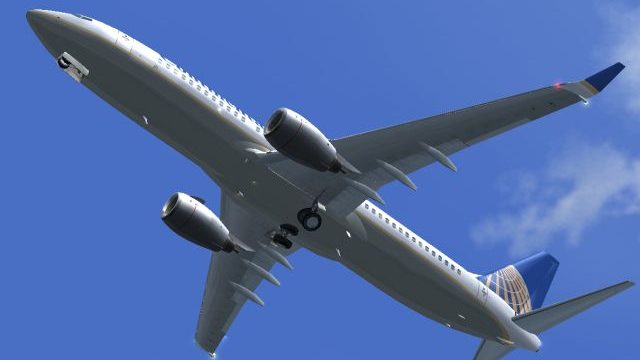
Continental Airlines Boeing 737-800W for FS2004 brings a crisp Pericles Maranhao Neto repaint to Kittyhawk’s model, with fully animated moving parts such as flaps, spoilers, doors, reverse thrust, and an opening engine. It’s built for smooth day-to-day airline flying and includes the effects needed for a lively, detailed virtual cockpit experience.
 Rate
Rate
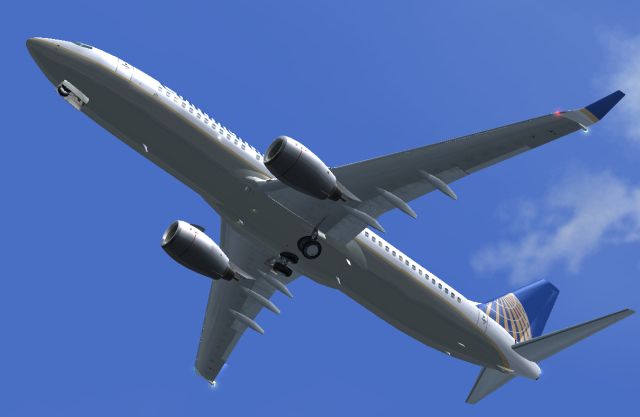
Features full moving parts including, but not limited to, engines (engine also opens), flaps, spoilers, doors, and reverse thrusts. Model by Kittyhawk. Livery by Pericles Maranhao Neto.

Screenshot of Continental Airlines Boeing 737-800 in flight.
This is a Continental Airlines 737-800W plane painted by Pericles Maranhao Neto. It has been tested for FS2004, but should also work with FS2002. Pericles is NOT responsible to any harm caused to any computer while this packet is being handled in any way. If you installed everything correctly then it didn't harm your computer. If you think it did, think again.
Installation instructions: Simply move the "Continental Boeing 737-800W Kittyhawk" folder direct to your FS9/Aircrafts folder, and open the folder to find the "effects" folder. Move all contents in the effects folder to your FS/Effects folder. Now close FS if it was running when you did so. Start FS (again?), and it should be under Boeing > 737-800W > Continental Airlines.
Free for all simmers · 1.65 MB · Scanned clean Oct 2026
Download speed: Free tier is capped at 0.5 Mbps. PRO members download at full line speed.
FS9\Aircraft\, FS9\Addon Scenery\, FS9\Gauges\, or FS9\Effects\.readme.txt or README file. It tells you exactly where files go, what dependencies are needed, and any quirks specific to this add-on.The archive cont_738.zip has 32 files and directories contained within it.
This list displays the first 500 files in the package. If the package has more, you will need to download it to view them.
| Filename/Directory | File Date | File Size |
|---|---|---|
| ReadMe.txt | 08.15.04 | 1.10 kB |
| 737800.air | 03.27.04 | 8.40 kB |
| aircraft.cfg | 08.15.04 | 13.58 kB |
| effects | 08.15.04 | 0 B |
| B738_BCNL.fx | 05.20.03 | 1.16 kB |
| B738_BCNU.fx | 05.20.03 | 3.13 kB |
| B738_STROBE.fx | 05.20.03 | 3.46 kB |
| B738_vclight.fx | 05.20.03 | 1.30 kB |
| B738wing.fx | 05.20.03 | 1.15 kB |
| model | 08.15.04 | 0 B |
| B737_800W.mdl | 03.21.04 | 1.62 MB |
| model.cfg | 03.21.04 | 26 B |
| panel | 08.15.04 | 0 B |
| panel.cfg | 03.28.04 | 30 B |
| sound | 08.15.04 | 0 B |
| sound.cfg | 03.28.04 | 31 B |
| texture | 08.15.04 | 0 B |
| 737_B_L.BMP | 08.15.04 | 256.07 kB |
| 737_B_T.BMP | 08.15.04 | 1.00 MB |
| 737INTERIOR_L.bmp | 03.18.04 | 256.07 kB |
| 737INTERIOR_T.BMP | 08.15.04 | 1.00 MB |
| 738_FUSE_L.BMP | 08.15.04 | 256.07 kB |
| 738_FUSE_T.BMP | 08.15.04 | 1.00 MB |
| ENGINES_L.BMP | 08.15.04 | 256.07 kB |
| ENGINES_T.BMP | 08.15.04 | 1.00 MB |
| WINGLET_L.bmp | 08.15.04 | 16.07 kB |
| WINGLET_T.BMP | 08.15.04 | 256.07 kB |
| WINGS_L.bmp | 08.15.04 | 256.07 kB |
| WINGS_T.BMP | 08.15.04 | 1.00 MB |
| Screenshot.jpg | 08.15.04 | 82.23 kB |
| flyawaysimulation.txt | 10.29.13 | 959 B |
| Go to Fly Away Simulation.url | 01.22.16 | 52 B |
Only PRO members can place votes.
More FS2004 add-ons hand-picked based on this download.
FS2004 Civil Jet Aircraft
Boeing 737-800 with and without winglets. Model by Kittyhawk Productions. Scr…
 FS2004 Civil Jet Aircraft
Textures for Kittyhawk's B737-800, winglet textures have been included for th…
 FS2004 Civil Jet Aircraft
Original by Kittyhawk Productions. Model by Erick Cantu. Model assistance by …
 FS2004 Civil Jet Aircraft
N10323. Features: -Accurate details of the real bird -Handpainted textures wi…
 FS2004 Civil Jet Aircraft
This freeware repaint brings the Continental Airlines theme to the default Bo…
 FS2004 Civil Jet Aircraft
Original by Kittyhawk Productions. Model by Erick Cantu. Model assistance by …
 FS2004 Civil Jet Aircraft
For AI. A repaint of the David Rawlins/AI Aardvark B737-300 in the current co…
 FS2004 Civil Jet Aircraft
This is a repaint of the default Boeing 747-400 in Continental Airlines liver…
Be the first to leave a comment on this download.
Be the first to share your thoughts on this download.