


 FS2004 Propeller Aircraft
MAAM-Sim Douglas DC-3 Prop Tip
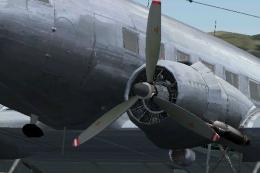
MAAM-Sim Douglas DC-3/C-47 red/white propeller tips update. Textures only. By…
MAAM-Sim Douglas DC-3 and R4D-6 prop textures bring airline-accurate spinner and blade colors to repaints in FS2004, replacing the default red-white-blue tips. Four matched options cover red, orange, white, and bare metal looks for classic carriers, and the set requires the MAAM passenger model for consistent visuals in the virtual cockpit and exterior.
 Rate
Rate
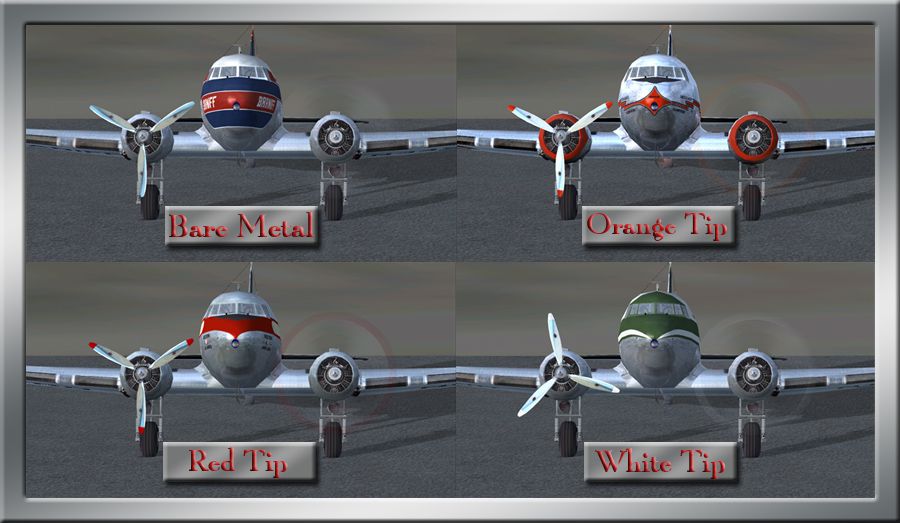
These files are prop replacement textures for the MAAM R4D6/DC3 passenger model to be used for various airlines when installing repaints. Instead of having a red, white and blue tipped prop now you can have an accurate looking prop that matches the correct colors that were used. Includes these choices: red (like used by TWA and Western), orange (AA), white (like Allegheny Air), and bare metal (like Eastern, Braniff, Delta, etc.) prop textures. By Chuck Lawsen.
Image showing four different prop textures.
Installation:
To change the props for your favorite DC3 airliner, just choose from one of the four folders (red, orange, white, or bare) and copy paste the 2 files (A_spinprop & b25_propblade_t) to your add on repaint folder.
Note: I've tested this texture set using the entry above and all displayed and operated normally on my PC. Use at your own risk. I take no responsibility for any harm to your PC or files claimed due to their use.
That's it, you're good to go!
Free for all simmers · 382.17 KB · Scanned clean Oct 2026
Download speed: Free tier is capped at 0.5 Mbps. PRO members download at full line speed.
FS9\Aircraft\, FS9\Addon Scenery\, FS9\Gauges\, or FS9\Effects\.readme.txt or README file. It tells you exactly where files go, what dependencies are needed, and any quirks specific to this add-on.The archive fs9_maam_dc3_props.zip has 17 files and directories contained within it.
This list displays the first 500 files in the package. If the package has more, you will need to download it to view them.
| Filename/Directory | File Date | File Size |
|---|---|---|
| Bare metal | 11.26.09 | 0 B |
| A_spinprop.bmp | 01.07.09 | 85.43 kB |
| b25_propblade_t.bmp | 01.06.09 | 85.43 kB |
| Orange tip | 11.26.09 | 0 B |
| A_spinprop.bmp | 07.10.05 | 64.07 kB |
| b25_propblade_t.bmp | 01.06.09 | 64.07 kB |
| readme.txt | 11.26.09 | 1004 B |
| Red Tip | 11.26.09 | 0 B |
| A_spinprop.bmp | 01.06.09 | 64.07 kB |
| b25_propblade_t.bmp | 09.23.09 | 64.07 kB |
| Various tip colors.jpg | 11.26.09 | 232.12 kB |
| White tip | 11.26.09 | 0 B |
| A_spinprop.bmp | 01.07.09 | 85.43 kB |
| b25_propblade_t.bmp | 01.07.09 | 64.07 kB |
| FS9_DC3_Props | 11.26.09 | 0 B |
| flyawaysimulation.txt | 10.29.13 | 959 B |
| Go to Fly Away Simulation.url | 01.22.16 | 52 B |
Only PRO members can place votes.
More FS2004 add-ons hand-picked based on this download.
FS2004 Propeller Aircraft
MAAM-Sim Douglas DC-3/C-47 red/white propeller tips update. Textures only. By…
 FS2004 Propeller Aircraft
This self-installing patch corrects several issues found after release of the…
 FS2004 Propeller Aircraft
MAAM-SIM DC-3 Fuel Tank Selection and autolean modification. This gauge is ap…
 FS2004 Propeller Aircraft
A repaint of the MAAM-SIM passenger Douglas DC-3 in a specially commissioned …
 FS2004 Propeller Aircraft
A repaint of the MAAM-SIM passenger DC3 in a specially commissioned livery fo…
 FS2004 Propeller Aircraft
Replacement prop texture for Greg Pepper's Boeing KC-97E and KC-97G tankers. …
 FS2004 Propeller Aircraft
Boeing B377 Prop Textures for various civilian B-377's. Requires KC97EPRP.ZIP…
 FS2004 Propeller Aircraft
The default Microsoft DC3 prop bitmap has been adjusted to make it a little m…
Be the first to leave a comment on this download.
Be the first to share your thoughts on this download.