

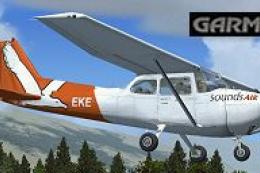
 FSX General Aviation Aircraft
Sounds Air Cessna 172 ZK-EKE W/Garmin 1000
This freeware repaint exhibits the ZK-EKE registration markings of Sounds Air…
Sounds Air’s Cessna 172 ZK-EKE livery brings an authentic New Zealand regional look to the default Skyhawk with crisp fuselage markings and accurate tail colors for realistic screenshots and training flights. Built for Microsoft Flight Simulator X, it provides textures only and requires the default C172 base model.
 Rate
Rate
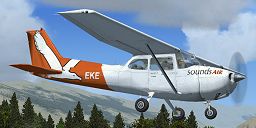
This repaint package showcases a Sounds Air Cessna 172 registration ZK-EKE exclusively for the default Cessna 172 in Microsoft Flight Simulator X. It is a textures-only release created by Jon Murchison, and it replicates the real-world scheme worn by an aircraft in the Sounds Air fleet. This freeware add-on requires the base model, which can be acquired in the Fly Away Simulation mod library.
Jon Murchison has meticulously recreated the Sounds Air livery, capturing the distinctive styling and coloration with precision. The actual airline, Sounds Air, operates regional flights across New Zealand, often relying on smaller aircraft like the famed Cessna 172 due to their reliability and straightforward handling. In this rendition, you will notice careful paintwork on the fuselage and empennage—a unique touch that adds realism for those seeking authentic flight sim missions.

Screenshot of Sounds Air Cessna 172 ZK-EKE in flight.
The Cessna 172, first introduced in the mid-1950s, remains one of the most widespread single-engine aircraft in existence, used extensively by training schools and recreational enthusiasts worldwide. Thanks to its stable profile, robust landing gear, and tricycle configuration, pilots often appreciate it for cross-country journeys and proficiency building. In commercial and charter contexts like Sounds Air, this platform consistently proves its worth.
[fltsim.x]

title=Cessna Skyhawk 172SP ZK-EKE 'Sounds Air'

sim=Cessna172SP

model=

panel=

sound=

texture=SOUNDS

kb_checklists=Cessna172SP_check

kb_reference=Cessna172SP_ref

atc_id=EKE

ui_manufacturer="ARNZ"

ui_type="C172SP Skyhawk"

ui_variation="Sounds Air - ZK-EKE"

ui_typerole="Single Engine Prop"

ui_createdby="ARNZ"

description="A stable and dependable plane, the Cessna 172 has seen many pilots through their initial training hours. Introduced in 1955, it has become one of the most commonly produced single-engine aircraft worldwide. Its easy handling characteristics and steady performance design have ensured that it remains a preferred option for flight schools, charter operations, and private ownership across the globe."
Please remember that this file comprises paints for the default C172 model in Microsoft Flight Simulator X only. If you have not yet obtained the freeware base package, consult the Fly Away Simulation mod library to find the relevant download. For those seeking even more immersion, keep in mind that exterior textures go a long way in enhancing flight simulation realism, particularly when exploring dynamic regions like New Zealand’s scenic landscapes.
Enjoy the refined look of ZK-EKE in your sim, and credit goes to Jon Murchison for crafting this accurate Sounds Air repaint. Safe flying!
Free for all simmers · 694.39 KB · Scanned clean Oct 2026
Download speed: Free tier is capped at 0.5 Mbps. PRO members download at full line speed.
texture.{airline}) inside FSX\SimObjects\Airplanes\{base-aircraft}\.aircraft.cfg in Notepad. Add a new [fltsim.X] section per the readme.readme.txt or README file. It tells you exactly where files go, what dependencies are needed, and any quirks specific to this add-on.The archive zk_eke.zip has 7 files and directories contained within it.
This list displays the first 500 files in the package. If the package has more, you will need to download it to view them.
| Filename/Directory | File Date | File Size |
|---|---|---|
| C172_T.dds | 06.15.07 | 1.00 MB |
| texture.cfg | 08.14.06 | 137 B |
| thumbnail.jpg | 06.17.07 | 30.70 kB |
| texture.SOUNDS | 06.17.07 | 0 B |
| README_INSTALL.txt | 06.17.07 | 2.33 kB |
| flyawaysimulation.txt | 10.29.13 | 959 B |
| Go to Fly Away Simulation.url | 01.22.16 | 52 B |
Only PRO members can place votes.
More FSX & P3D add-ons hand-picked based on this download.
FSX General Aviation Aircraft
This freeware repaint exhibits the ZK-EKE registration markings of Sounds Air…
 FSX General Aviation Aircraft
Experience a uniquely detailed Wanganui Aeroclub Air livery for the classic C…
 FSX General Aviation Aircraft
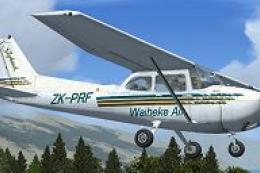
This repaint introduces a new Waiheke Air livery for the default FSX Cessna 1…
 FSX General Aviation Aircraft
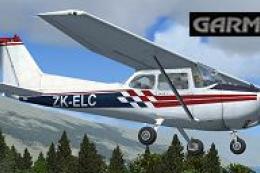
Enhance your general aviation adventures with this unique paint scheme for th…
 FSX General Aviation Aircraft
This repaint package delivers a fresh look for the default Cessna 172 in Micr…
 FSX General Aviation Aircraft
This repaint presents a meticulous texture set for the default Cessna 172 in …
 FSX General Aviation Aircraft
This freeware repaint introduces a customized Wanganui Aeroclub livery specif…
 FSX General Aviation Aircraft
This freeware repaint brings the Ardmore Aerodrome-inspired Cessna 172 ZK-JRA…
Read what other simmers think, or add your own.
