

 FSX General Aviation Aircraft
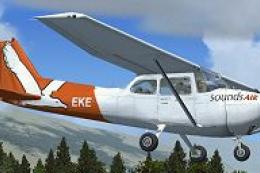
Sounds Air Cessna 172 ZK-EKE
This repaint package showcases a Sounds Air Cessna 172 registration ZK-EKE ex…
Sounds Air’s ZK-EKE Cessna 172 livery brings a crisp New Zealand regional look to the default Skyhawk, paired with a Garmin 1000-style virtual cockpit layout for a modern glass-panel feel in Microsoft Flight Simulator X. Includes exterior textures with refined markings and paintwork, and requires the matching base aircraft files.
 Rate
Rate
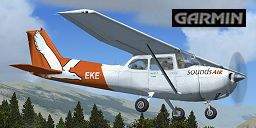
This freeware repaint exhibits the ZK-EKE registration markings of Sounds Air, featuring a Garmin 1000 panel upgrade on a well-known single-engine platform. Built exclusively for the default Skyhawk within Microsoft Flight Simulator X, it incorporates realistic color schemes and detail refinements. This package includes only the visual textures, developed by Jon Murchison, and requires the corresponding default aircraft files. You will need the freeware base model from the Fly Away Simulation mod library to activate this repaint.
Sounds Air is recognized as a regional operator in New Zealand, and this rendering captures their signature aesthetics in a subtle yet elegant manner. The distinctive markings are placed along the fuselage, door panels, and tail section, giving flight enthusiasts an immersive look at how the original aircraft would appear in reality. The Cessna 172 itself, first flown in 1955, remains among the most trusted flight training and touring aircraft worldwide thanks to its uncomplicated avionics and stable handling.

Screenshot featuring the customized exterior in-flight.
This repaint provides a crisp finish across the fuselage and wings. Equipped with a Garmin 1000 integrated avionics suite in the cockpit, it enhances situational awareness for simulation pilots. The Garmin 1000 system (referred to as the G1000) consolidates flight information, engine metrics, and navigation data into two primary displays, making it easier to monitor flight parameters when practicing instrument approaches or maintaining standard cruise settings. While the avionics in this revision are purely aesthetic, they faithfully represent the real-world glass panel layout.
...\SimObjects\Airplanes\C172.[fltsim.x]
title=Cessna Skyhawk 172SP ZK-EKE 'Sounds Air' G1000
sim=Cessna172SP
model=G1000
panel=G1000
sound=
texture=G1000_SOUNDS
kb_checklists=Cessna172SP_check
kb_reference=Cessna172SP_ref
atc_id=ZK-EKE
ui_manufacturer="ARNZ"
ui_type="C172SP Skyhawk"
ui_variation="ZK-EKE 'Sounds Air G1000"
ui_typerole="Single Engine Prop"
ui_createdby="ARNZ"
description="A stable and highly regarded aircraft, it has become the preferred choice for training and recreational flying. The C172 stands out with its exceptional reliability, straightforward controls, and updates to its basic tricycle-gear design over decades of continuous production."
The C172 design incorporates a high-wing configuration and simplified landing gear, contributing to predictable flight responses. Many student pilots across the globe have clocked their initial hours in variations of this robust airframe. Coupled with the G1000 layout, it offers both traditional familiarity and advanced navigational capability.
Textures are by Jon Murchison. Enjoy this accurate depiction of a local airline’s livery and expand your virtual routes in Microsoft Flight Simulator X flying under ZK-EKE.
Free for all simmers · 2.57 MB · Scanned clean Oct 2026
Download speed: Free tier is capped at 0.5 Mbps. PRO members download at full line speed.
texture.{airline}) inside FSX\SimObjects\Airplanes\{base-aircraft}\.aircraft.cfg in Notepad. Add a new [fltsim.X] section per the readme.readme.txt or README file. It tells you exactly where files go, what dependencies are needed, and any quirks specific to this add-on.The archive eke_1k.zip has 12 files and directories contained within it.
This list displays the first 500 files in the package. If the package has more, you will need to download it to view them.
| Filename/Directory | File Date | File Size |
|---|---|---|
| C172_1_C.dds | 09.04.06 | 682.79 kB |
| C172_1_night_C.dds | 09.04.06 | 682.79 kB |
| C172_2_C.dds | 09.04.06 | 682.79 kB |
| C172_2_night_C.dds | 09.04.06 | 682.79 kB |
| C172_Interior_T.dds | 09.04.06 | 341.45 kB |
| C172_T.dds | 06.15.07 | 1.00 MB |
| texture.cfg | 08.14.06 | 137 B |
| thumbnail.jpg | 06.17.07 | 31.90 kB |
| texture.G1000_SOUNDS | 06.17.07 | 0 B |
| README_INSTALL.txt | 06.17.07 | 2.39 kB |
| flyawaysimulation.txt | 10.29.13 | 959 B |
| Go to Fly Away Simulation.url | 01.22.16 | 52 B |
Only PRO members can place votes.
More FSX & P3D add-ons hand-picked based on this download.
FSX General Aviation Aircraft
This repaint package showcases a Sounds Air Cessna 172 registration ZK-EKE ex…
 FSX General Aviation Aircraft
Enhance your general aviation adventures with this unique paint scheme for th…
 FSX General Aviation Aircraft
This repaint package delivers a fresh look for the default Cessna 172 in Micr…
 FSX General Aviation Aircraft
Experience a uniquely detailed Wanganui Aeroclub Air livery for the classic C…
 FSX General Aviation Aircraft
This repaint introduces a new Waiheke Air livery for the default FSX Cessna 1…
 FSX General Aviation Aircraft
This repaint presents a meticulous texture set for the default Cessna 172 in …
 FSX General Aviation Aircraft
This freeware repaint introduces a customized Wanganui Aeroclub livery specif…
 FSX General Aviation Aircraft
This freeware repaint brings the Ardmore Aerodrome-inspired Cessna 172 ZK-JRA…
Be the first to leave a comment on this download.
Be the first to share your thoughts on this download.