

 FSX General Aviation Aircraft
Ardmore Aerodrome Cessna 172 ZK-JRA W/Garmin 1000
This repaint package delivers a fresh look for the default Cessna 172 in Micr…
Cessna 172 ZK-JRA brings an Ardmore Aerodrome training look to the default Skyhawk with crisp New Zealand registration markings and carefully matched exterior textures for believable local circuits and cross-country flights in Microsoft Flight Simulator X. It requires the stock C172 base model and complements the virtual cockpit with authentic ramp presence.
 Rate
Rate
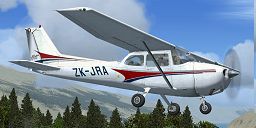
This freeware repaint brings the Ardmore Aerodrome-inspired Cessna 172 ZK-JRA to Microsoft Flight Simulator X. Created by Jon Murchison, it applies detailed exterior graphics over the default C172 model, reflecting a trainer frequently seen in New Zealand's busy aviation hub. It is designed to enhance visual realism for sim aviation enthusiasts who enjoy flying in and around Ardmore Aerodrome.
This repaint showcases a vivid livery modeled after an actual aircraft configuration used for flight training. The exterior scheme features precise markings that pay homage to the real-world ZK-JRA registration, a registration commonly encountered on Cessnas operating around Ardmore. Designers Jon Murchison and his team developed this texture set to incrementally enhance the aircraft's authenticity, capturing the recognizable nature of a trainer you might see in New Zealand’s skies.

Screenshot of Ardmore Aerodrome Cessna 172 in the air.
Please note that this add-on only includes texture files. The base aircraft originates from the default fleet within FSX. However, if you do not have it, the freeware Cessna 172 model can be obtained from the Fly Away Simulation mod library. Integrating this repaint requires a quick manual installation, with no external modifications affecting any aircraft handling characteristics.
[fltsim.x]

title=Cessna Skyhawk 172SP ZK-JRA

sim=Cessna172SP

model=

panel=

sound=

texture=JRA

kb_checklists=Cessna172SP_check

kb_reference=Cessna172SP_ref

atc_id=JRA

ui_manufacturer="ARNZ"

ui_type="C172SP Skyhawk"

ui_variation="JRA"

ui_typerole="Single Engine Prop"

ui_createdby="ARNZ"

description="A stable and trustworthy plane, most pilots have logged at least a few hours in a Cessna 172, since it's the most widely available aircraft in the rental fleet, and is used by most flight schools. Since the first prototype was completed in 1955, more than 35,000 C172s have been produced, making it the world's most popular single-engine plane. One of Cessna's first tricycle-gear airplanes, the 172 quickly became the favorite of a growing class of business pilots. Its reliability and easy handling (along with thoughtful engineering and structural updates) have ensured its continued popularity for decades."
Recognized globally for its dependable flight characteristics, the C172 remains a top choice among training facilities. Its stable handling and robust design suit new student pilots and experienced hobbyists alike. Ardmore Aerodrome, known for its vast general aviation activity, is a hub where the Cessna 172 is often seen refining a pilot’s foundational skills. This livery brings that training environment closer to your simulation cockpit, capturing the same visual style that flight instructors and learners depend upon.
All credit for this repaint belongs to Jon Murchison. Install, explore, and enjoy flying around your favorite virtual airports in this meticulously rendered trainer skin.
Free for all simmers · 699.39 KB · Scanned clean Oct 2026
Download speed: Free tier is capped at 0.5 Mbps. PRO members download at full line speed.
texture.{airline}) inside FSX\SimObjects\Airplanes\{base-aircraft}\.aircraft.cfg in Notepad. Add a new [fltsim.X] section per the readme.readme.txt or README file. It tells you exactly where files go, what dependencies are needed, and any quirks specific to this add-on.The archive zk_jra.zip has 7 files and directories contained within it.
This list displays the first 500 files in the package. If the package has more, you will need to download it to view them.
| Filename/Directory | File Date | File Size |
|---|---|---|
| C172_T.dds | 06.14.07 | 1.00 MB |
| texture.cfg | 08.14.06 | 137 B |
| thumbnail.jpg | 06.17.07 | 29.92 kB |
| texture.JRA | 06.17.07 | 0 B |
| README_INSTALL.txt | 06.17.07 | 2.30 kB |
| flyawaysimulation.txt | 10.29.13 | 959 B |
| Go to Fly Away Simulation.url | 01.22.16 | 52 B |
Only PRO members can place votes.
More FSX & P3D add-ons hand-picked based on this download.
FSX General Aviation Aircraft
This repaint package delivers a fresh look for the default Cessna 172 in Micr…
 FSX General Aviation Aircraft
Enhance your general aviation adventures with this unique paint scheme for th…
 FSX General Aviation Aircraft
This freeware repaint exhibits the ZK-EKE registration markings of Sounds Air…
 FSX General Aviation Aircraft
This repaint package showcases a Sounds Air Cessna 172 registration ZK-EKE ex…
 FSX General Aviation Aircraft
Experience a uniquely detailed Wanganui Aeroclub Air livery for the classic C…
 FSX General Aviation Aircraft
This repaint presents a meticulous texture set for the default Cessna 172 in …
 FSX General Aviation Aircraft
This freeware repaint introduces a customized Wanganui Aeroclub livery specif…
 FSX General Aviation Aircraft
This repaint introduces a new Waiheke Air livery for the default FSX Cessna 1…
Be the first to leave a comment on this download.
Be the first to share your thoughts on this download.