

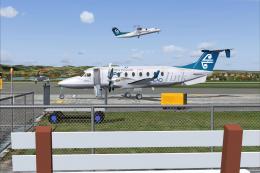
 FS2004 AFCAD Files
AFCAD Pack (Airport) by Leo Pardon
A huge compilation of AFCAD files for various countries and airports compatib…
KAVL Asheville Regional Airport scenery enhances Asheville, North Carolina with five commercial terminal gates, expanded general aviation parking in multiple sizes, and a dedicated military combat ramp for transient traffic. Built for FS2004, it helps populate the field with more realistic airline and GA operations, especially alongside AI traffic packages.
 Rate
Rate
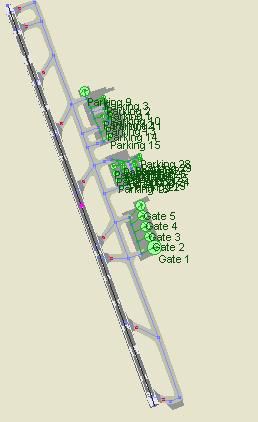
KAVL Asheville Regional Airport, North Carolina (NC) gates and parking. Once again, Microsoft did not include commercial gates with this airport. This adds 5 gates, along with more GA parking. By David Bishop.
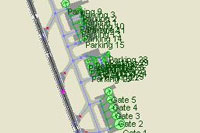
Overview of Asheville Regional Airport.
Once again, FS 2004 did not include commercial gates at KAVL (Asheville, NC Regional Airport). I made 5 gates at the terminal, and put in more than ample GA parking of different sizes. If you have a add-on such as Flight One's Ultimate Traffic (sorry I am biased about this), got to throw in the sales pitch since I was part of the AFCAD design team and a beta tester), you will see immediate commercial AI traffic. I even put in a military combat ramp for the frequent transient military traffic that comes in and out of Asheville. Feel free to share and improve. If you re-post this with improvements, be sure to give me the original credit. Any feedback is appreciated. Watch for other Western North Carolina and East Tennessee airports to come soon. Enjoy.
Free for all simmers · 17.99 KB · Scanned clean Oct 2026
Download speed: Free tier is capped at 0.5 Mbps. PRO members download at full line speed.
FS9\Aircraft\, FS9\Addon Scenery\, FS9\Gauges\, or FS9\Effects\.readme.txt or README file. It tells you exactly where files go, what dependencies are needed, and any quirks specific to this add-on.The archive kavlgat4.zip has 6 files and directories contained within it.
This list displays the first 500 files in the package. If the package has more, you will need to download it to view them.
| Filename/Directory | File Date | File Size |
|---|---|---|
| AF2_KAVL mod.bgl | 10.28.03 | 5.66 kB |
| FILE_ID.DIZ | 10.31.03 | 295 B |
| kavlgates.jpg | 10.31.03 | 33.24 kB |
| readme.txt | 10.31.03 | 817 B |
| flyawaysimulation.txt | 10.29.13 | 959 B |
| Go to Fly Away Simulation.url | 01.22.16 | 52 B |
Only PRO members can place votes.
More FS2004 add-ons hand-picked based on this download.
FS2004 AFCAD Files
A huge compilation of AFCAD files for various countries and airports compatib…
 FS2004 AFCAD Files
Tokyo Narita Airport (RJAA), Japan (not for the default FS2004 airport; detai…
 FS2004 AFCAD Files
An AFCAD2 file for Soekarno-Hatta Airport, Jakarta, Indonesia (WIII) for use …
 FS2004 AFCAD Files
Skopje Airport (LWSK). An AFCAD file for Skopje Petrovec Airport "Aleksandar …
 FS2004 AFCAD Files
An AFCAD2 file for Ngurah Rai Int'l Airport, Denpasar Bali, Indonesia (WRRR),…
 FS2004 AFCAD Files
Chicago O'Hare Int'l Airport (KORD), Illinois (IL). Adds very accurate gate a…
 FS2004 AFCAD Files
NAHA (ROAH). Gates and taxiways for Naha Airport (Japan military and civilian…
 FS2004 AFCAD Files
Schiphol Airport, Amsterdam, the Netherlands (EHAM). Includes landclass and A…
Be the first to leave a comment on this download.
Be the first to share your thoughts on this download.