

 FSX Civil Aircraft
National Air Services Airbus A318 VP-CKS
A repaint for the model by FSX AI Bureau (FAIBA318.ZIP). By Mariano Bonaccors…
National Air Services Airbus A318 livery VP-CKH brings authentic NAS EXPRESS branding to AI traffic, with crisp fuselage and tail textures mapped for realistic ramp and enroute visuals in FSX. It requires the freeware FSX AI Bureau Airbus A318 base model, and includes texture formats suited to both FSX and FS2004 workflows.
 Rate
Rate
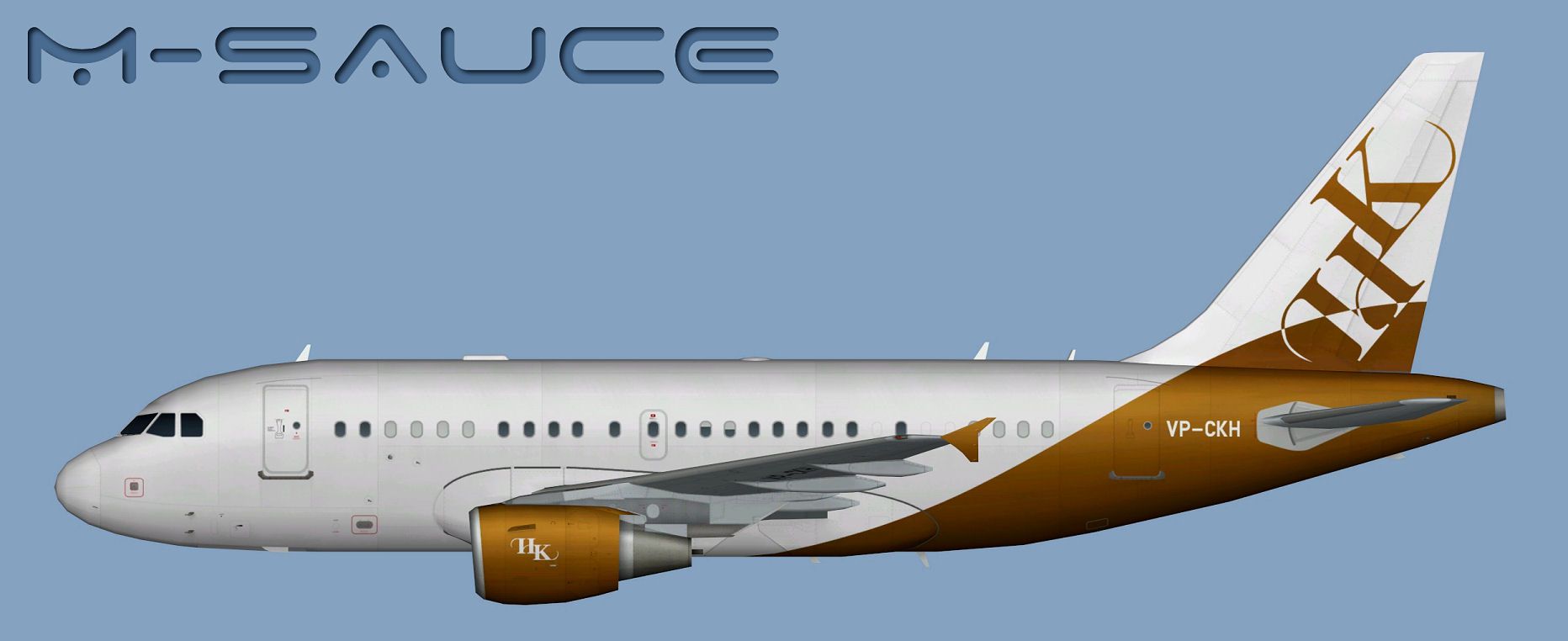
This package delivers a high-quality repaint depicting the National Air Services Airbus A318, registration VP-CKH, designed to enrich AI traffic in FSX. It requires the freeware base model by FSX AI Bureau (FAIBA318.ZIP)—created by the FSX AI Bureau and repainted by Mariano Bonaccorso—to function correctly. The base model itself is not included in this download but is available separately in the Fly Away Simulation library.
This Airbus A318 repaint encompasses the distinctive colors used by National Air Services (known by the call sign NAS EXPRESS). The A318 is the smallest jet in the Airbus A320 family, tailored for short to medium-range operations, and it is favored for its advanced avionics as well as its agility when navigating crowded airspace. With this repaint, the airline’s branding is accurately displayed on the fuselage and tail, reflecting precise texture mapping techniques compatible with FSX.
Side view of National Air Services Airbus A318.
Below is an example reference for the [fltsim] entry you might adapt for your own configuration:
[fltsim.X]
title=AI A318 KNE_VP-CKH
sim=FAIB_A318
model=CFM
texture=KNE_VP-CKH
atc_airline=NAS EXPRESS
atc_id=VP-CKH
atc_parking_codes=KNE
atc_parking_types=RAMP
ui_manufacturer=Airbus
ui_type=A318
ui_variation=National Air Services (OpFor: Al Kholi Establishment)
description=AI Aircraft from FAIB
The main texture folder includes DDS files designed for FSX. An additional folder labeled FS9 carries BMP textures optimized for FS9. These follow the respective SDK recommendations for each simulator platform. If a custom texture format is preferred, rely on the included Targa files to generate alternative image formats without degrading visual fidelity.
This repaint was assembled by Mariano Bonaccorso for the FSX AI Bureau Airbus A318 model. To make use of it, remember to download the freeware base package from the Fly Away Simulation mod library. By incorporating this National Air Services A318, flight simulators will gain a more realistic mid- to short-haul AI operation, especially suitable if you aim to replicate the airline’s real-world schedules and presence.
Free for all simmers · 6.1 MB · Scanned clean Oct 2026
Download speed: Free tier is capped at 0.5 Mbps (this file takes approximately 2 mins at the cap). PRO members download at full line speed.
texture.{airline}) inside FSX\SimObjects\Airplanes\{base-aircraft}\.aircraft.cfg in Notepad. Add a new [fltsim.X] section per the readme.readme.txt or README file. It tells you exactly where files go, what dependencies are needed, and any quirks specific to this add-on.The archive faib_a318_kne_vp-ckh.zip has 12 files and directories contained within it.
This list displays the first 500 files in the package. If the package has more, you will need to download it to view them.
| Filename/Directory | File Date | File Size |
|---|---|---|
| FAIB_A318_CFM_T.dds | 12.08.13 | 5.33 MB |
| FS9 | 12.08.13 | 0 B |
| FAIB_A318_CFM_L.bmp | 12.08.13 | 1.33 MB |
| FAIB_A318_CFM_T.bmp | 12.08.13 | 682.74 kB |
| Targas | 12.08.13 | 0 B |
| FS9_KNE_VP-CKH.tga | 12.08.13 | 4.00 MB |
| KNE_VP-CKH.tga | 12.08.13 | 16.00 MB |
| Installation.txt | 12.08.13 | 1.89 kB |
| Preview.jpg | 12.08.13 | 115.65 kB |
| Thumbnail.png | 12.08.13 | 6.48 kB |
| flyawaysimulation.txt | 10.29.13 | 959 B |
| Go to Fly Away Simulation.url | 01.22.16 | 52 B |
Only PRO members can place votes.
More FSX & P3D add-ons hand-picked based on this download.
FSX Civil Aircraft
A repaint for the model by FSX AI Bureau (FAIBA318.ZIP). By Mariano Bonaccors…
 FSX Civil Aircraft
This repaint features United Parcel Services (UPS) markings on the Airbus A30…
 FSX Civil Aircraft
This package comes with a complete virtual cockpit from the default B747-400.…
 FSX Civil Aircraft
The payware PMDG B777-200 LR as Aeroflot VP-BGE. This file contains a repaint…
 FSX Civil Aircraft
This file contains a repaint only of the payware PMDG B777. This is a fiction…
 FSX Civil Aircraft
Mineralogy textures for the payware Comercial Level Simulations (CLS) MD81. R…
 FSX Civil Aircraft
OJSC Siberia Airlines operating as S7 Airlines is an airline based in Moscow.…
 FSX Civil Aircraft
Upgrade, small mistake in the MLG fairing repainted. By Juan Villamor. Screen…
Be the first to leave a comment on this download.
Be the first to share your thoughts on this download.