

 FSX General Aviation Aircraft
BD-5 Collection
The BD-5 Home Built Experimental aircraft collection featuring a new Prop ver…
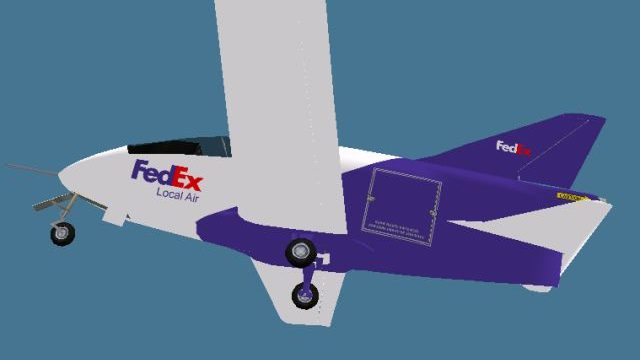
FedEx-inspired “Local Air” livery for the freeware Bede BD-5 brings a cargo-themed look to both the prop BD-5 and jet BD-5J, with clean, eye-catching textures that suit the aircraft’s compact lines. Built for Microsoft Flight Simulator X, it requires the Jez G BD-5 base pack before use.
 Rate
Rate
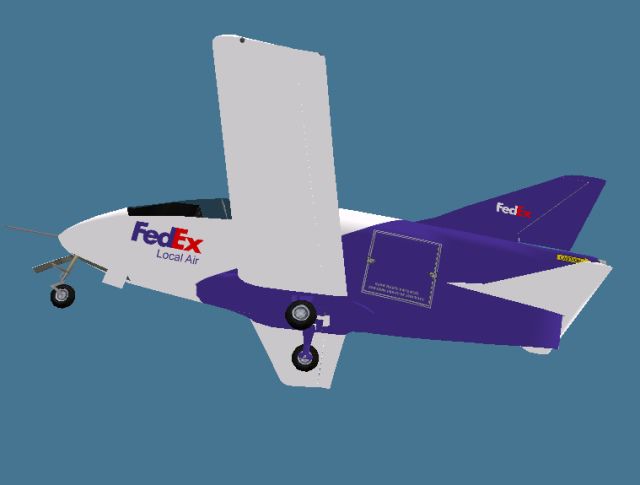
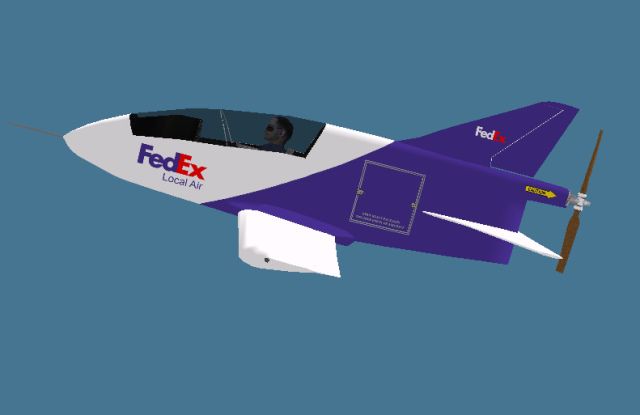
This fictional FedEx Local Air repaint brings a unique cargo-inspired paint scheme to the freeware Bede BD-5 aircraft developed by Jez G, with additional texture work by Rick Federmann. It works seamlessly on both the single-engine propeller (BD-5) and jet-powered (BD-5J) variants. Despite having a livery that bears resemblance to FedEx, it serves purely as a creative tribute and does not reflect any real-world fleet. You will need to download the freeware BD-5 base pack from the Fly Away Simulation library before applying these textures.
The BD-5 family is known for its compact layout, originally designed by Jim Bede in the early 1970s as a homebuilt kit aircraft. Its small fuselage lends itself well to eye-catching liveries, and this FedEx concept paint job accentuates the aerodynamic shape of both BD-5 and BD-5J models. Although FedEx typically operates larger cargo jets, you can now simulate short-hop or last-mile flights in your simulator of choice thanks to this custom skin. If you load this add-on in Microsoft Flight Simulator X, you will see how compact and nimble the BD-5 is compared to bigger, heavier cargo aircraft.
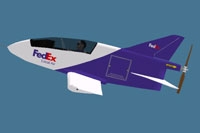
Screenshot of the fictional FedEx-inspired Bede BD-5 repaint.
To integrate the new textures, follow these instructions carefully so you'll have no complications during setup:
For the prop-driven version, add the following block of text to the end of your aircraft.cfg file, editing [fltsim.x] to match the correct sequence:
[fltsim.x]
title=BD-5 FedEx
sim=BD-5
model=
panel=
sound=
texture=FedEx
kb_checklists=
kb_reference=
atc_id=
ui_manufacturer="Bede"
ui_type="BD-5"
ui_variation="FedEx"
ui_typerole="Single Engine Prop"
ui_createdby="Bede"
description=
For the jet-powered BD-5J model, add the following code. Once again, update [fltsim.x] as needed:
[fltsim.x]
title=BD-5J FedEx
sim=BD-5J
model=
panel=
sound=
texture=FedEx
kb_checklists=
kb_reference=
atc_id=
ui_manufacturer="Bede"
ui_type="BD-5J"
ui_variation="FedEx"
ui_typerole="Single Engine Jet"
ui_createdby="Bede"
description=
The result is a small but striking package hauler you can operate in your simulator environment. Both Jez G and Rick Federmann have done a remarkable job bringing this free repaint to life. Enjoy exploring short routes or quick test flights using this miniature aircraft repaint with a memorable shipping-themed design.
Free for all simmers · 1.83 MB · Scanned clean Oct 2026
Download speed: Free tier is capped at 0.5 Mbps. PRO members download at full line speed.
texture.{airline}) inside FSX\SimObjects\Airplanes\{base-aircraft}\.aircraft.cfg in Notepad. Add a new [fltsim.X] section per the readme.readme.txt or README file. It tells you exactly where files go, what dependencies are needed, and any quirks specific to this add-on.The archive bd5_fedex_textures.zip has 24 files and directories contained within it.
This list displays the first 500 files in the package. If the package has more, you will need to download it to view them.
| Filename/Directory | File Date | File Size |
|---|---|---|
| Instructions.txt | 02.23.14 | 2.76 kB |
| $vc | 11.21.13 | 64.09 kB |
| $vca | 11.21.13 | 64.09 kB |
| cp_32.bmp | 01.25.14 | 1.00 MB |
| cp2_32.bmp | 01.25.14 | 1.00 MB |
| cp3.bmp | 02.23.14 | 1.33 MB |
| dash_32.bmp | 11.21.13 | 1.00 MB |
| fuse1_32.bmp | 02.23.14 | 5.33 MB |
| glass.bmp | 01.28.14 | 85.43 kB |
| glass2.bmp | 01.28.14 | 85.43 kB |
| parts_32.bmp | 02.23.14 | 5.33 MB |
| prop.bmp | 11.21.13 | 1.33 MB |
| Proptbmp | 11.21.13 | 86.39 kB |
| thumbnail.jpg | 02.23.14 | 29.54 kB |
| thumbnail-jet.jpg | 02.23.14 | 33.91 kB |
| thumbnail-prop.jpg | 02.23.14 | 29.54 kB |
| wingsb-32.bmp | 02.23.14 | 5.33 MB |
| wingst_32.bmp | 02.23.14 | 5.33 MB |
| thumbnail-jet.jpg | 02.23.14 | 33.91 kB |
| thumbnail-prop.jpg | 02.23.14 | 29.54 kB |
| BD5_FedEx_Textures.gif | 03.13.14 | 2.91 kB |
| FILE_ID.DIZ | 03.13.14 | 216 B |
| flyawaysimulation.txt | 10.29.13 | 959 B |
| Go to Fly Away Simulation.url | 01.22.16 | 52 B |
Only PRO members can place votes.
More FSX & P3D add-ons hand-picked based on this download.
FSX General Aviation Aircraft
The BD-5 Home Built Experimental aircraft collection featuring a new Prop ver…
 FSX General Aviation Aircraft
A private livery for the payware Iris Bede BD-5G model. By Colin Sefton. Scre…
 FSX General Aviation Aircraft
Red and blue repaint of the BD5 by "Jez G". This file includes the complete a…
 FSX General Aviation Aircraft
The BD5 design is challenging to fly. This package provides easy tweaks for t…
 FSX General Aviation Aircraft
"Ice Tea" BD-5J fictional skin. A fictional repaint of "Ice Tea" for the Iris…
 FSX General Aviation Aircraft
These are repaints for the Iris BD5 Microjet payware model. This package cont…
 FSX General Aviation Aircraft
Textures only for the payware Iris BD-5J. Repaint by Todd Disrud. Screenshot …
 FSX General Aviation Aircraft
A CAP repaint of the freeware BD5 by "Jez G" (BD5COLLE.ZIP). These textures c…
Be the first to leave a comment on this download.
Be the first to share your thoughts on this download.