

 FSX Panels & Gauges
Default Bombardier CRJ 700 Reworked Views
This enhanced freeware package updates and refines the external perspectives …
Bombardier CRJ 100/200LR view set refreshes the camera definitions with eight exterior angles and four focused virtual cockpit perspectives, tuned for the Premier Aircraft Design model. Designed for Microsoft Flight Simulator X, it adds clearer coverage of airframe details, control surfaces, engines, and key panels for smoother situational awareness.
 Rate
Rate
This freeware package introduces meticulously refined camera definitions that augment your experience flying the Bombardier CRJ 100/200LR. It brings a total of eight external viewpoints and four specialized cockpit perspectives, all crafted by Marc Renaud, and adapted for the Premier Aircraft Design creation. These vantage configurations enhance immersion in Microsoft Flight Simulator X by providing thorough coverage of both interior and exterior elements. Below you will find technical details of the modification and steps for integrating it into your simulator.
The Bombardier CRJ 100/200 family, originally developed to serve short-haul regional routes, features twin turbofan engines below the wings and a T-tail arrangement for optimal aerodynamics. This model by Premier Aircraft Design leverages these performance characteristics to simulate realistic flight dynamics. By incorporating Marc Renaud’s enhanced camera definitions, you can explore notable airframe details, observe flight surfaces during operation, and seamlessly switch to unique cockpit vantages for improved situational awareness.
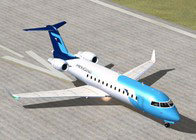
Bombardier CRJ 100/200LR Views.
Below is a concise procedure to integrate the updated camera definitions into your copy of Microsoft Flight Simulator X. Ensure the CRJ 100/200LR is not currently selected in the simulator during installation.
The author, Marc Renaud, and contributors assume no responsibility for extremely unlikely damage to your simulator installation or computer arising from use of these files. All modifications and downloads are installed at your own risk.
Free for all simmers · 81.06 KB · Scanned clean Oct 2026
Download speed: Free tier is capped at 0.5 Mbps. PRO members download at full line speed.
SimObjects\Airplanes\, Addon Scenery\, Effects\, or Gauges\.readme.txt or README file. It tells you exactly where files go, what dependencies are needed, and any quirks specific to this add-on.The archive bombardier_crj_100_200_lr_views.zip has 7 files and directories contained within it.
This list displays the first 500 files in the package. If the package has more, you will need to download it to view them.
| Filename/Directory | File Date | File Size |
|---|---|---|
| Bombardier CRJ 200LR - Views.jpg | 09.25.11 | 10.05 kB |
| Available.pdf | 09.30.11 | 61.95 kB |
| Camera definitions.txt | 09.30.11 | 6.64 kB |
| Read me.txt | 09.30.11 | 3.47 kB |
| Bombardier CRJ 200LR - Views.gif | 09.25.11 | 9.77 kB |
| flyawaysimulation.txt | 10.29.13 | 959 B |
| Go to Fly Away Simulation.url | 01.22.16 | 52 B |
Only PRO members can place votes.
More FSX & P3D add-ons hand-picked based on this download.
FSX Panels & Gauges
This enhanced freeware package updates and refines the external perspectives …
 FSX Panels & Gauges
This freeware package introduces specialized camera perspectives for the Bomb…
 FSX Panels & Gauges
This freeware package introduces a tailored set of camera placements for the …
 FSX Panels & Gauges
The BAe 146-100 is a compact, four-engined regional aircraft known for its sh…
 FSX Panels & Gauges
This free modification optimizes the viewpoint configuration on the Fokker 10…
 FSX Panels & Gauges
Bombardier CRJ 700-900 Panel, made by Marco Spada using default and third par…
 FSX Panels & Gauges
Default FSX Bombardier CRJ700 VC for the Project Open Sky Bombardier CRJ-700 …
 FSX Panels & Gauges
This freeware package refines and expands the default camera angles for the B…
Be the first to leave a comment on this download.
Be the first to share your thoughts on this download.