

 FSX Scenery
FL Jacksonville International
This freeware scenery package by Ray Smith creates a comprehensive overhaul o…
Jacksonville International Airport (KJAX) gets a busier, more authentic look with expanded buildings and airport objects, renumbered gates with clear signage, improved jetway alignment, and cargo parking increased to 10 stands. Two parking-layout options support either default traffic or AI airline packages in Microsoft Flight Simulator X, and requires Acceleration.
 Rate
Rate
 United States of America
Jacksonville International Airport (KJAX), Florida (FL). Requires Acceleration. By TimTom Productions.
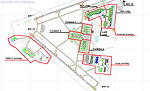
Jacksonville International Scenery.
This is add on scenery for Jacksonville international airport. A web page for this airport at flight aware is here. I have provided a taxi chart both real and made. It uses FSX default objects. So acceleration is required. Several things are similar to my TNCM scenery. I have created 2 different scenery files. 1 for thoues of you who have AI traffic add-ons, it places the real airlines at the correct gates). And another for us who still use the default traffic. There lots of objects and buildings so look out for a performance hit on your FPS. Futcher airports are coming soon.
I renumbered the gates and added a sign to each one. A flaw with acceleration is that when AI planes park to far up, the jet way doesn’t work correctly. I have fixed this by rearranging the scenery parking spots. I also increased the number of cargo parking spots from 1 (in default) to 10 (as close to real as possible). However there are no default AI flight plans to this airport for cargo aircraft. There may be in AI add-ons. And speaking of them I have created 2 different scenery files. 1 for thus of you who have AI traffic add-ons, it places the real airlines at the correct gates). And another for us who still use the default traffic.
Installation:
After downloading and unzipping the file open you FSX folders.
Find the folder named “add-on scenery” it should be at the top.
In it there are 2 sub folders “scenery, texture”.
Pick the scenery file you need.
File name: KJAX_real_park data = for AI traffic add-ons.
File name: KJAX_default_park data = for default traffic.
5. Past the selected file in the scenery sub folder.
6. Start FSX and go to the seetings menu.
7. Go to the scenery library, and find the scenery area labeled “add-on scenery” make shore its enabled and moved to the top of the list. Make shore to click okay.
8. Test the scenery and see how you enjoy it.
Remarks:
I’m making several airports for the Florida area. I’ve included. A preview file to KCRG a smaller general aviation airport south of KJAX. Install it the same way. Airports in the making are:
Key west Intel
Area 51
Craig municipal
Atlanta international
Seattle Tacoma international
This is freeware scenery.
Free for all simmers · 1.18 MB · Scanned clean Oct 2026
Download speed: Free tier is capped at 0.5 Mbps. PRO members download at full line speed.
FSX\Addon Scenery\ containing scenery and texture sub-folders.readme.txt or README file. It tells you exactly where files go, what dependencies are needed, and any quirks specific to this add-on.Use these coordinates to fly directly to this location once the mod is installed.
30.49406000,-81.68786000
Launch FSX or Prepar3D and use Flights → Load to open the downloaded .pln file. Your aircraft will be positioned at this location.
The archive kjax2.zip has 21 files and directories contained within it.
This list displays the first 500 files in the package. If the package has more, you will need to download it to view them.
| Filename/Directory | File Date | File Size |
|---|---|---|
| kjax | 07.30.08 | 0 B |
| charts | 07.15.08 | 0 B |
| KJAX taxi.bmp | 07.14.08 | 2.75 MB |
| pdf.pdf | 07.14.08 | 153.62 kB |
| read me.txt | 07.14.08 | 2.50 kB |
| scenery | 07.15.08 | 0 B |
| KCRG_test.BGL | 07.14.08 | 45.40 kB |
| KJAX_default_park data.BGL | 07.14.08 | 84.62 kB |
| KJAX_real_park data.BGL | 07.14.08 | 84.75 kB |
| tower | 07.15.08 | 0 B |
| flight plans | 07.15.08 | 0 B |
| IFR Jacksonville Intl to Nashville Intl.PLN | 07.08.08 | 4.07 kB |
| VFR Kissimmee Gateway to Davis.PLN | 07.10.08 | 2.73 kB |
| KJAX tower.FLT | 04.18.08 | 5.84 kB |
| KJAX tower.FSSAVE | 04.18.08 | 8.05 kB |
| KJAX tower.SPB | 04.18.08 | 282 B |
| KJAX tower.WX | 04.18.08 | 3.22 MB |
| read me.txt | 07.15.08 | 489 B |
| FILE_ID.DIZ | 08.04.08 | 119 B |
| flyawaysimulation.txt | 10.29.13 | 959 B |
| Go to Fly Away Simulation.url | 01.22.16 | 52 B |
Only PRO members can place votes.
More FSX & P3D add-ons hand-picked based on this download.
FSX Scenery
This freeware scenery package by Ray Smith creates a comprehensive overhaul o…
 FSX Scenery
Jacksonville Naval Air Station, Florida (FL). This is an enhanced version of …
 FSX Scenery
NAS Jacksonville (KNIP), Florida (FL). This is the third rendition of NAS Jac…
 FSX Scenery
Jacksonville NAS Update, for use with KNIP_ENHANCED.ZIP. Without this update …
 FSX Scenery
NAS Jacksonville (KNIP), Florida (FL). An improved version with added parking…
 FSX Scenery
This package updates and refines Jacksonville Craig Municipal Airport (KCRG) …
 FSX Scenery
Princess Juliana International Airport (TNCM) in Saint Marteen, Netherlands A…
 FSX Scenery
Barbados International Airport (TBPB). Grantley Adams International Airport f…
Be the first to leave a comment on this download.
Be the first to share your thoughts on this download.