


 United States of America
  FSX Scenery
German Camp Marmal
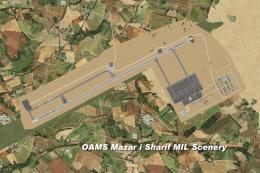
German Camp Marmal v2.0 (OAMS); a tribute to the German soldiers in Afghanist…
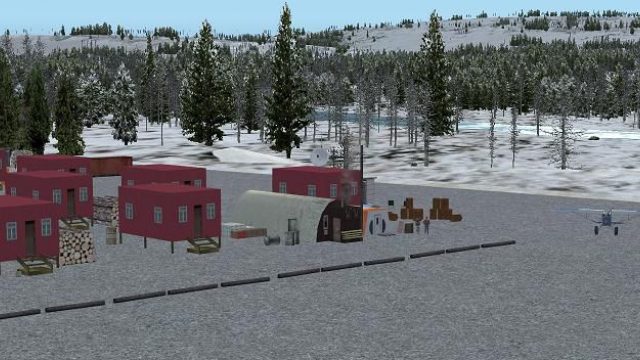
Kavik Rivier Camp (PAKA) brings Alaska’s remote Dew Line airstrip to life with a fully custom-built airport, hand-placed objects, and distinctive camp details including an outhouse, echoing the setting popularized by Flying Wild Alaska. Designed for FSX, it delivers an immersive bush-flying stopover with accurate atmosphere and strong on-ground character.
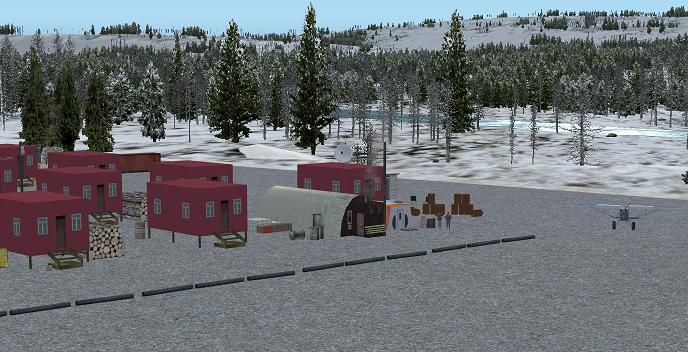
Kavik Rivier Camp, Alaska (AK). Kavik airstrip is part of the "Dew Line" set up as a defensive radar line in Alaska to counter the threat of a U.S.S.R. attack. Made famous by the TV series "Flying Wild Alaska" and with a population of one. Completely custom built airport and objects, and even comes with a outhouse! By Frits Beyer and Jacques Botha.
Screenshot of Kavik Rivier Camp Scenery.
Windows 7 users follow the following instructions:
1.Unzip "Kavik.zip" to a temp folder.
2.Copy the "Kavik Rivier Camp(PAKA)" folder to your "FSX/scenery" folder.
3.Copy the "AFX_PAKA_ALT.bgl" file to your "FSX/scenery/world/scenery" folder.
4.Run FSX.
5.On the main page go to "settings".
6.Now click on "scenery library".
7.Now click on "Add area" and search for the scenery folder.
8.Double click on the scenery folder and look for the"Kavik Rivier Camp(PAKA)" folder.
9.Double click on this folder and then you shall see a texture and a scenery folder.Click on the white area outside the two folders.
10.The scenery will now load !
11.Go to free flight and choose "PAKA" to start your flight !
Windows Vista and XP users :
1.Unzip "Kavik Rivier Camp(PAKA)" to a temp folder.
2.Copy the "PAKA_Kavik" folder to your "FSX/scenery" folder.
3.Copy the "AFX_PAKA_ALT.bgl" file to your "FSX/scenery/world/scenery" folder.
4.Run FSX.
5.On the main page go to "settings"
6.Now click on "scenery library".
7.Now click on "Add area" and search for the scenery folder.
8.Double click on the scenery folder and look for the"Kavik Rivier Camp(PAKA)" folder.
9.NB !!!!!! click on this folder only once ! and then click on "OK".
10.The scenery will now load !
11.Go to free flight and choose "PAKA" to start your flight !
Enjoy !
Free for all simmers · 529.77 KB · Scanned clean Oct 2026
Download speed: Free tier is capped at 0.5 Mbps. PRO members download at full line speed.
FSX\Addon Scenery\ containing scenery and texture sub-folders.readme.txt or README file. It tells you exactly where files go, what dependencies are needed, and any quirks specific to this add-on.Use these coordinates to fly directly to this location once the mod is installed.
69.68000000,-146.94000000
Launch FSX or Prepar3D and use Flights → Load to open the downloaded .pln file. Your aircraft will be positioned at this location.
The archive kavik.zip has 22 files and directories contained within it.
This list displays the first 500 files in the package. If the package has more, you will need to download it to view them.
| Filename/Directory | File Date | File Size |
|---|---|---|
| Kavik | 03.04.11 | 0 B |
| AFX_PAKA_ALT.bgl | 03.04.11 | 509 B |
| Kavik Rivier Camp(PAKA) | 03.04.11 | 0 B |
| scenery | 03.04.11 | 0 B |
| 001_AFX_PAKA.bgl | 03.04.11 | 2.28 kB |
| cvxKAVIC_RIVER.BGL | 03.04.11 | 3.41 kB |
| cvxKAVIK.BGL | 03.04.11 | 472 B |
| Kavik_lib.bgl | 03.04.11 | 43.71 kB |
| KAVIK_Scenery.BGL | 03.04.11 | 112 B |
| PAKA_EZ_Scenery.bgl | 03.04.11 | 3.65 kB |
| PAKA_OX_Scenery.bgl | 03.04.11 | 3.84 kB |
| texture | 03.04.11 | 0 B |
| Kavik_bungalo.dds | 03.04.11 | 170.80 kB |
| Kavik_bungalo_LM.dds | 03.04.11 | 170.80 kB |
| Kavik_outhouse.dds | 03.04.11 | 170.80 kB |
| Kavik_outhouse_LM.dds | 03.04.11 | 170.80 kB |
| PAKA_Tent.dds | 03.04.11 | 682.80 kB |
| PAKA_Tent_LM.dds | 03.04.11 | 682.80 kB |
| PAKA_Readme.txt | 03.04.11 | 2.54 kB |
| Thumbnail.jpg | 03.04.11 | 64.39 kB |
| flyawaysimulation.txt | 10.29.13 | 959 B |
| Go to Fly Away Simulation.url | 01.22.16 | 52 B |
Only PRO members can place votes.
More FSX & P3D add-ons hand-picked based on this download.
FSX Scenery
German Camp Marmal v2.0 (OAMS); a tribute to the German soldiers in Afghanist…
 FSX Scenery
Camp Bastion Airport, Helmand Province, Afghanistan (OAZI). This airport is m…
 FSX Scenery
MCAS Camp Pendleton (KNFG), Oceanside, California (CA). An improved version w…
 FSX Scenery
IPBB Bush Camp, British Columbia, Canada. IPBB ("Ian P's Bigger Base") is a p…
 FSX Scenery
Scenery Bear Camp Reserch (BC). This is a fictitious research center located …
 FSX Scenery
Bob's Safari Camp, airport ID HSAF. This is a fictitious fly-in Safari Camp c…
 FSX Scenery
Ranger 6000 Foot Training Camp, located east of Port Hardy, British Columbia,…
FSX Scenery
Skara Scenery Bonaire X. Flamingo International Airport or Bonaire Internatio…
Be the first to leave a comment on this download.
Be the first to share your thoughts on this download.