

 FSX Scenery
NL2000 V4.02 Rotterdam,The Hague Airport
Enhance your simulator’s portrayal of one of the Netherlands’ busiest regiona…
NL2000 V4 EHDR recreates Drachten Aerodrome with accurate runway and taxiway geometry, high-resolution ground textures, tuned apron and approach lighting, and realistically placed hangars and airfield objects for immersive VFR circuits and local hops in Microsoft Flight Simulator X. It integrates cleanly with the modular NL2000 Netherlands coverage and requires the NL2000 v4.0.20 installer.
 Rate
Rate
 Netherlands
The NL2000 V4 EHDR scenery package brings a precise rendition of Drachten Aerodrome (ICAO: EHDR) to Microsoft Flight Simulator X, featuring lifelike terrain modeling and extensively detailed structures. Developed by The Netherlands 2000 Scenery Design Team, this free add-on complements the broader NL2000 v4 project, which offers a modular approach to covering the Netherlands with high-resolution scenery. This release requires the NL2000 v4.0.20 installer, ensuring a smooth integration of all custom textures, 3D models, and accurate airfield layouts.
Within this pack, Drachten Aerodrome is accurately portrayed to reflect real-world configurations. The runway orientation and associated taxiway network are carefully modeled for efficient circuit training or short-haul operations. Buildings such as hangars and support facilities are positioned according to actual geospatial data, and static objects ensure a familiar appearance for anyone who has visited the location in reality.
Aerodrome lighting, including approach lights and apron illumination, is fine-tuned to enhance low-visibility workflows. Ground images benefit from higher-resolution textures, offering crisp markings along the runway shoulders and taxi edges. These design elements combine to improve overall immersion during both daytime and nocturnal operations.
This EHDR scenery fits seamlessly with the broader NL2000 v4 environment, connecting fluidly to neighboring regions without gaps or conflicting texture files. The modular design allows pilots to selectively install specific airports or entire provinces, maintaining optimal simulator performance. Each segment uses uniform geodata references, so boundaries match perfectly when multiple NL2000 packages are active in a single flight session.
The NL2000 v4.0.20 installer is required to integrate this scenery. Once the package is added, users can activate it in the simulator scenery library for a fully functional depiction of Drachten Aerodrome in Microsoft Flight Simulator X. This approach ensures that all dependencies, shared object libraries, and terrain elements remain consistent.
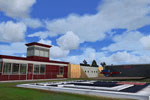
Screenshot of NL2000 V4 EHDR Scenery.
The Netherlands 2000 Scenery Design Team has meticulously crafted this module, dedicating ample research and testing to match real-world data. Their work reflects an ongoing commitment to free, high-quality expansions that accurately portray Dutch airports and their surroundings. Enthusiasts can broaden their coverage by using additional NL2000 modules to complete an immersive, country-wide flying experience.
Free for all simmers · 27.02 MB · Scanned clean Oct 2026
Download speed: Free tier is capped at 0.5 Mbps (this file takes approximately 8 mins at the cap). PRO members download at full line speed.
FSX\Addon Scenery\ containing scenery and texture sub-folders.readme.txt or README file. It tells you exactly where files go, what dependencies are needed, and any quirks specific to this add-on.Use these coordinates to fly directly to this location once the mod is installed.
53.11970000,6.12940000
Launch FSX or Prepar3D and use Flights → Load to open the downloaded .pln file. Your aircraft will be positioned at this location.
The archive nl2k_v4_01_ehdr.zip has 8 files and directories contained within it.
This list displays the first 500 files in the package. If the package has more, you will need to download it to view them.
| Filename/Directory | File Date | File Size |
|---|---|---|
| nl2k_v4.01_ehdr.txt | 05.12.11 | 360 B |
| auteursrecht.txt | 05.24.10 | 5.06 kB |
| copyright.txt | 05.24.10 | 4.43 kB |
| FILE_ID.DIZ | 05.12.11 | 360 B |
| nl2k_v4.01_ehdr.gif | 05.12.11 | 10.45 kB |
| nl2k_v4.01_ehdr.nl2 | 05.09.11 | 27.02 MB |
| flyawaysimulation.txt | 10.29.13 | 959 B |
| Go to Fly Away Simulation.url | 01.22.16 | 52 B |
Only PRO members can place votes.
More FSX & P3D add-ons hand-picked based on this download.
FSX Scenery
Enhance your simulator’s portrayal of one of the Netherlands’ busiest regiona…
 FSX Scenery
This comprehensive scenery package brings an authentic representation of Eind…
 FSX Scenery
This free add-on offers a precisely modeled depiction of EHEH Eindhoven Airpo…
 FSX Scenery
Enhance your simulator with this free package dedicated to EHEH (Eindhoven Ai…
 FSX Scenery
This comprehensive package brings an updated rendition of Maastricht Aachen A…
 FSX Scenery
Scenery NL2000 V4.0. This is the NL2000 v4.0 Traffic package for the NL2000 s…
 FSX Scenery
Immerse yourself in a thoroughly revised depiction of Dutch landscapes using …
 FSX Scenery
This package provides a dedicated set of core libraries intended to enhance a…
Be the first to leave a comment on this download.
Be the first to share your thoughts on this download.