

 FSX Scenery
NL2000 V4.0 Teuge Airport
Experience an enhanced portrayal of EHTE Teuge Airport in the Netherlands wit…
Teuge Airport (EHTE) gets a crisp, up-to-date NL2000 v4.02 rendition with accurate runway and taxiway layout, sharp ground markings, photoreal textures, and custom-modeled hangars and facilities for convincing VFR circuits and skydiving approaches in FSX. It requires the NL2000 v4.0.20 installer and blends cleanly with the wider Dutch scenery coverage.
 Rate
Rate
 Netherlands
This freeware add-on brings a fully updated rendition of Teuge Airport (EHTE) to FSX, delivering precise ground markings, custom structures, and refined surroundings. It is designed by The Netherlands 2000 Scenery Design Team, who have meticulously reproduced this unique airfield in the province of Gelderland for enthusiasts seeking an accurate environment in which to practice circuits, local flights, and even skydiving approaches.
At its core, this release focuses on Teuge Airport’s runway configuration, taxiway network, and apron details. High-resolution imagery ensures that every navigational sign and surface texture appears clearly, helping pilots familiarize themselves with the real-world look of this bustling general aviation location. Furthermore, the package captures the characteristic hangars, the terminal building, and smaller onsite facilities, lending recognizable charm throughout.
This scenery is a dedicated module within the overall NL2000 v4 series, which covers significant areas of the Netherlands using a modular approach. To install this specific package, the NL2000 v4.0.20 installer is required. Once integrated, Teuge Airport becomes an integral component of your richly detailed Dutch airspace—one that aligns seamlessly with the rest of the NL2000 environment.
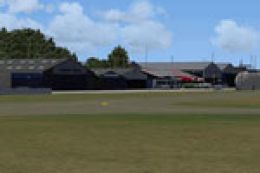
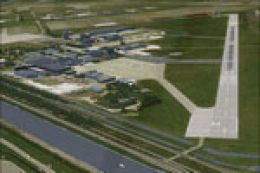
Screenshot of Teuge Airport Scenery.
Teuge Airport’s close proximity to Apeldoorn and Deventer means this package accurately models the surrounding region, providing striking visuals across forests, farmland, and local infrastructure. If you are conducting flight training or general exploration, you will benefit from the consistent color palette that matches neighboring NL2000 areas.
This expansion owes its refined details to The Netherlands 2000 Scenery Design Team, who continue to refine their depiction of Dutch airports and landscapes. By merging photoreal ground textures with carefully modeled structures, the developers ensure that Teuge Airport stands out as an excellent representation of regional aviation hubs.
After installing the required NL2000 v4.0.20 files, adding this Teuge package is straightforward. It effortlessly merges into your simulator’s library, allowing you to start up at EHTE without any complicated configuration steps. The modular nature of this series means further Dutch airports or expansions can be bolted on whenever desired.
Overall, this freeware project fits perfectly within an FSX setup focused on realistic Dutch flying. It highlights the distinctive features of Teuge Airport while preserving performance and giving enthusiasts a practical, well-rounded training environment.
Free for all simmers · 22.23 MB · Scanned clean Oct 2026
Download speed: Free tier is capped at 0.5 Mbps (this file takes approximately 6 mins at the cap). PRO members download at full line speed.
FSX\Addon Scenery\ containing scenery and texture sub-folders.readme.txt or README file. It tells you exactly where files go, what dependencies are needed, and any quirks specific to this add-on.Use these coordinates to fly directly to this location once the mod is installed.
52.24388900,6.04666700
Launch FSX or Prepar3D and use Flights → Load to open the downloaded .pln file. Your aircraft will be positioned at this location.
The archive nl2k_v4_02_ehte.zip has 8 files and directories contained within it.
This list displays the first 500 files in the package. If the package has more, you will need to download it to view them.
| Filename/Directory | File Date | File Size |
|---|---|---|
| nl2k_v4.02_ehte.gif | 05.12.11 | 8.68 kB |
| nl2k_v4.02_ehte.nl2 | 12.16.11 | 22.33 MB |
| nl2k_v4.02_ehte.txt | 12.22.11 | 355 B |
| auteursrecht.txt | 05.24.10 | 5.06 kB |
| copyright.txt | 05.24.10 | 4.43 kB |
| FILE_ID.DIZ | 12.22.11 | 355 B |
| flyawaysimulation.txt | 10.29.13 | 959 B |
| Go to Fly Away Simulation.url | 01.22.16 | 52 B |
Only PRO members can place votes.
More FSX & P3D add-ons hand-picked based on this download.
FSX Scenery
Experience an enhanced portrayal of EHTE Teuge Airport in the Netherlands wit…
 FSX Scenery
Enhance your freeware collection with a detailed rendition of Teuge Airport (…
 FSX Scenery
Enhance your simulator’s portrayal of one of the Netherlands’ busiest regiona…
 FSX Scenery
This free add-on offers a precisely modeled depiction of EHEH Eindhoven Airpo…
 FSX Scenery
This comprehensive package brings an updated rendition of Maastricht Aachen A…
 FSX Scenery
This airport enhancement transforms Groningen Airport Eelde (EHGG) within Mic…
 FSX Scenery
Experience the intricacies of Den Helder Airport (EHKD) with this free FSX sc…
 FSX Scenery
This add-on enhances Microsoft Flight Simulator X with a finely detailed rend…
Be the first to leave a comment on this download.
Be the first to share your thoughts on this download.