

 FSX Scenery
NL2000 V4.02 Rotterdam,The Hague Airport
Enhance your simulator’s portrayal of one of the Netherlands’ busiest regiona…
Terlet Airfield (EHTL) is recreated as a lively Dutch gliding hub near Arnhem with accurate runway and grass-strip layout, refined terrain elevations, and recognizable hangars and club buildings that suit VFR navigation across the Veluwe. Built for FSX, it integrates with the Netherlands 2000 v4 environment and requires the NL2000 v4.0.20 installer.
 Rate
Rate
 Netherlands
This freeware scenery package brings Terlet Airfield (EHTL) right into FSX, delivering authentic coverage of the iconic glider hub near Arnhem in the Netherlands. It is part of the Netherlands 2000 v4 collection, a modular set of enhancements meticulously created by The Netherlands 2000 Scenery Design Team. Enthusiasts will recognize this airfield for its busy soaring activity, and this package captures that spirit with detailed groundwork and carefully placed structures. You will need the NL2000 v4.0.20 installer to integrate this add-on seamlessly, ensuring that the broader photorealistic setting offered by the entire NL2000 series ties in with these local enhancements.
Terlet Airfield occupies a unique position in Gelderland, widely known for its expansive fields and outstanding glider operations. This scenery package replicates that environment using tailored building textures and carefully adjusted terrain elevations. The team has highlighted the distinctive hangars, clubhouses, and runways in a way that accurately captures real-world references. Pilots using visual flight rules (VFR) will appreciate the scattered landmarks that confirm their position over the Veluwe region.
When installing, use the NL2000 v4.0.20 installer, which manages all files for the EHTL Terlet Airfield add-on. This approach avoids manual file assignments and prevents conflicts with default assets. To further enhance your Dutch flying environment, the entire Netherlands 2000 v4 scenery can be layered to include airports, landmarks, and urban zones. This modular system benefits simmers looking to incorporate only specific regions while aiming for high performance. Because this add-on is tailor-made for FSX, ensure that your simulator’s library settings prioritize the NL2000 packages correctly.
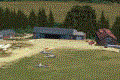
Experience real-world fencing, hangars, and runway markings within FSX.
Developers from The Netherlands 2000 Scenery Design Team have ensured that this freeware add-on lives up to the expectations of dedicated virtual pilots who prioritize authenticity. By focusing on both regional accuracy and high-fidelity texturing, they have provided an immersive platform for glider enthusiasts, general aviation flyers, and anyone seeking a precisely modeled Dutch airfield in FSX.
Free for all simmers · 42.21 MB · Scanned clean Oct 2026
Download speed: Free tier is capped at 0.5 Mbps (this file takes approximately 12 mins at the cap). PRO members download at full line speed.
FSX\Addon Scenery\ containing scenery and texture sub-folders.readme.txt or README file. It tells you exactly where files go, what dependencies are needed, and any quirks specific to this add-on.Use these coordinates to fly directly to this location once the mod is installed.
52.06000000,5.87000000
Launch FSX or Prepar3D and use Flights → Load to open the downloaded .pln file. Your aircraft will be positioned at this location.
The archive nl2k_v4_02_ehtl.zip has 8 files and directories contained within it.
This list displays the first 500 files in the package. If the package has more, you will need to download it to view them.
| Filename/Directory | File Date | File Size |
|---|---|---|
| FILE_ID.DIZ | 12.22.11 | 357 B |
| nl2k_v4.02_ehtl.gif | 12.22.11 | 5.23 kB |
| nl2k_v4.02_ehtl.nl2 | 12.13.11 | 42.19 MB |
| nl2k_v4.02_ehtl.txt | 12.22.11 | 357 B |
| auteursrecht.txt | 05.24.10 | 5.06 kB |
| copyright.txt | 05.24.10 | 4.43 kB |
| flyawaysimulation.txt | 10.29.13 | 959 B |
| Go to Fly Away Simulation.url | 01.22.16 | 52 B |
Only PRO members can place votes.
More FSX & P3D add-ons hand-picked based on this download.
FSX Scenery
Enhance your simulator’s portrayal of one of the Netherlands’ busiest regiona…
 FSX Scenery
This free add-on offers a precisely modeled depiction of EHEH Eindhoven Airpo…
 FSX Scenery
This comprehensive package brings an updated rendition of Maastricht Aachen A…
 FSX Scenery
Immerse yourself in a thoroughly revised depiction of Dutch landscapes using …
 FSX Scenery
This freeware package enhances the Volkel Air Base environment within FSX by …
 FSX Scenery
This airport enhancement transforms Groningen Airport Eelde (EHGG) within Mic…
 FSX Scenery
Experience the intricacies of Den Helder Airport (EHKD) with this free FSX sc…
 FSX Scenery
This add-on enhances Microsoft Flight Simulator X with a finely detailed rend…
Be the first to leave a comment on this download.
Be the first to share your thoughts on this download.