

 FS2004 Civil Jet Aircraft
Manx Airlines BAe 146-200 Fix
A texture fix for use with TXT_MANX.ZIP. By David Fox. Screenshot of Manx Air…
Manx Airlines “Web Colours” livery for the BAe 146-300 recreates G-MIMA in its final months before the BA Citiexpress transition, with crisp exterior textures and authentic registration details. Built for FS2002 and requires an original Jon Murchison/ARNZ BAe 146 model, this repaint delivers a period-correct regional jet look.
 Rate
Rate
Textures only; requires any original Jon Murchison/ARNZ model. Repainted by David Fox.
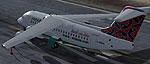
Screenshot of Manx Airlines BAe 146-300 on runway.
These are the textures only to save on file size. The aircraft is G-MIMA as it appeared in its last few months operation under the Manx Airlines banner before being integrated in BA Citiexpress and being integrated into those colours.
You need to add this to your aircraft CFG:
[fltsim.XX]

	title=Manx Airlines Web Colours

	sim=bae1462

	model=

	panel=

	sound=

	texture=MANXWEB

	checklists=

	ui_manufacturer=British Aerospace

	ui_type=146 200

	ui_variation=Manx Airlines Web Colours

	description=Original model by Jon Murchison.\nManx Airways textures by David Fox.

	atc_heavy=1

	atc_id=G-MIMA

	atc_airline=SPEED BIRD

	atc_flight_number=1579

	atc_type=BaE

	atc_model=BA46

	visual_damage=0

	atc_id_color=000000
Free for all simmers · 1.14 MB · Scanned clean Oct 2026
Download speed: Free tier is capped at 0.5 Mbps. PRO members download at full line speed.
readme.txt or README file. It tells you exactly where files go, what dependencies are needed, and any quirks specific to this add-on.The archive txtmanxw.zip has 13 files and directories contained within it.
This list displays the first 500 files in the package. If the package has more, you will need to download it to view them.
| Filename/Directory | File Date | File Size |
|---|---|---|
| 1462_FUSE.bmp | 01.23.04 | 2.00 MB |
| 1462_FUSE_L.bmp | 01.02.03 | 512.07 kB |
| 1463_ENGINES.bmp | 12.10.03 | 1.00 MB |
| 1463_ENGINES_L.bmp | 12.22.02 | 256.07 kB |
| 1463_OTHER.bmp | 12.22.02 | 512.07 kB |
| 1463_OTHER_L.bmp | 12.18.02 | 32.07 kB |
| 1463_TAIL.bmp | 12.10.03 | 1.00 MB |
| 1463_TAIL_L.bmp | 12.23.02 | 256.07 kB |
| 1463_WINGS_TAIL.bmp | 12.10.03 | 4.00 MB |
| 1463_WINGS_TAIL_L.bmp | 12.23.02 | 256.07 kB |
| Readme.txt | 01.26.04 | 946 B |
| flyawaysimulation.txt | 10.29.13 | 959 B |
| Go to Fly Away Simulation.url | 01.22.16 | 52 B |
Only PRO members can place votes.
More FS2004 add-ons hand-picked based on this download.
FS2004 Civil Jet Aircraft
A texture fix for use with TXT_MANX.ZIP. By David Fox. Screenshot of Manx Air…
 FS2004 Civil Jet Aircraft
and requires Mike Stone's FS2002 original model Avro RJ 85 (example available…
 FS2004 Civil Jet Aircraft
FS2004 BAe 146-300 Jet2 (Operated by FlightLine), registration G-FLTC. Jet2 (…
 FS2004 Civil Jet Aircraft
Updated model of the cargo version of BAe's successful 146 aircraft type. Mod…
 FS2004 Civil Jet Aircraft
This second package of the Flybe AI BAe 146-300s are painted using the paintk…
 FS2004 Civil Jet Aircraft
Textures only; requires 1463QT6.ZIP. Model by Jon Murchison. Livery by Jon Ma…
 FS2004 Civil Jet Aircraft
A repaint of Jon Murchison's BAe 146-300/RJ85 in Aegean Airlines livery. Text…
 FS2004 Civil Jet Aircraft
Hamburg Airlines (HX) BAe 146-200 D-ALOA for Eurowings Professional 2004. By …
Be the first to leave a comment on this download.
Be the first to share your thoughts on this download.