

 FS2004 Civil Jet Aircraft
USAir Boeing 737-300 (OC) Full Package
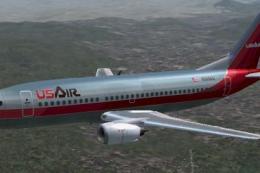
A repaint of the FFX B737-300 in the old colors of US Air. This package inclu…
USAir’s classic “old colors” arrive on the Boeing 737-300 with a crisp repaint that suits vintage U.S. domestic routes and screenshots in FS2004. The package focuses on accurate airline markings and clean texture work, and requires the FFX Boeing 737-300 base aircraft already installed.
 Rate
Rate
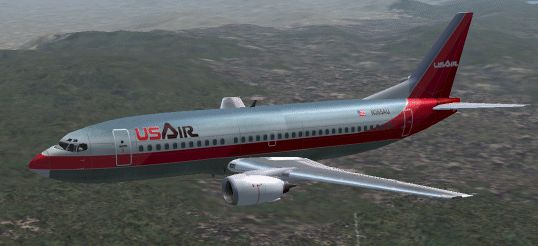
A repaint of the FFX B737-300 in the old colors of US Air. This package only includes the textures for those who already have the complete aircraft. Original files Erick Cantu/FFX. USair repaint by Gary D. Jones. (See also 73USOCUD.ZIP).
-fs2004-1.jpg)
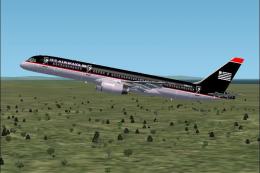
Screenshot of USAir Boeing 737-300 in flight.
Installation:
[fltsim.xx]

	title=USAir B737-300 Old Colors

	sim=Boeing737-300

	model=

	panel=

	sound=

	texture=US_OC

	kb_checklists=Boeing737-400_check

	kb_reference=Boeing737-400_ref

	atc_id=

	atc_airline=USAir

	atc_flight_number=

	atc_parking_codes=USA

	atc_parking_types=GATE

	ui_manufacturer=Boeing

	ui_type=B737-300 FFX

	ui_variation=USAir Old Colors

	description=One should hardly be surprised that the world's most prolific manufacturer of commercial aircraft is also the producer of the world's most popular jetliner. The 737 became the best-selling commercial jetliner worldwide when orders for it hit 1,831 in June 1987 (surpassing Boeing's own 727 as the previous champ). However, it wasn't always that way\s in the first few years of production, there were so few orders that Boeing considered canceling the program. They didn't, and the airplane has more than proven itself in over three decades of service.

	visual_damage=1
Start FS2004 and select "USAir B737-300 Old Colors". from the aircraft menu. Enjoy!!
**Not tested in FS2002** but may work.
Free for all simmers · 1.62 MB · Scanned clean Oct 2026
Download speed: Free tier is capped at 0.5 Mbps. PRO members download at full line speed.
FS9\Aircraft\, FS9\Addon Scenery\, FS9\Gauges\, or FS9\Effects\.readme.txt or README file. It tells you exactly where files go, what dependencies are needed, and any quirks specific to this add-on.The archive 73usocl.zip has 61 files and directories contained within it.
This list displays the first 500 files in the package. If the package has more, you will need to download it to view them.
| Filename/Directory | File Date | File Size |
|---|---|---|
| 733FUSE_L.BMP | 05.17.03 | 1.33 MB |
| 733fuse_t.bmp | 03.12.04 | 2.67 MB |
| 737WING_L.BMP | 05.18.03 | 5.43 kB |
| 737WING_T.BMP | 06.02.03 | 1.33 MB |
| AILERON_L.bmp | 05.18.03 | 5.43 kB |
| AILERON_T.bmp | 05.04.03 | 341.43 kB |
| CFM56FAN1.bmp | 05.21.03 | 257.05 kB |
| CFM56FAN2.BMP | 05.21.03 | 257.05 kB |
| CFM56_CONE_L.bmp | 05.18.03 | 5.43 kB |
| CFM56_CONE_T.bmp | 05.04.03 | 42.78 kB |
| CFM56_TAILPIPE_L.bmp | 05.18.03 | 5.43 kB |
| CFM56_TAILPIPE_T.bmp | 05.04.03 | 42.78 kB |
| FLAPGUIDES_L.bmp | 05.18.03 | 5.43 kB |
| FLAPGUIDES_T.BMP | 05.04.03 | 85.46 kB |
| FRAMES_L.bmp | 05.18.03 | 5.43 kB |
| FRAMES_T.BMP | 05.04.03 | 85.43 kB |
| GEARLEGS_L.bmp | 05.18.03 | 5.43 kB |
| GEARLEGS_T.bmp | 05.04.03 | 42.78 kB |
| INNERFLAPS_L.bmp | 05.18.03 | 5.43 kB |
| INNERFLAPS_T.bmp | 05.04.03 | 341.43 kB |
| INSPOILER_L.bmp | 05.18.03 | 5.43 kB |
| INSPOILER_T.BMP | 05.26.03 | 85.43 kB |
| INTAKE_L.bmp | 05.18.03 | 5.43 kB |
| INTAKE_T.BMP | 05.04.03 | 42.78 kB |
| KRAP_L.BMP | 05.18.03 | 5.43 kB |
| KRAP_T.bmp | 05.04.03 | 85.43 kB |
| LENG_L.BMP | 05.18.03 | 341.43 kB |
| Leng_t.bmp | 03.12.04 | 257.05 kB |
| LMAINDOOR_L.bmp | 05.18.03 | 5.43 kB |
| LMAINDOOR_T.bmp | 05.04.03 | 85.43 kB |
| MESH_L.bmp | 05.18.03 | 5.43 kB |
| MESH_T.BMP | 05.04.03 | 42.78 kB |
| MISC_L.BMP | 05.18.03 | 5.43 kB |
| Misc_t.bmp | 03.10.04 | 682.75 kB |
| MOREKRAP_L.BMP | 05.18.03 | 5.43 kB |
| MOREKRAP_T.BMP | 05.04.03 | 5.43 kB |
| OLEO_L.bmp | 05.18.03 | 5.43 kB |
| OLEO_T.bmp | 05.04.03 | 170.78 kB |
| OUTERFLAPS_L.bmp | 05.18.03 | 5.43 kB |
| OUTERFLAPS_T.bmp | 05.04.03 | 341.43 kB |
| OUTSPOILER_L.bmp | 05.18.03 | 5.43 kB |
| OUTSPOILER_T.bmp | 05.04.03 | 341.43 kB |
| pspbrwse.jbf | 03.12.04 | 194.83 kB |
| PYLONS_L.bmp | 05.18.03 | 5.43 kB |
| PYLONS_T.bmp | 05.04.03 | 85.46 kB |
| RENG_L.BMP | 05.18.03 | 341.43 kB |
| RENG_T.BMP | 03.12.04 | 257.05 kB |
| RMAINDOOR_L.bmp | 05.18.03 | 5.43 kB |
| RMAINDOOR_T.bmp | 05.04.03 | 85.43 kB |
| STAB_L.bmp | 05.18.03 | 5.43 kB |
| STAB_T.bmp | 05.04.03 | 341.43 kB |
| TAIL_L.BMP | 05.18.03 | 85.43 kB |
| Tail_t.bmp | 03.12.04 | 682.75 kB |
| Thumbs.db | 03.02.04 | 23.50 kB |
| Texture.US_OC | 03.12.04 | 0 B |
| Readme.txt | 03.13.04 | 3.02 kB |
| file_id.diz | 03.13.04 | 268 B |
| 73usocL.gif | 03.12.04 | 75.01 kB |
| Orig_README.txt | 03.10.04 | 8.65 kB |
| flyawaysimulation.txt | 10.29.13 | 959 B |
| Go to Fly Away Simulation.url | 01.22.16 | 52 B |
Only PRO members can place votes.
More FS2004 add-ons hand-picked based on this download.
FS2004 Civil Jet Aircraft
A repaint of the FFX B737-300 in the old colors of US Air. This package inclu…
 FS2004 Civil Jet Aircraft
For AI. A repaint of David Rawlins' B737-300 in the old colors of US Air. It …
 FS2004 Civil Jet Aircraft
Model by SGA/FFX. Repainted by Rene Bruun. Screenshot of Aer Lingus Boeing 73…
 FS2004 Civil Jet Aircraft
Model by Project Open Sky. Painted by Michael Pearson. Screenshot of USAir Ai…
 FS2004 Civil Jet Aircraft
This freeware package offers a meticulously recreated Boeing 737-200 wearing …
 FS2004 Civil Jet Aircraft
This freeware package features USAir’s classic Boeing 737-200 (registered N24…
 FS2004 Civil Jet Aircraft
A repaint of Vistaliners B727-200 in the colors of USAir. Model by Erick Cant…
 FS2004 Civil Jet Aircraft
This aircraft is made by Project OpenSky. Livery by Daniel Counahan. Screensh…
Be the first to leave a comment on this download.
Be the first to share your thoughts on this download.